

Overview
For example:- An EC2 instance that needs to access an S3 bucket can be assigned a role containing the required permissions.
- An AWS Lambda function that pulls messages from a queue or writes logs to CloudWatch must have an IAM role with the appropriate permissions.
Assigning Roles to EC2 Instances
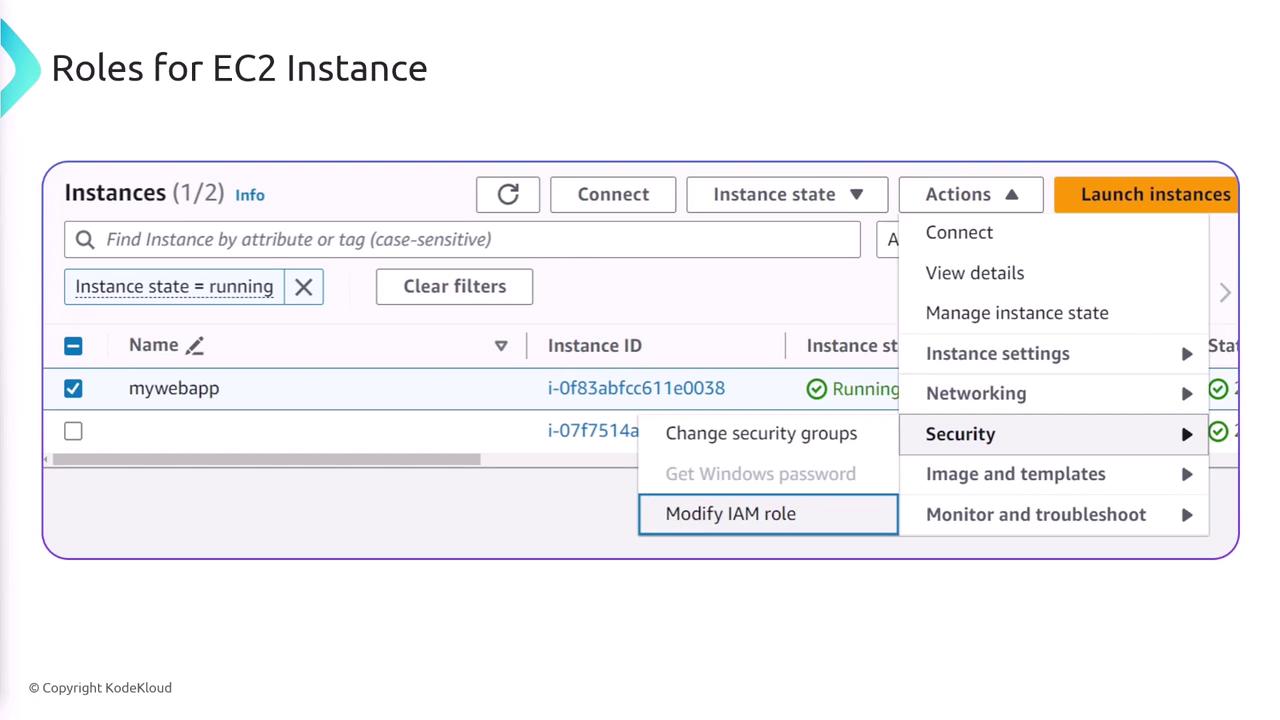
To assign an IAM role to an EC2 instance, follow these steps:- Navigate to the EC2 management console.
- Under the “Actions” menu, select “Security” and then “Modify IAM Role.”
- Once the role is assigned, any application running on that EC2 instance automatically inherits the permissions associated with the IAM role.
Assigning Roles to Lambda Functions
The process for assigning a role to a Lambda function is similar:- When creating a Lambda function, select a role to grant the permissions required for its operations.
- For instance, if the Lambda function needs to write logs to CloudWatch, choose or create a role with permissions for CloudWatch Logs.
- Creating a new role using an AWS policy template.
- Using an existing role.
- Creating a brand new role if necessary.
![The image is a screenshot of a user interface for setting roles for AWS Lambda functions, showing options to create a new role with basic permissions, use an existing role, or create a new role from AWS policy templates. It includes a note about role creation time and permissions for uploading logs to Amazon CloudWatch Logs.]
Using IAM roles is the best practice for assigning permissions and ensuring secure access between AWS services.
Exam Preparation Tips
If you encounter exam questions regarding assigning permissions for inter-service communication, remember:- Use IAM roles to securely assign the necessary permissions between services.
- Always verify that the role has the correct policy permissions for the intended operations.