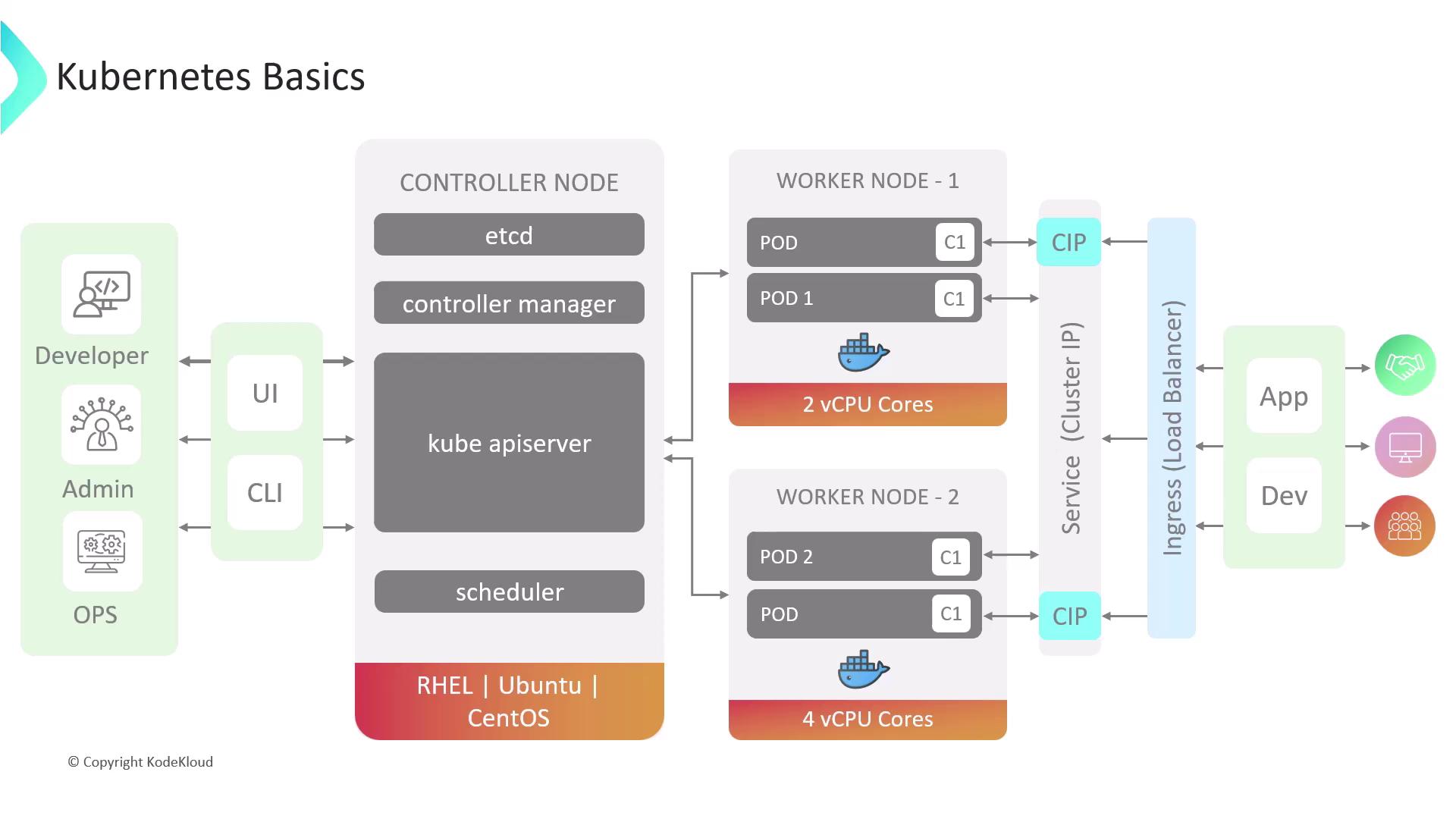
Kubernetes Cluster Architecture
A Kubernetes cluster consists of nodes that run containerized workloads. Nodes are classified as:| Node Type | Role |
|---|---|
| Control Plane Node | Manages the cluster’s desired state and runs the API server, controller manager, scheduler, etcd |
| Worker Node | Hosts application workloads and runs kubelet, kube-proxy, and a container runtime |
Control Plane Components
-
API Server
The central REST endpoint through which all cluster operations are performed. -
Controller Manager
Ensures the cluster’s actual state matches the desired state by running built-in controllers (e.g., Node Controller, Replication Controller). -
Scheduler
Assigns Pods to nodes based on resource requirements, affinity/anti-affinity rules, and other constraints. -
etcd
A highly available, distributed key-value store that persists all cluster data.
etcd is the single source of truth for your cluster. Ensure you have regular backups and secure access controls.
Pods
A Pod is the smallest deployable unit in Kubernetes. It encapsulates one or more containers sharing:- A common network namespace (IP address, port space)
- Shared storage volumes
Use Deployments or ReplicaSets to ensure Pods are automatically recreated after failures.
Deployments
Deployments provide declarative updates for Pods and ReplicaSets. You specify the desired state—such as the number of replicas and container images—and Kubernetes continuously works to achieve and maintain that state, handling rolling updates and rollbacks. Example: Create a DeploymentServices
A Service exposes a set of Pods as a network service. It provides stable IPs, DNS names, and load balancing.| Service Type | Description | Example Command |
|---|---|---|
| ClusterIP | Internal-only service accessible within the cluster | kubectl expose deployment web-server --port=80 --target-port=80 |
| NodePort | Exposes the service on each node’s IP at a static port | kubectl expose deployment web-server --type=NodePort --port=80 |
| LoadBalancer | Provisions an external load balancer (cloud provider required) | kubectl expose deployment web-server --type=LoadBalancer --port=80 |
| ExternalName | Maps the service to an external DNS name via the externalName field | See ExternalName Service |
LoadBalancer
A LoadBalancer service automatically provisions and configures an external load balancer—e.g., AWS ELB or GCP Load Balancing. This simplifies external traffic routing but may incur additional costs for each exposed service.LoadBalancer services often incur per-hour or per-GB data processing fees. Review your cloud provider’s pricing before use.
Ingress
Ingress provides HTTP and HTTPS routing into the cluster. It allows you to:- Expose multiple services under a single IP or domain
- Define host- and path-based routing rules
- Terminate TLS/SSL connections
ClusterIP so that the Ingress controller handles all external traffic.