

LoadBalancer. We begin with a quick recap of NodePort, then introduce LoadBalancer and demonstrate how to provision a cloud load balancer automatically.
1. Recap: Kubernetes NodePort Service
A NodePort exposes a Service on a static port (the NodePort) on every node in your cluster. For example, if you expose the voting app on port31000 and the result app on port 32000, external users can reach them via:
- http://<node-ip>:31000
- http://<node-ip>:32000
2. Limitations of NodePort
While NodePort is straightforward, it has some drawbacks:- No single friendly URL for end users
- Manual management of external load balancer infrastructure
- Exposure of high-range ports (30000–32767)
Managing separate load balancer VMs (HAProxy, NGINX, etc.) increases operational overhead.
3. Introducing the LoadBalancer Service
On supported cloud platforms (GCP, AWS, Azure), settingtype: LoadBalancer in your Service manifest will:
- Provision a native cloud load balancer
- Configure forwarding rules to cluster nodes
- Distribute traffic across Service endpoints
voting-service.yaml:
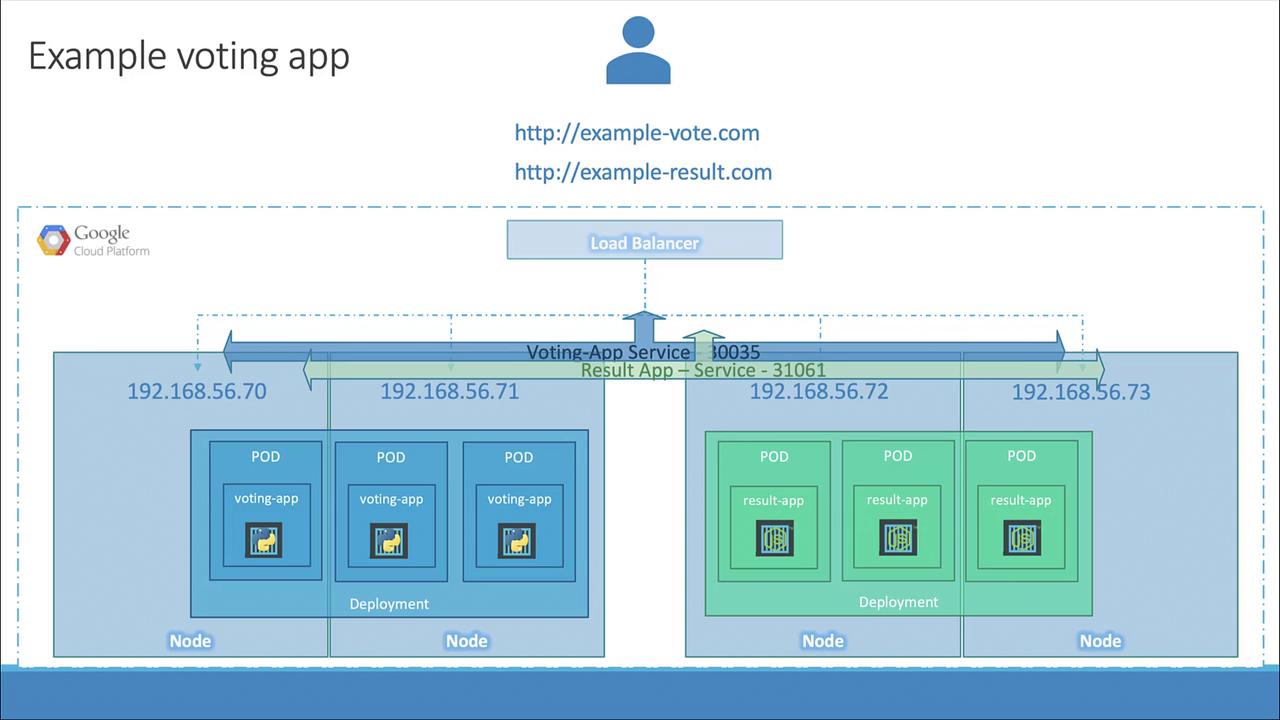
type: LoadBalancer only works on supported cloud environments. In unsupported setups (e.g., VirtualBox), Kubernetes falls back to assigning a NodePort without provisioning an external load balancer.4. Comparing Service Types
| Service Type | Use Case | Behavior |
|---|---|---|
| NodePort | Expose Service on a static port on nodes | Assigns a port from the 30000–32767 range |
| LoadBalancer | Expose Service via cloud load balancer | Provisions native LB and assigns external IP |