

How Scheduling Works
When a pod is defined, it enters a scheduling queue along with other pending pods. Consider a pod that requires 10 CPU; it will only be scheduled on nodes with at least 10 available CPUs. Additionally, pods with higher priorities are placed at the beginning of the queue. For instance, the following pod definition uses a high-priority class:Scheduling Phases
After being queued, pods progress through several phases:- Filter Phase: Nodes that cannot meet the pod’s resource requirements (e.g., nodes lacking 10 CPUs) are filtered out.
- Scoring Phase: Remaining nodes are scored based on resource availability after reserving the required CPU. For example, a node with 6 CPUs left scores higher than one with only 2.
- Binding Phase: The pod is assigned to the node with the highest score.
Key Scheduler Plugins
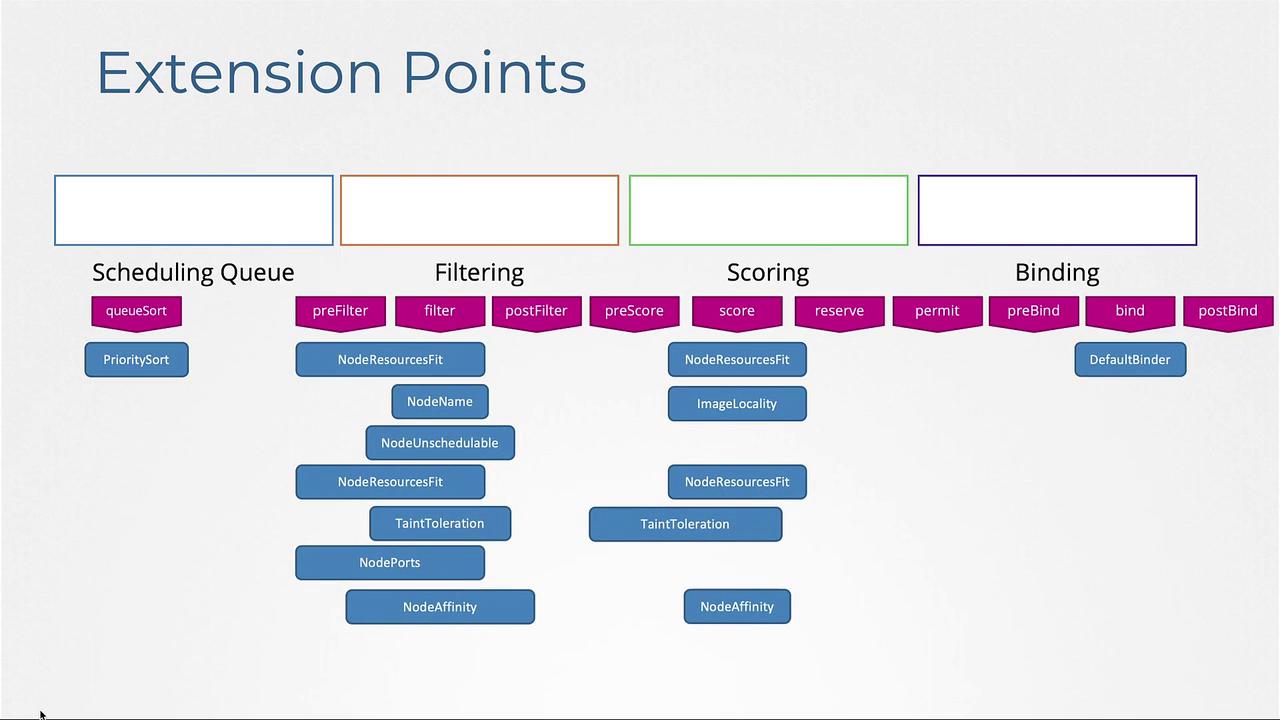
Several scheduler plugins play critical roles during these phases:- Priority Sort Plugin: Sorts pods in the scheduling queue according to their priority.
- Node Resources Fit Plugin: Filters out nodes that do not have the needed resources.
- Node Name Plugin: Checks for a specific node name in the pod specification and filters nodes accordingly.
-
Node Unschedulable Plugin: Excludes nodes marked as unschedulable. For instance, running commands like drain or cordon will set the unschedulable flag. An example node description is:
- Scoring Plugins: During the scoring phase, plugins (such as the Node Resources Fit and Image Locality plugins) assess each node’s suitability. They assign scores rather than outright rejecting nodes.
- Default Binder Plugin: Finalizes the scheduling process by binding the pod to the selected node.
Kubernetes emphasizes extensibility, allowing you to modify the scheduling process via extension points at stages such as queueing, filtering, scoring, and binding.
Customizing Scheduler Behavior with Profiles
Rather than running separate scheduler binaries (like default scheduler, MyScheduler, and MyScheduler2) with distinct configuration files, Kubernetes 1.18 introduced support for multiple scheduling profiles within a single scheduler binary. This approach minimizes operational overhead and prevents potential race conditions that can arise when multiple processes schedule workloads on the same node.Profile Configuration
Each scheduler profile is defined within the scheduler configuration file and behaves like an independent scheduler. For example, here are several configuration snippets:This flexible configuration allows you to tailor the scheduling behavior to meet your unique workload requirements by selectively enabling or disabling plugins across different profiles.
Summary
This lesson provided an overview of Kubernetes scheduling and scheduler profiles. We covered:- The phases of scheduling: queueing, filtering, scoring, and binding.
- The role of various scheduler plugins and extension points.
- How to configure multiple scheduler profiles within a single scheduler binary to customize scheduling behavior.