This article explores Kubernetes IP Address Management, focusing on IP assignment, storage, and prevention of duplicate IPs within virtual bridge networks.
Welcome to this in-depth lesson on Kubernetes IP Address Management. In this article, we explore how Kubernetes assigns IP addresses within virtual bridge networks on nodes, how pods receive their IPs, where this information is stored, and the mechanisms in place to prevent duplicate IP assignments.
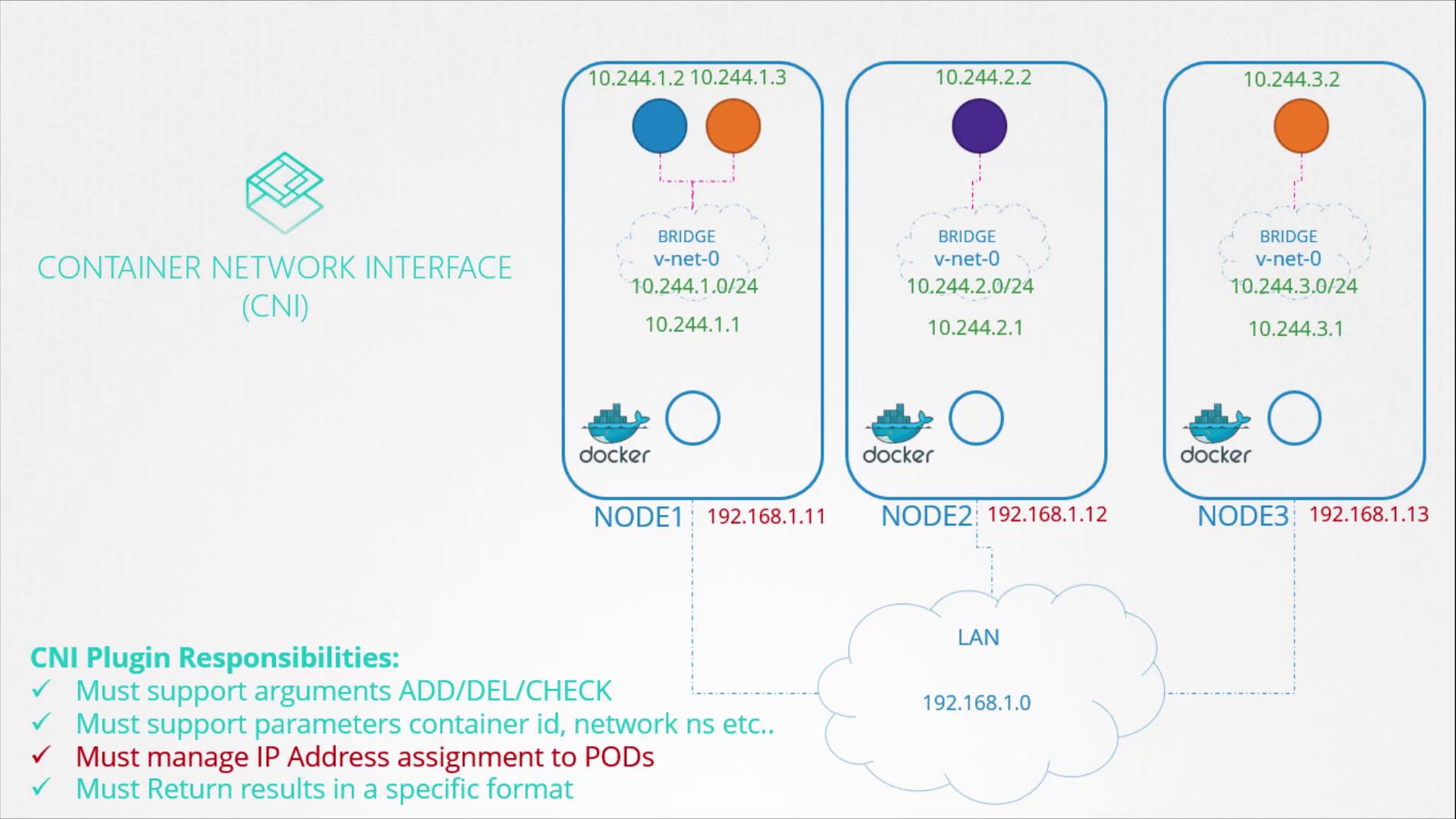
Kubernetes distinguishes between node IPs and pod IPs. This article focuses on the allocation of an IP subnet to the virtual bridge networks on each node and the subsequent assignment of IPs to pods. Node IP addresses are managed separately, often using external IP management solutions.IP assignment is governed by the Container Network Interface (CNI) standards. The CNI plugin—the network solution provider—is responsible for assigning IPs to containers. The diagram below illustrates a typical CNI setup across three nodes, highlighting how Docker containers receive their IP addresses and the role of the CNI plugins.
Recall the basic plugin developed earlier, which handled IP assignment within the container network namespace. To ensure smooth network operations, the assigned IPs must be unique. Kubernetes does not enforce a specific IP management method, leaving that responsibility to the CNI solution’s design.
One straightforward approach to IP management is to store the list of assigned IPs in a file. A script then manages this file and assigns IP addresses and routes within a specific network namespace. For example:
Copy
Ask AI
# Assign IP Address in a specific namespaceip -n <namespace> addr add <ip_address>/<subnet_mask> dev <interface>ip -n <namespace> route add <destination> via <gateway>
This manual method is best suited for simple environments or testing purposes. For larger deployments, consider using built-in IPAM solutions.
Rather than implementing custom IP assignment logic, you can leverage built-in IPAM plugins provided by the CNI. The host-local plugin, for instance, manages IP addresses locally on each node. A typical workflow might include retrieving a free IP from a maintained file:
Copy
Ask AI
# Retrieve free IP from fileip=$(get_free_ip_from_file)# Assign IP Address in a specific namespaceip -n <namespace> addr add <ip_address>/<subnet_mask> dev <interface>ip -n <namespace> route add <destination> via <gateway>
Alternatively, you can directly invoke the host-local plugin within your script:
Copy
Ask AI
# Invoke IPAM host-local plugin to retrieve a free IPip=$(get_free_ip_from_host_local)# Assign IP Address in a specific namespaceip -n <namespace> addr add <ip_address>/<subnet_mask> dev <interface>ip -n <namespace> route add <destination> via <gateway>
Leveraging CNI plugins such as host-local reduces custom code maintenance and aligns with Kubernetes best practices for network management.
The IPAM configuration is specified in the CNI configuration file. This file includes details such as the plugin type, subnet, and routing rules. Your script can read these parameters at runtime and invoke the appropriate plugin without hard-coding settings. Below is an example configuration using the host-local plugin:
Different network solution providers offer varied mechanisms for IP address management. Weaveworks, for instance, automatically allocates an IP range of 10.32.0.0/12 for the entire cluster. This range, covering IP addresses from 10.32.0.1 to 10.47.255.254, provides approximately one million IPs for pods. The total range is equally divided among the cluster nodes, with each node assigning its share to its pods. These IP ranges are configurable through additional options during the deployment of the Weave plugin.By understanding both manual and plugin-based IP management strategies, you can implement a robust and scalable network configuration in your Kubernetes clusters. Explore further with practice tests and configuration exercises to deepen your knowledge of IPAM in Kubernetes.For more insights and detailed guidance, check out our additional resources on Kubernetes Basics and Weaveworks Networking.