

/etc/hosts setups to a full-blown centralized DNS server.
Understanding Local Name Resolution
Imagine you have two computers on the same network—Computer A with IP address 192.168.1.10 and Computer B with IP address 192.168.1.11. You can easily ping Computer B from Computer A using its IP address:/etc/hosts file on Computer A. This informs the system that Computer B (192.168.1.11) is known as “db”:
Once you trust the mappings in
/etc/hosts, the system does not verify whether the actual hostname (e.g., Computer B’s real name) matches the alias you defined./etc/hosts file for IP address mapping. This process is called name resolution:
While managing local
/etc/hosts files works for small networks, it becomes difficult to maintain as the number of systems grows and IP addresses change.Scaling with a Centralized DNS Server
To overcome the challenges of managing numerous local host mappings, organizations consolidate all mappings on a centralized DNS server. Suppose your centralized DNS server is at IP address 192.168.1.100. You configure each host to use this server by editing the/etc/resolv.conf file:
/etc/hosts is resolved via the DNS server. If an IP address changes, you update the DNS server’s records instead of modifying each system individually. Although local /etc/hosts entries—which are useful for test servers—are still honored, they take precedence over DNS queries. The resolution order is defined in /etc/nsswitch.conf:
/etc/hosts file for a hostname. If a match is not found, it then queries the DNS server.
Now, if you try pinging a hostname not found in either /etc/hosts or the DNS server (e.g., www.facebook.com), the resolution fails:
Domain Names and Structure
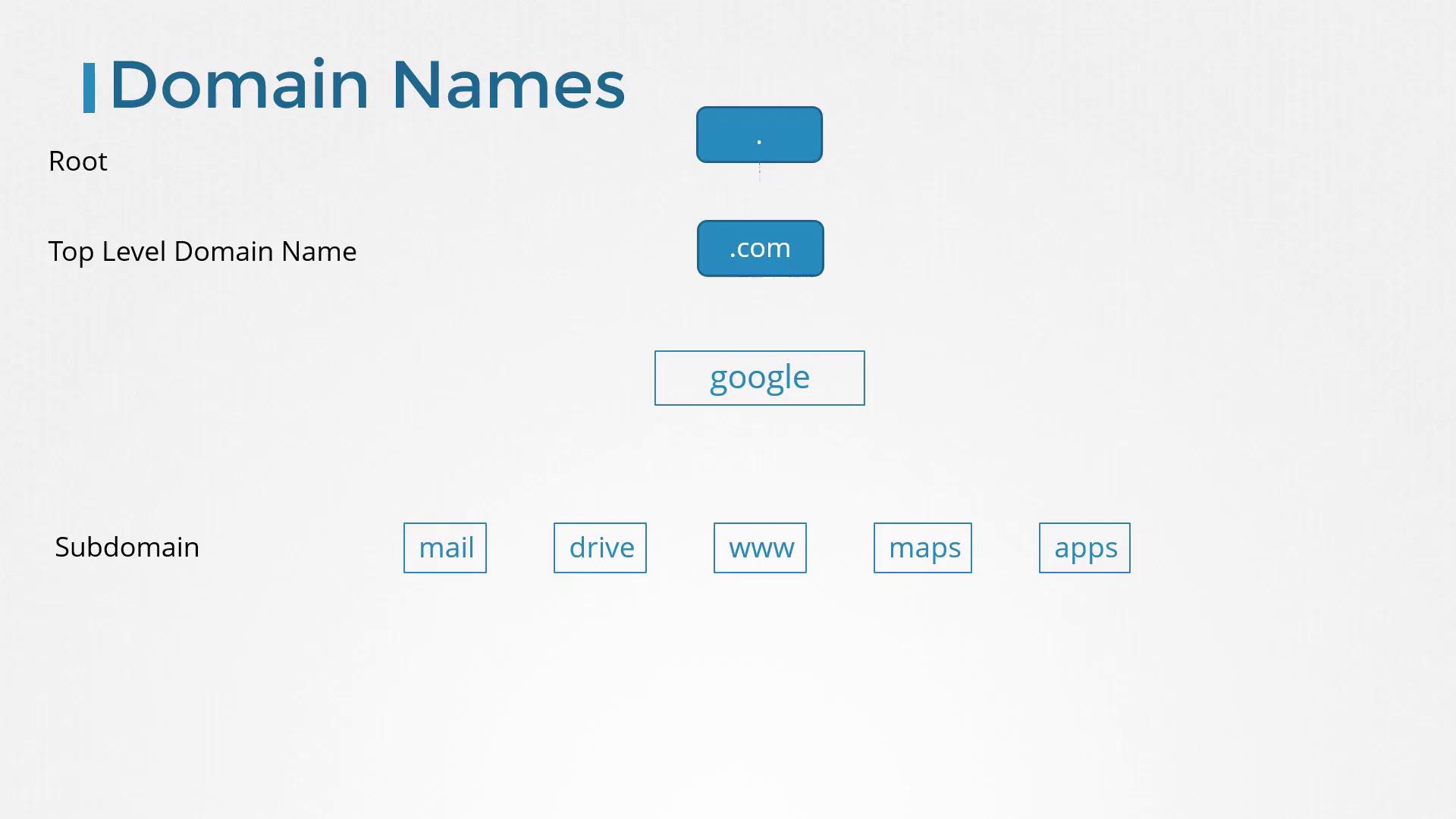
Up until now, we have been resolving internal hostnames such as web, db, and nfs. But what is a domain name? A domain name (like www.facebook.com) is composed of parts separated by dots: • The top-level domain (TLD) appears at the end (e.g., .com, .net, .edu, .org).• The domain name precedes the TLD (e.g., facebook in www.facebook.com).
• Any segment before the domain name is considered a subdomain (e.g., www). For instance, consider Google’s domain: • The root is implicit.
• “.com” is the TLD.
• “google” is the main domain.
• “www” is a subdomain. Subdomains allow organizations to separate services. Examples from Google include maps.google.com for maps, drive.google.com for storage, and mail.google.com for email.
- www.mycompany.com: External website
- mail.mycompany.com: Email service
- drive.mycompany.com: Storage solution
- payroll.mycompany.com: Payroll systems
- hr.mycompany.com: Human resources
Using Search Domains for Short Names
Within many organizations, it is often convenient to use short hostnames. To resolve a short name (for example, “web”) to its fully qualified domain name (FQDN, such as web.mycompany.com), add a search domain to your/etc/resolv.conf file:
Overview of Common DNS Record Types
DNS records map hostnames to IP addresses and serve various other purposes. Here is an overview of some common DNS record types:| Record Type | Hostname | Address/Mapping |
|---|---|---|
| A | web-server | Maps hostname to an IPv4 address (e.g., 192.168.1.1) |
| AAAA | web-server | Maps hostname to an IPv6 address (e.g., 2001:0db8:85a3:0000:0000:8a2e:0370:7334) |
| CNAME | food.web-server | Aliases one hostname to another (e.g., aliasing to eat.web-server or hungry.web-server) |
Testing DNS Resolution Tools
While ping is the most common tool for verifying basic DNS resolution, utilities likenslookup and dig provide more detailed insights.
• The
• The
nslookup command does not consider /etc/hosts entries and only queries the configured DNS server.• The
dig command offers comprehensive details about DNS queries.Example: nslookup
Example: dig
Next Steps
In upcoming practice exercises, you will configure and troubleshoot DNS on actual systems using tools likedig and nslookup. Later in the course, you will also learn how to set up an actual DNS server using CoreDNS as the DNS solution.
Thank you for reading this article. Enjoy exploring the intricacies of DNS and optimizing your network’s name resolution process!