

ExpressRoute Network Architecture
The diagram below outlines the key network components and their roles:- Customer’s Network: Represents your on-premises infrastructure and private network.
- Partner Edge: A connectivity partner extends your private network to Microsoft’s network edge.
- ExpressRoute Circuit: The dedicated path connecting your on-premises network to Microsoft cloud services. Typically, there are two circuits to provide redundancy.
- Microsoft Edge: Where ExpressRoute circuits connect to Microsoft’s network, ensuring secure and reliable access. At this stage, connectivity splits into:
- Microsoft Peering: Connects to cloud services such as Microsoft 365.
- Azure Private Peering: Enables direct connectivity to Azure services.
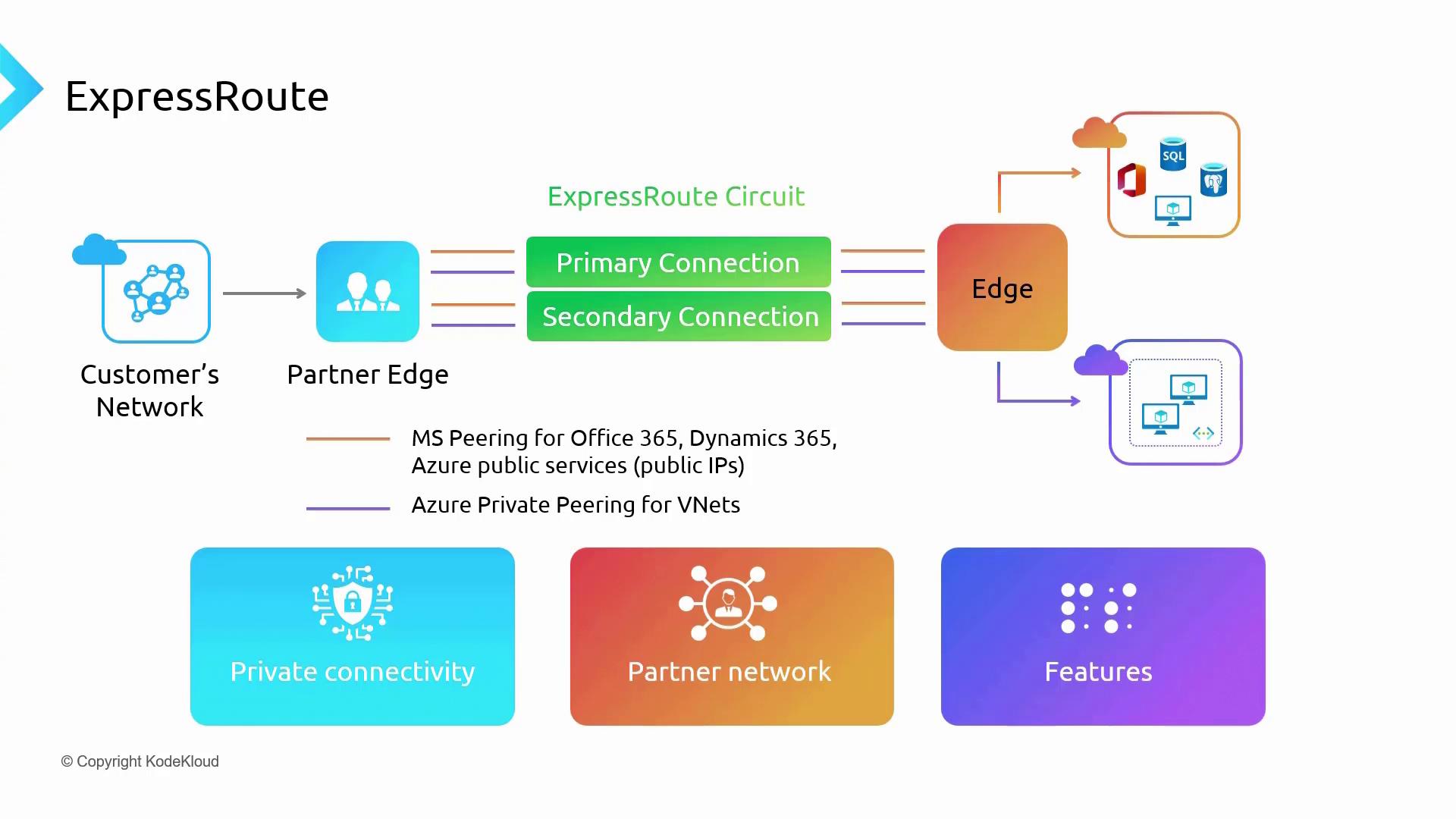
ExpressRoute creates a secure, direct connectivity bridge between your on-premises data centers and Microsoft’s data centers, effectively minimizing common vulnerabilities and disruptions associated with public internet routing.
Features and Benefits
ExpressRoute distinguishes itself through several key benefits:- Private Connectivity: Ensures data is transmitted directly between your on-premises infrastructure and Microsoft data centers, bypassing the public internet.
- Partner Network: Routes traffic through a trusted partner network, reducing exposure to public network risks.
- Reliability and Redundancy: Uses redundant Layer 3 connectivity (primary and secondary circuits) to ensure high availability.
- Global Reach: Extends connectivity across multiple regions within a designated geography, enhancing performance.
- Flexible Bandwidth Options: Supports bandwidth options ranging from 50 Mbps for small to medium deployments up to 100 Gbps for enterprise-scale applications.
- Cost Structuring: Offers various SKU options:
- Local SKU: Billed under an unlimited plan with free outbound data transfer.
- Standard and Premium SKUs: Choose between metered (pay-as-you-go) or unlimited pricing models for outbound data. The Premium SKU also adds a global connectivity option for multinational networks.
ExpressRoute Peering Locations
ExpressRoute connects your on-premises network to Microsoft’s cloud via specific peering locations, categorized into two main types:-
ExpressRoute National Cloud Peering Locations:
Tailored for national cloud deployments (e.g., Azure USGov or Azure China), these locations comply with local regulatory and compliance requirements, ensuring data remains within designated geographic boundaries. -
ExpressRoute Peering Locations:
Global peering locations that facilitate connections to Microsoft’s broader network. They support multiple peering options, including Microsoft Peering and Azure Private Peering, along with the legacy Azure Public Peering (still maintained for some organizations).
ExpressRoute Connectivity Models
ExpressRoute supports multiple connectivity models suited for different organizational needs:-
Cloud Exchange Co-location:
For organizations with servers in data centers that host cloud exchanges (e.g., Equinix, CoreSite), this model offers connectivity to Azure either at Layer 2 or managed Layer 3. -
Point-to-Point Ethernet Connection:
Enables direct connections (e.g., between offices in New York and a nearby peering location in New Jersey) with support for both Layer 2 and managed Layer 3 connectivity. -
Any-to-Any IP VPN:
Ideal for extending a wide area network (WAN) across branch offices to include Microsoft Cloud. This model supports managed Layer 3 connectivity, integrating Azure as another branch office. -
Direct Connect (ExpressRoute Direct):
Provides a high-speed, low-latency connection by establishing direct connectivity to Microsoft’s global network without a partner intermediary. This option is available if your organization is located near a Microsoft peering location.
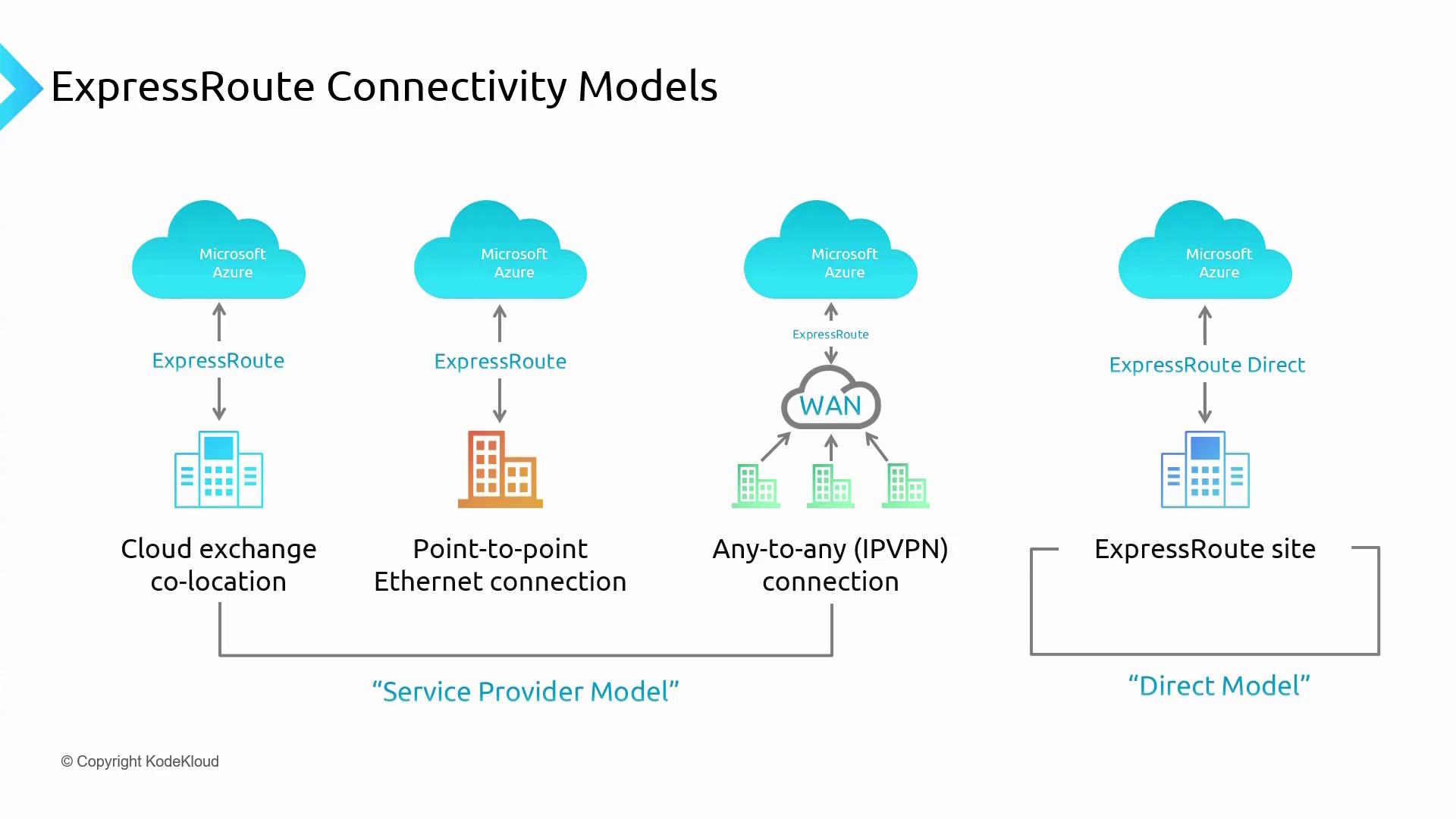
For cloud exchange co-location, point-to-point Ethernet, and any-to-any IP VPN deployments, a service provider is typically involved. In contrast, ExpressRoute Direct delivers connectivity without an intermediary.