

needs syntax in GitHub Actions to control job execution order. In this tutorial, you’ll chain build_job_1, test_job_2, and deploy_job_3 so that each runs only after its dependency succeeds.
How needs Works
The
needs keyword, defined at the job level, accepts a single job name or an array of job names. A job won’t start until all its specified dependencies complete successfully.1. Basic Build + Test Workflow
Here’s a minimal workflow wheretest_job_2 waits for build_job_1:
test_job_2 only starts once build_job_1 finishes without errors.
2. Detecting Cyclic Dependencies
If you introduce a cycle, GitHub Actions will reject your workflow before it runs.Circular dependencies (e.g.,
build_job_1 needs test_job_2 and vice versa) are invalid. The runner throws an error on push.3. Adding a Deploy Phase
You can chain multiple jobs by listing dependencies as an array. Below is a full build–test–deploy sequence:Job Dependency Table
| Job | needs | Purpose |
|---|---|---|
| build_job_1 | — | Installs Cowsay and generates dragon.txt |
| test_job_2 | build_job_1 | Verifies that dragon.txt contains “dragon” |
| deploy_job_3 | [test_job_2] | Outputs the contents of dragon.txt |
4. Observing the Workflow Run
When you push this workflow:- The GitHub Actions graph displays:
build_job_1 → test_job_2 → deploy_job_3 - Each job runs on a separate runner; files are not shared by default.
- If
test_job_2fails to finddragon.txt, the runner skipsdeploy_job_3:
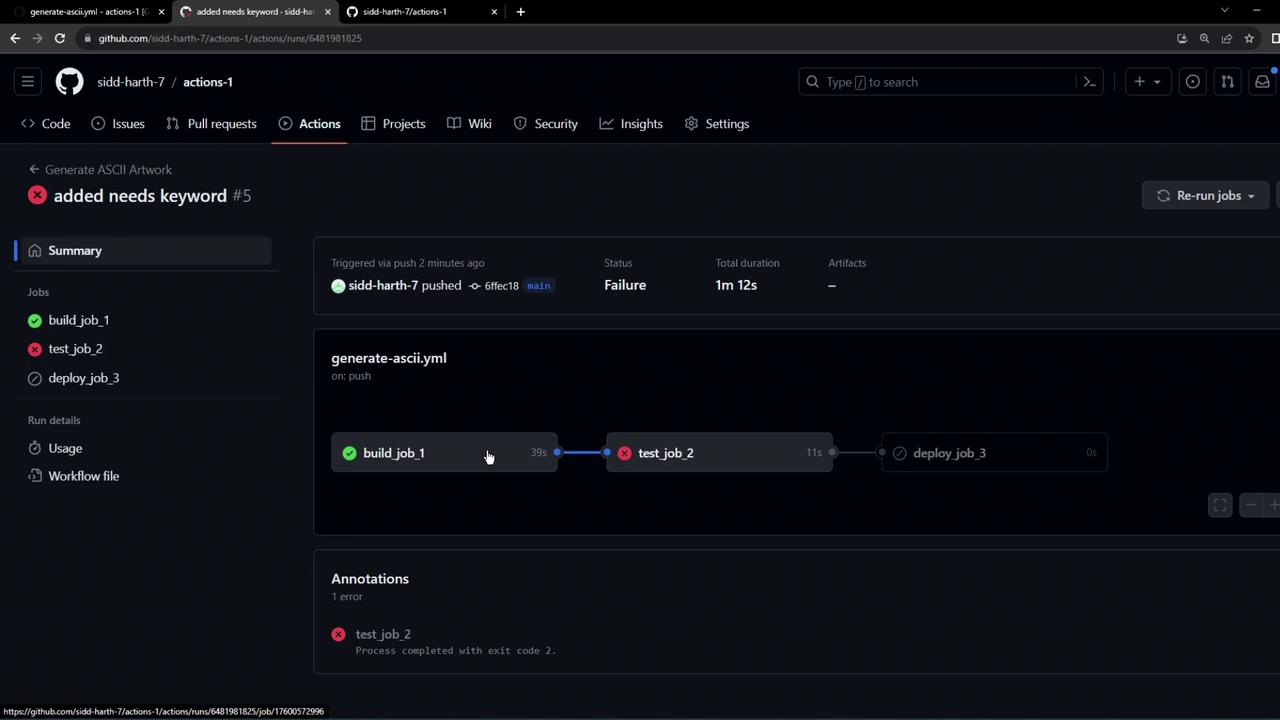
To share files between jobs, explicitly upload and download artifacts using the
actions/upload-artifact and actions/download-artifact actions.