

Understanding the Azure Hierarchy
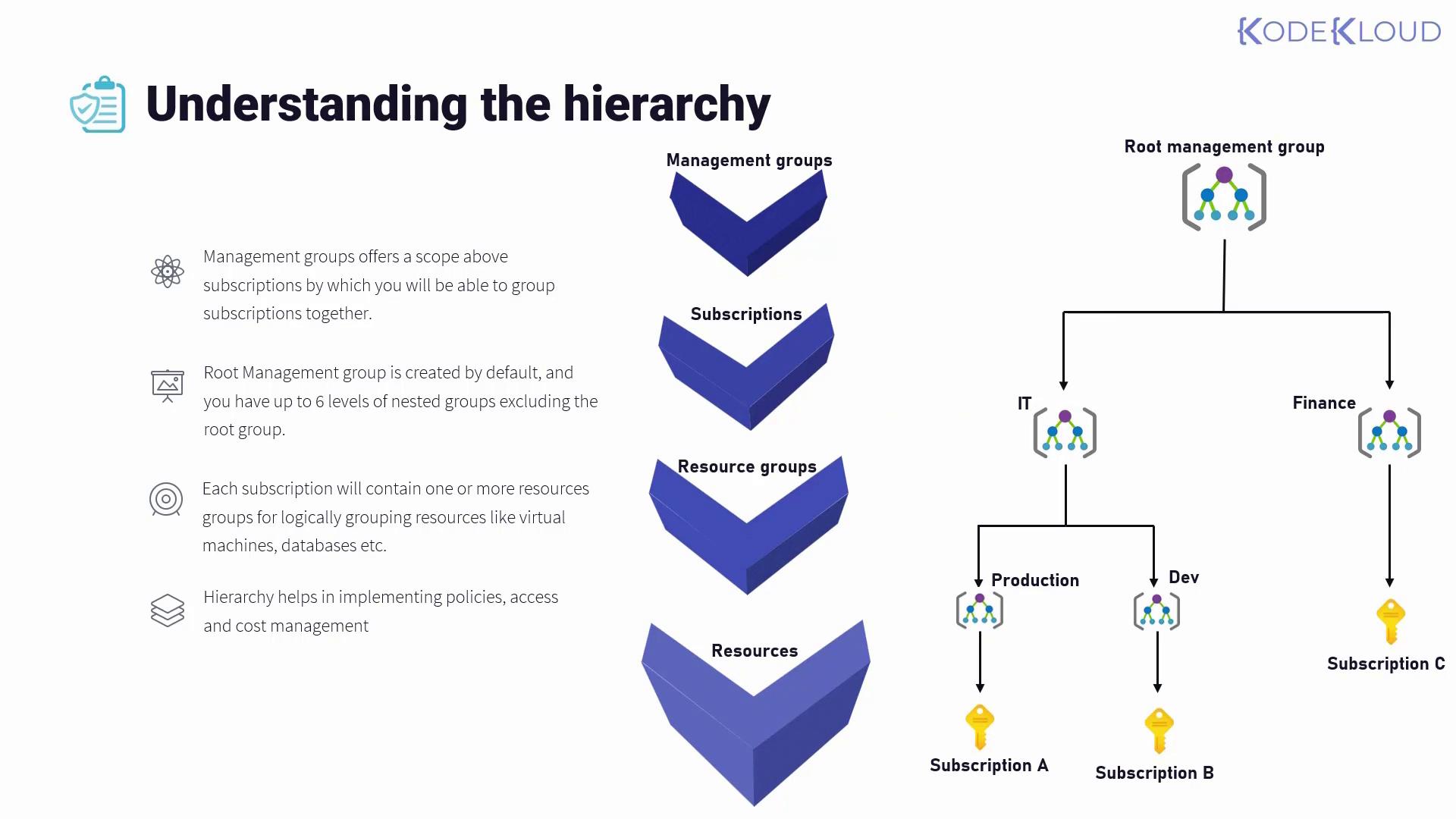
At the apex of the hierarchy are management groups. These groups provide a scope above subscriptions, allowing you to group subscriptions together and apply governance settings uniformly across the organization. When you log into the Azure portal, you start with the default root management group that is automatically created. From there, you can create additional management groups up to six levels deep (excluding the root). For example, your hierarchy might look like this:- Root Management Group
- IT Management Group
- Production Management Group
- Development Management Group
- Finance Management Group
- IT Management Group
Governance Strategies and Inheritance
Implementing governance strategies such as policies, role-based access control, tagging, and cost management becomes more efficient with this hierarchical approach. Controls applied at a higher level automatically inherit to all levels below. For example:- A policy applied at the root management group level affects every child subscription and resource.
- A role assignment made at the IT management group level is inherited by both the production and development management groups, as well as any subscriptions under them.
- Adding a new subscription (e.g., Subscription D under the production management group) will automatically incorporate policies and configurations applied at the IT group level.
By centralizing policy application, you reduce administrative overhead and ensure consistency across your organization.