This article explores using ConfigMaps in Kubernetes Deployments, covering definitions, integration, troubleshooting, and resolution through command-line and UI feedback.
In this lesson, we will explore the structure and implementation of a ConfigMap using a sample CartsDB Deployment. The walkthrough includes definitions, integration steps, troubleshooting, and resolution using command-line operations and UI feedback from the OpenShift console.
Begin by reviewing the following ConfigMap definition. In this example, a ConfigMap named cartsdb-config is created, containing key-value pairs that specify configuration values for our database connection:
The data section holds simple key-value pairs. Here, MONGODB_USER is set to "sock-user" and MONGODB_DATABASE is set to "data". This ConfigMap will later be referenced in our Deployment to provide environment variables.
Consider the standard Deployment configuration for CartsDB. The most crucial part is how the ConfigMap values are injected into container environment variables using the valueFrom directive with configMapKeyRef.First, here is the base Deployment configuration:
The environment variable MONGODB_ADMIN_PASSWORD references a key that is not defined in the provided ConfigMap. Ensure that this key is added to the ConfigMap, or consider using a Secret to handle sensitive data and prevent runtime errors.
Before deploying the Deployment, confirm that the ConfigMap is successfully applied in the cluster.
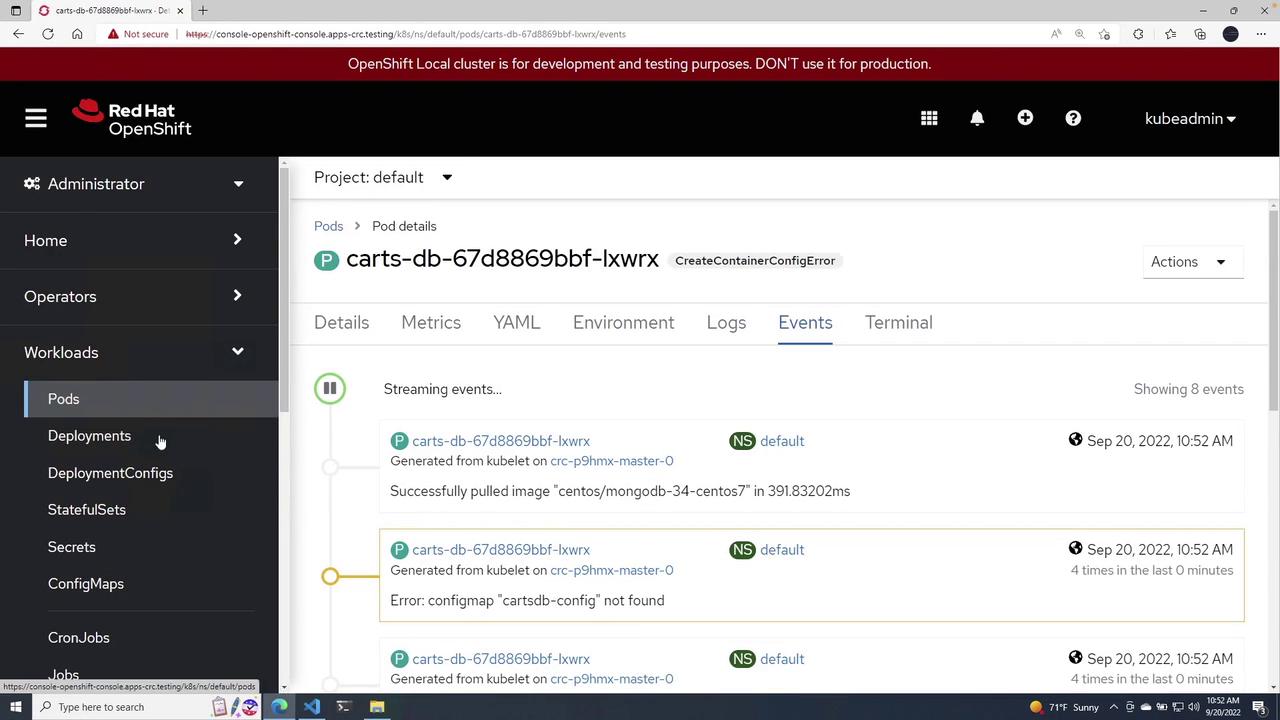
After deploying, refresh the cluster view. You might observe that although the Deployment is running, the Pod displays a status of CreateContainerConfigError. Investigating the events will reveal an error indicating a missing ConfigMap, such as “ConfigMap carts-db-config-9 not found.”
If you encounter errors related to the ConfigMap, inspect your Deployment file in VS Code and review the OpenShift console for additional error details. An example screenshot from the OpenShift console illustrating the error is shown below:
To resolve the misconfiguration, delete the problematic Deployment using:
Copy
Ask AI
oc delete -f cartsconfigmap.yml
The console output may include warnings such as:
Warning Message
Details
Allow Privilege Escalation
container “carts-db” must set securityContext.allowPrivilegeEscalation=false
Unrestricted Capabilities
container “carts-db” must set securityContext.capabilities.drop=[“ALL”]
Non-root User Requirement
pod or container “carts-db” must set securityContext.runAsNonRoot=true
Seccomp Profile Setting
pod or container “carts-db” must set securityContext.seccompProfile.type to “RuntimeDefault” or “Localhost”
After the Pod is running, inspect its YAML to confirm that the ConfigMap references are present. An extract of the Pod’s configuration might look like:
This demonstration showcased how to use a ConfigMap to inject environment variables into a Kubernetes Deployment. For further reading and advanced deployment techniques, check out the following resources:
By confirming that the ConfigMap is properly deployed before applying the Deployment, you can avoid runtime configuration errors and ensure a smooth deployment process.