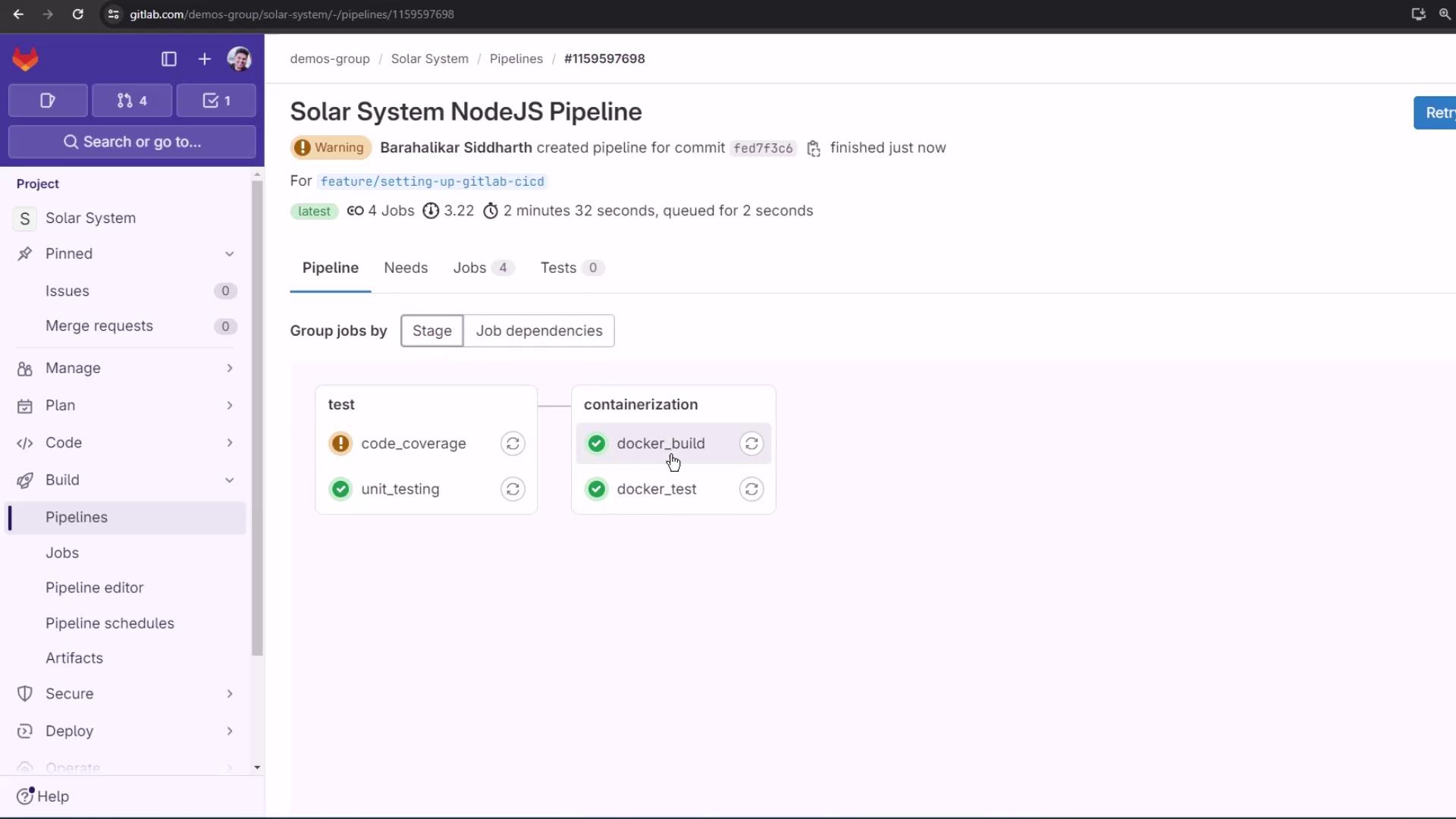
In robust CI/CD workflows, validating your Docker image before pushing to a registry helps catch runtime issues early. This guide shows you how to extend a GitLab CI pipeline with a docker_test job that consumes the image built by docker_build, verifies the /live endpoint, and ensures your container is production-ready.
CI/CD Pipeline Overview Define your basic stages and shared variables in .gitlab-ci.yml:
stages : - test - containerization variables : DOCKER_USERNAME : siddharth67 IMAGE_VERSION : $CI_PIPELINE_ID MONGO_URI : 'mongodb+srv://supercluster.d83jji.mongodb.net/superData' MONGO_USERNAME : superuser MONGO_PASSWORD : $M_DB_PASSWORD unit_testing : stage : test # … code_coverage : stage : test # …
Stage Job Name Purpose test unit_testing Execute unit tests test code_coverage Generate code coverage reports containerization docker_build Build Docker image and save as artifact containerization docker_test Load the image, run container, and test /live
Building and Archiving Docker Images The docker_build job builds your Node.js app into a Docker image, then saves it as a tarball artifact for downstream jobs.
docker_build : stage : containerization image : docker:24.0.5 services : - docker:24.0.5-dind script : - docker build -t $DOCKER_USERNAME/solar-system:$IMAGE_VERSION . - docker images $DOCKER_USERNAME/solar-system:$IMAGE_VERSION - mkdir -p image - docker save $DOCKER_USERNAME/solar-system:$IMAGE_VERSION \ -o image/solar-system-image-$IMAGE_VERSION.tar artifacts : paths : - image when : on_success expire_in : 3 days
Artifacts are retained for 3 days by default. Adjust expire_in to suit your retention policy.
Make sure sensitive environment variables (like MONGO_PASSWORD) are stored in GitLab CI/CD variables , not hard-coded. Testing the Docker Image Before Push The docker_test job retrieves the saved image artifact, runs the container, and probes the /live endpoint using an Alpine container with wget.
docker_test : stage : containerization image : docker:24.0.5 needs : - docker_build services : - docker:24.0.5-dind script : - docker load -i image/solar-system-image-$IMAGE_VERSION.tar - docker run --name solar-system-app -d -p 3000:3000 \ $DOCKER_USERNAME/solar-system:$IMAGE_VERSION - export IP=$(docker inspect -f \ '{{range .NetworkSettings.Networks}}{{.IPAddress}}{{end}}' solar-system-app) - echo "App IP : $IP" - docker run --rm alpine \ wget -qO- http://$IP:3000/live | grep -q '"live"'
Steps in docker_test:
docker load : Imports the tarball into Docker.docker run : Starts the container on port 3000 in detached mode.docker inspect : Extracts the container’s IP address.wget : From an Alpine image, requests http://$IP:3000/live and checks for "live" in the response.
Node.js Health Check Endpoints Below is the simplified app.js. The /live endpoint returns { status: "live" } for liveness probes.
const express = require ( 'express' ); const path = require ( 'path' ); const OS = require ( 'os' ); const bodyParser = require ( 'body-parser' ); const mongoose = require ( 'mongoose' ); const cors = require ( 'cors' ); const app = express (); app . use ( bodyParser . json ()); app . use ( express . static ( path . join ( __dirname , '/' ))); app . use ( cors ()); mongoose . connect ( process . env . MONGO_URI , { user: process . env . MONGO_USERNAME , pass: process . env . MONGO_PASSWORD , useNewUrlParser: true , useUnifiedTopology: true }, err => { if ( err ) console . error ( "MongoDB connection error:" , err ); }); app . get ( '/' , ( req , res ) => { res . sendFile ( path . join ( __dirname , 'index.html' )); }); app . get ( '/os' , ( req , res ) => { res . json ({ os: OS . hostname (), env: process . env . NODE_ENV }); }); app . get ( '/live' , ( req , res ) => { res . json ({ status: "live" }); }); app . get ( '/ready' , ( req , res ) => { res . json ({ status: "ready" }); }); app . listen ( 3000 , () => { console . log ( "Server running on port 3000" ); }); module . exports = app ;
Pipeline Visualization With this setup, docker_test will only run once docker_build successfully produces and archives the image. A successful liveness check means the container is ready to be pushed.
Links and References