This guide explains KubeConfig files in Kubernetes and how they facilitate secure communication with the Kubernetes API server.
Welcome to this guide on KubeConfig files. In this article, we explain how KubeConfig files work in Kubernetes and demonstrate how they simplify secure communication with the Kubernetes API server.In earlier segments, we covered generating a certificate for a user and how a client uses certificate and key files to query the Kubernetes REST API for a list of pods. In our example, the cluster is named “my-kube-playground”. To query the API server using curl, include the client key, client certificate, and CA certificate as options. For instance:
When using the kubectl command-line tool, you can also supply the certificate and key information as options, eliminating the need to specify them with every command:
Typing these options repeatedly can be cumbersome. Instead, you can consolidate this information into a configuration file called a kubeconfig file. Place the file at the default location ($HOME/.kube/config) or specify a custom file using the —kubeconfig option. For example, a kubeconfig file might contain:
Copy
Ask AI
--server my-kube-playground:6443--client-key admin.key--client-certificate admin.crt--certificate-authority ca.crtkubectl get podsNo resources found.
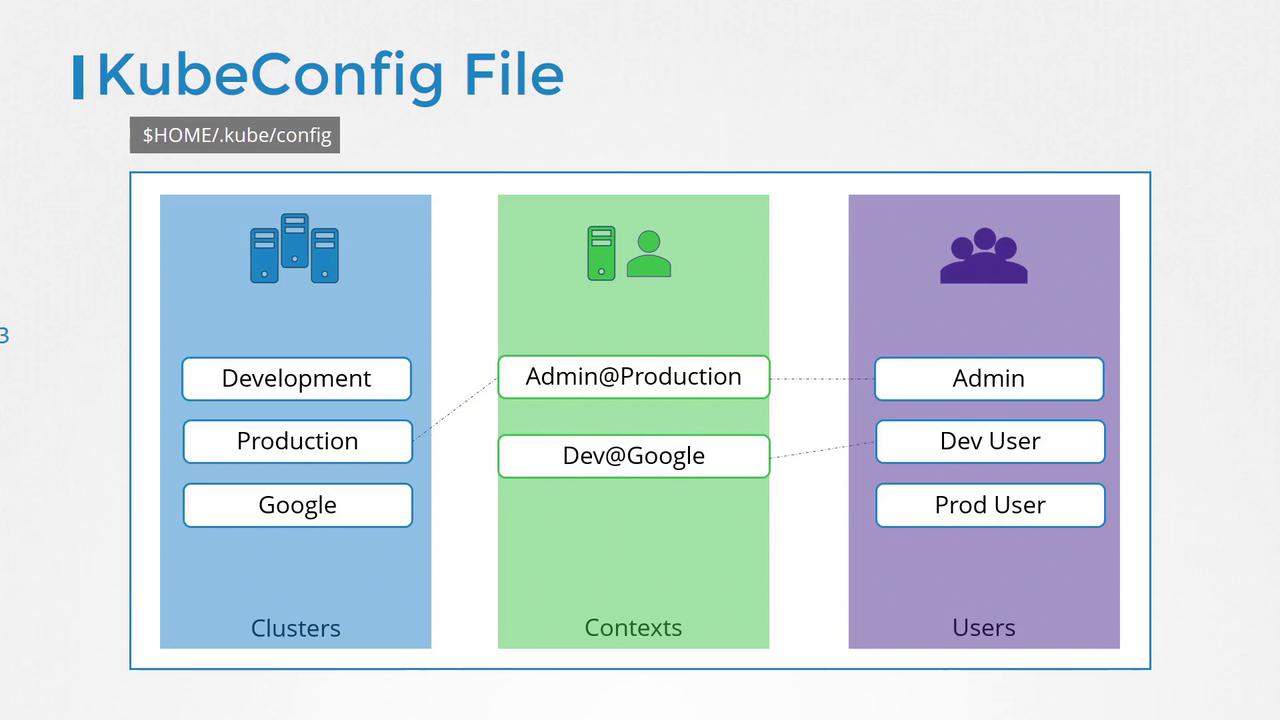
Once the kubeconfig file is stored at $HOME/.kube/config, kubectl automatically loads it, so you no longer need to specify all the certificate file paths with each command.The kubeconfig file follows a defined format and is organized into three main sections:
Clusters: Represent the Kubernetes clusters you need access to (e.g., development, testing, production).
Users: Define the credentials that can interact with those clusters (e.g., admin, dev-user, prod-user).
Contexts: Combine clusters and users to specify which user accesses which cluster. For example, the context “admin@production” designates that the admin account accesses the production cluster.
Below is an illustrative diagram that shows the structure of a KubeConfig file:
Let’s examine a real kubeconfig file in YAML format. Notice it includes the API version set to v1 and the kind set to Config. Clusters, contexts, and users are each specified as an array element, allowing you to store multiple configurations in one file:
Once you have configured this file, you don’t need to create any Kubernetes objects—the kubectl tool reads the file and uses the defined configuration automatically. To set a default context, simply update the current-context field. For instance, to default to the context “dev-user@google”, include the following line:
Copy
Ask AI
current-context: dev-user@google
You can view your active configuration with:
Copy
Ask AI
kubectl config view
This command outputs the clusters, contexts, and users along with the current context. If the kubeconfig file is at the default location, it is automatically picked up by kubectl. If you prefer using a custom configuration file, you can specify it as shown below:
Copy
Ask AI
kubectl config view --kubeconfig=my-custom-config
Below is a sample output from a custom kubeconfig file:
Another useful feature of kubeconfig files is the ability to set a default namespace within a context. Since a cluster can manage multiple namespaces, specifying a default namespace allows you to bypass using the —namespace flag with every command.Consider the following configuration without a namespace:
For improved security and portability, it is recommended to use the full file paths for certificate files. Alternatively, you can embed the actual certificate content (in base64 format) using the certificate-authority-data field.
For example, you can include the certificate data directly in the kubeconfig file like so:
Copy
Ask AI
apiVersion: v1kind: Configclusters:- name: production cluster: certificate-authority: /etc/kubernetes/pki/ca.crt certificate-authority-data: LS0tLS1CRUdJTiBDRVJU...
If you encounter a certificate in base64 encoded format, you can decode it as required, ensuring flexibility in managing your credentials.That’s the end of this guide. For further practice, explore the practice exercises section to work with KubeConfig files and troubleshoot common issues. Happy learning!