This guide demonstrates how to combine the power of awk with Bash to process delimited text files. We’ll compare a pure awk script to a Bash/awk hybrid, then progressively build a reusable salary‐benchmarking tool.
Why Bash-AWK Hybrids?
Pure awk scripts are concise for text processing.
Embedding awk inside Bash adds flexibility (variables, flags, CLI args).
Shebangs (#!/usr/bin/env …) let you run scripts directly.
Pure awk Script (salary.awk) #!/usr/bin/env awk -f BEGIN { FS = "|" } { print $2 , $3 }
Bash Script Embedding awk (print_names.sh) #!/usr/bin/env bash awk -F "|" '{ print $2, $3 }'
You can run either script by:
chmod +x print_names.sh ./print_names.sh < employees.txt
Or invoke awk directly:
awk -f salary.awk employees.txt
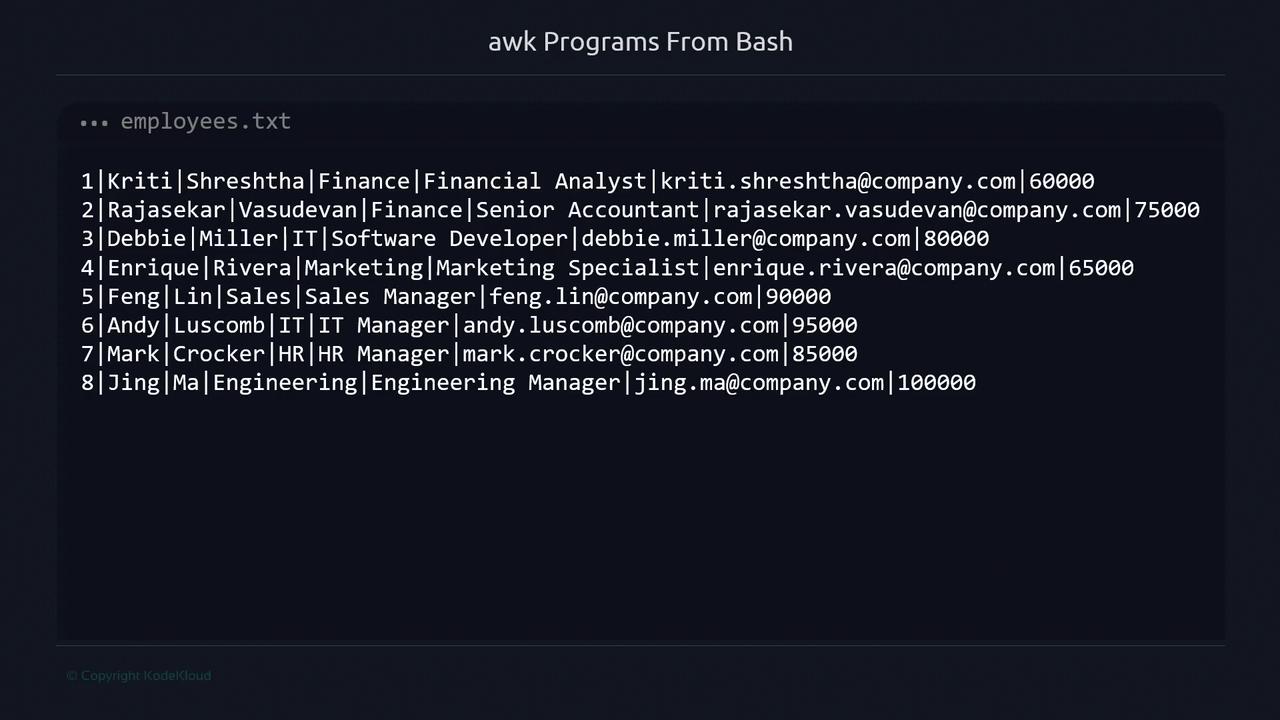
Preparing the Data Source Our employees.txt file uses | as the field separator and contains:
Column No Field Description 1 Employee ID Unique identifier 2 First name Given name 3 Last name Family name 4 Department Department name 5 Job title Position title 6 Email Contact email 7 Salary Annual salary (USD)
Set the field separator with -F or FS to split on |.
Salary Thresholds Threshold Variable Criteria high_salarySalary ≥ 90000 (high earners) low_salarySalary ≤ 65000 (potential bumps)
1. Basic One-Liner Print first name, last name, and salary for every employee:
awk -F "|" '{ print $2, $3, $7 }' employees.txt
Output:
Kriti Shreshtha 60000 Rajasekar Vasudevan 75000 Debbie Miller 80000 Enrique Rivera 65000 Feng Lin 90000 Andy Luscomb 95000 Mark Crocker 85000 Jing Ma 100000
2. Filter by Salary Range Use -v to pass thresholds into awk:
awk -F "|" \ -v high_salary= 90000 \ -v low_salary= 65000 \ '$7 >= high_salary || $7 <= low_salary { print $2, $3, $7 }' employees.txt
This shows both high and low earners in one stream.
Introduce a one-time header via BEGIN:
awk -F "|" \ -v high_salary= 90000 \ -v low_salary= 65000 \ -v header="==== Salary Adjustments ====" \ 'BEGIN { print header } $7 >= high_salary || $7 <= low_salary { print $2, $3, $7 }' employees.txt
4. Wrap into a Bash Script (salary.sh) For readability and reuse, move the awk call into a Bash script:
#!/usr/bin/env bash awk -F "|" \ -v high_salary= 90000 \ -v low_salary= 65000 \ -v header="==== Salary Adjustments ====" ' BEGIN { print header } $7 >= high_salary || $7 <= low_salary { print $2, $3, $7 } ' < employees.txt
Make it executable and run:
chmod +x salary.sh ./salary.sh
5. Separate “Up” and “Down” Sections (salary-v2.sh) Print distinct headers for high and low salaries:
#!/usr/bin/env bash awk -F "|" \ -v high_salary= 90000 \ -v low_salary= 65000 \ -v up_header="===== Needs to be adjusted up =====" \ -v down_header="===== Needs to be adjusted down =====" ' $7 >= high_salary { print down_header print $2, $3, $7 } $7 <= low_salary { print up_header print $2, $3, $7 } ' < employees.txt
Use flags inside awk to avoid repeating headers:
#!/usr/bin/env bash awk -F "|" \ -v high_salary= 90000 \ -v low_salary= 65000 \ -v up_header="===== Needs to be adjusted up =====" \ -v down_header="===== Needs to be adjusted down =====" ' $7 <= low_salary { if (!printed_up_header) { print up_header printed_up_header = 1 } print $2, $3, $7 } $7 >= high_salary { if (!printed_down_header) { print down_header printed_down_header = 1 } print $2, $3, $7 } ' < employees.txt
7. Parameterize with CLI Arguments (salary-v4.sh) Allow users to override thresholds when running the script:
#!/usr/bin/env bash readonly UP_HEADER = "===== Needs to be adjusted up =====" readonly DOWN_HEADER = "===== Needs to be adjusted down =====" high_salary = " ${1 :- 90000} " low_salary = " ${2 :- 65000} " awk -F "|" \ -v high_salary=" $high_salary " \ -v low_salary=" $low_salary " \ -v up_header=" $UP_HEADER " \ -v down_header=" $DOWN_HEADER " ' $7 >= high_salary { if (!printed_down_header) { print down_header printed_down_header = 1 } print $2, $3, $7 } $7 <= low_salary { if (!printed_up_header) { print up_header printed_up_header = 1 } print $2, $3, $7 } ' < employees.txt
Run with defaults:
chmod +x salary-v4.sh ./salary-v4.sh
Or specify custom thresholds:
./salary-v4.sh 80000 60000
Next Steps You’ve now explored:
Pure awk vs Bash/awk hybrids
Using -v to pass variables into awk
Conditional headers with BEGIN and internal flags
Parameterizing scripts via CLI
Practice customizing these scripts for different file formats, field counts, or more complex filtering logic.
References