In this hands-on lesson, you’ll explore HashiCorp Configuration Language (HCL) fundamentals using OpenTofu. You’ll identify resource types and names, initialize your working directory, and apply changes to a local file resource.
Q1: Identify the HCL File Extension Navigate to your HCL project directory and list its contents:
cd ~/opentofu-projects/HCL/
ls
# → main.tf
Alternatively, open the folder in VS Code and observe that the filename is main.tf.Answer: .tf
Q2: Determine the Resource Type Inspect the resource block in main.tf:
resource "local_file" "games" {
  file    = "/root/favorite-games"
  content = "FIFA 21"
}
Answer: local_fileQ3: Find the Resource Name Within the same block, the second quoted identifier denotes the resource name:
resource "local_file" "games" { … }
Answer: gamesQ4: Identify the Provider Name The provider is indicated by the prefix of the resource type:
resource "local_file" "games" { … }
Here, local is the provider.Answer: local
Q5: Valid vs. Invalid Arguments The local_file resource supports only filename and content. It does not accept resource_type.
Argument Valid Description filename Yes Path to create the file content Yes Data to write into the file resource_type No Not a supported resource argument
Answer: resource_type = "local_file"Q6: Why tofu plan Fails Initially Running:
Produces:
Error: Inconsistent dependency lock file
… no version is selected
The directory must be initialized first.
Always run tofu init before planning or applying any changes.
Initialize the Working Directory You should see:
OpenTofu has been successfully initialized!
…
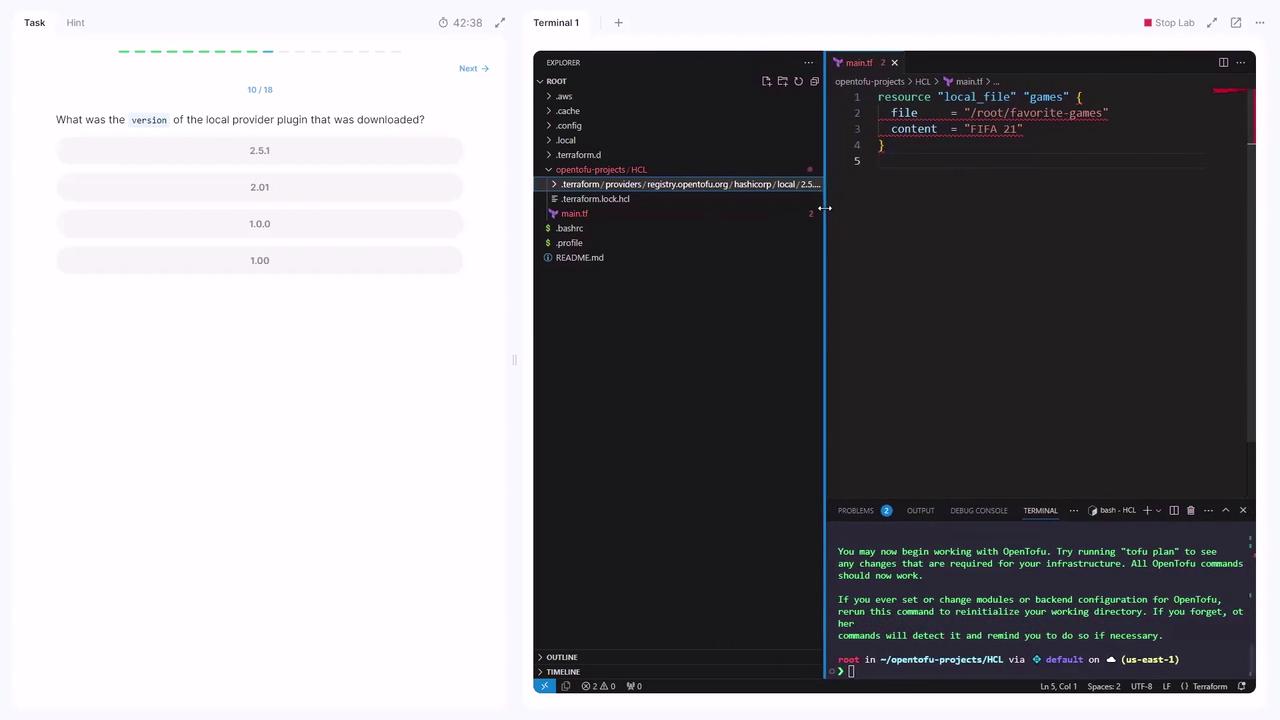
Q7: Locate the Provider Plugin Version After initialization, OpenTofu downloads provider plugins. You can confirm the version (2.5.1) from the output or by inspecting .terraform:
Answer: 2.5.1Q8: Re-run tofu plan with Incorrect Arguments Results in:
Error: Missing required argument
  on main.tf line 1, in resource "local_file" "games":
   1: resource "local_file" "games" {
The argument "filename" is required, but no definition was found.

Error: Unsupported argument
  on main.tf line 2, in resource "local_file" "games":
   2:   file = "/root/favorite-games"
An argument named "file" is not expected here.
You used file instead of filename and omitted filename.
Q9: Identify the Unsupported Argument Referring to the Local Provider Documentation , file is not supported.Answer: file
Q10: Correct the Configuration and Apply Update main.tf :
resource "local_file" "games" {
  filename = "/root/favorite-games"
  content  = "FIFA 21"
}
Run:
tofu plan
tofu apply
# → Apply complete! Resources: 1 added, 0 changed, 0 destroyed.
Q11: Switch to a Sensitive File Resource To mask content in plans, use local_sensitive_file:
resource "local_sensitive_file" "games" {
  filename = "/root/favorite-games"
  content  = "FIFA 21"
}
Attempting to add an unsupported sensitive_content argument will fail:
Error: Unsupported argument
  on main.tf line 4, in resource "local_sensitive_file" "games":
   4:   sensitive_content = "FIFA 21"
Remove sensitive_content; it’s not supported.
Q12: Apply the Sensitive File Resource With main.tf updated:
resource "local_sensitive_file" "games" {
  filename = "/root/favorite-games"
  content  = "FIFA 21"
}
Run:
tofu plan
tofu apply
# → Apply complete! Resources: 1 added, 0 changed, 1 destroyed.
Plans will now hide the file’s content.
Q13: Destroy the Resource Plan: 0 to add, 0 to change, 1 to destroy. Enter a value: yes Destroy complete! Resources: 1 destroyed.
Congratulations—you’ve completed the lab! 🎉
Links and References