In this tutorial, you’ll learn how to leverage GitHub Copilot’s inline suggestions to speed up building a Flask API. We’ll cover:
  • Inline completions for new routes
  • Inline chat refinements
  • Comment-driven code generation
  • Next-edit suggestions for refactoring

Prerequisites

  • Python ≥ 3.7
  • Flask installed (pip install flask)
  • GitHub Copilot extension enabled in your editor
  • Basic knowledge of RESTful APIs
This demo uses an in-memory database (items_db). For production workloads, integrate a persistent data store like PostgreSQL or MongoDB.

1. Basic Flask App with In-Memory DB

Start with a simple Flask application. Create an app.py file:
from flask import Flask, request, jsonify
from models import Item

app = Flask(__name__)

# In-memory storage
items_db = []
current_id = 1

@app.route('/items', methods=['POST'])
def create_item():
    global current_id
    data = request.get_json()

    if not data or 'name' not in data:
        return jsonify({'error': 'Name is required'}), 400

    new_item = Item(
        id=current_id,
        name=data['name'],
        description=data.get('description', '')
    )
    items_db.append(new_item)
    current_id += 1
    return jsonify(new_item.to_dict()), 201
As you type, Copilot suggests method bodies in real time.

2. Deleting All Items

Type a new route decorator and function signature:
@app.route('/deleteall', methods=['DELETE'])
def delete_all_items():
Copilot may auto-complete:
    global items_db
    items_db = []
    return jsonify({'message': 'All items deleted successfully'})

3. Generating Random Items

Define a “create random items” endpoint:
@app.route('/createrandom', methods=['POST'])
def create_random_items():
    global current_id
    data = request.get_json()
Copilot often suggests:
    if not data or 'count' not in data:
        return jsonify({'error': 'Count is required'}), 400

    count = data['count']
    for _ in range(count):
        new_item = Item(
            id=current_id,
            name=f"Random Item {current_id}",
            description=f"This is random item number {current_id}"
        )
        items_db.append(new_item)
        current_id += 1

    return jsonify([item.to_dict() for item in items_db[-count:]]), 201

4. Inline Chat: Analyze Numbers

Start with:
@app.route('/analyzenumbers', methods=['POST'])
def analyze_numbers():
    data = request.get_json()
Invoke Copilot’s inline chat and ask for number analysis. It may return:
    numbers = data.get('numbers')
    if not numbers:
        return jsonify({'error': 'No numbers provided'}), 400

    total = sum(numbers)
    average = total / len(numbers)
    return jsonify({'total': total, 'average': average})

4.1 Enhanced Validation & Stats

Refine the route for stronger validation:
@app.route('/analyzenumbers', methods=['POST'])
def analyze_numbers():
    data = request.get_json()

    if not data or 'numbers' not in data:
        return jsonify({'error': 'Numbers are required'}), 400

    numbers = data['numbers']
    if not all(isinstance(n, int) for n in numbers):
        return jsonify({'error': 'All elements must be integers'}), 400

    result = {
        'sum': sum(numbers),
        'average': sum(numbers) / len(numbers) if numbers else 0,
        'min': min(numbers) if numbers else None,
        'max': max(numbers) if numbers else None
    }

    return jsonify(result), 200

# Alternative registration:
app.add_url_rule(
    '/analyzenumbers',
    'analyze_numbers',
    analyze_numbers,
    methods=['POST']
)

5. Comment-Driven Suggestions

Write a descriptive comment, then let Copilot generate code:
# create a route to delete all items
@app.route('/items', methods=['DELETE'])
def delete_all_items():
    global items_db
    items_db = []
    return jsonify({'message': 'All items deleted successfully'})

6. Next-Edit Suggestions for Refactoring

Enable Next-Edit Suggestions in Copilot settings to receive automated refactors. Example: renaming items_db to items_db_new. Before:
@app.route('/items', methods=['DELETE'])
def delete_all_items():
    global items_db
    items_db = []
    return jsonify({'message': 'All items deleted successfully'})
After accepting suggestion:
@app.route('/items', methods=['DELETE'])
def delete_all_items():
    global items_db_new
    items_db_new = []
    return jsonify({'message': 'All items deleted successfully'})

Enabling Next-Edit Suggestions

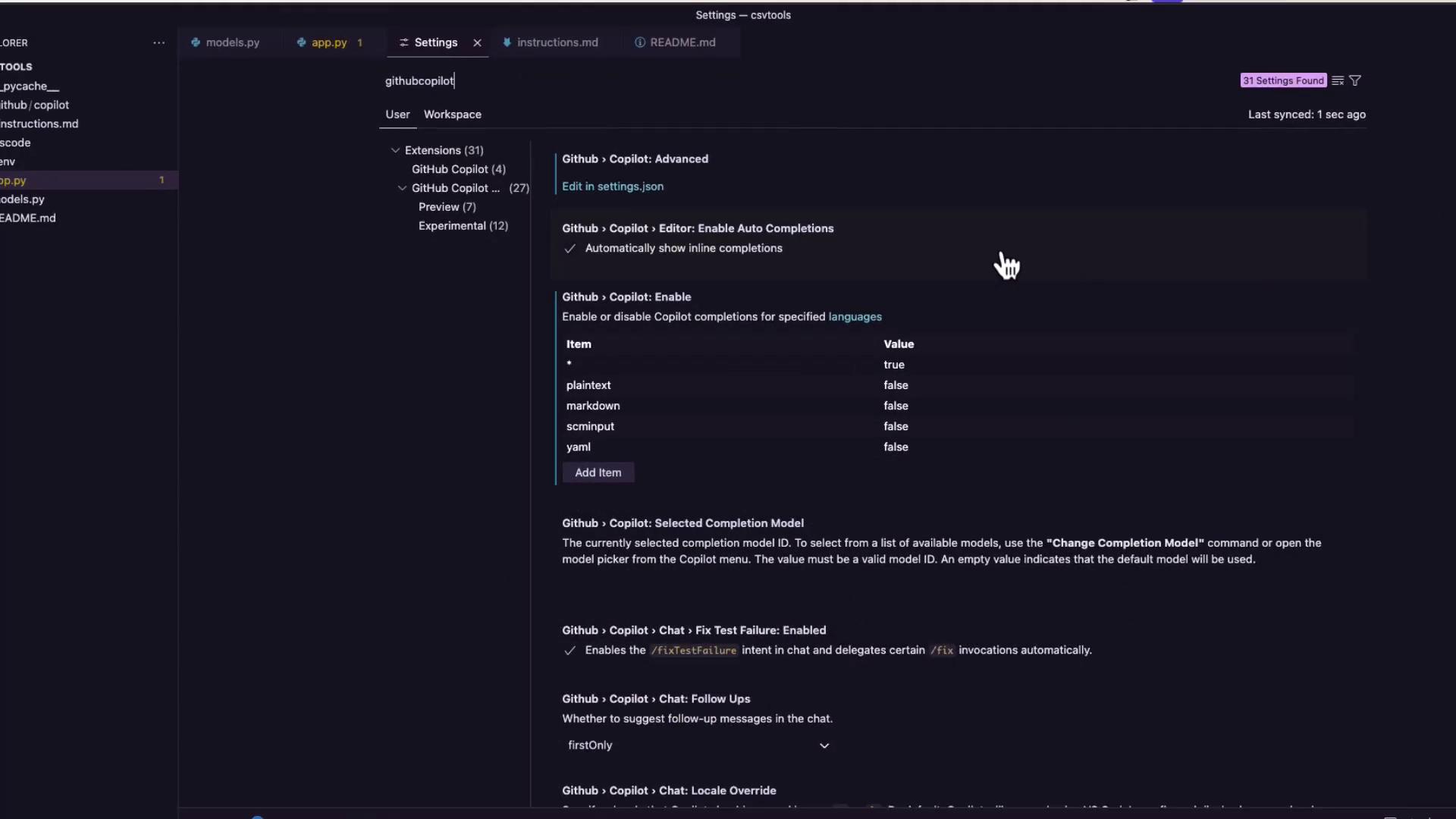
Open GitHub Copilot settings and search for next edit suggestions. Toggle it on under the Preview options:
The image shows a settings interface for GitHub Copilot in a code editor, displaying options for enabling auto completions and configuring language-specific settings.

Comparison of Copilot Features

Suggestion TypeUse CaseActivation
Inline CompletionsAuto-complete functions and blocksTyping code
Inline ChatContext-aware code suggestions via chat paneTrigger inline chat (e.g., Ctrl+Shift+I)
Comment-DrivenGenerate code from descriptive commentsAdd comment above function
Next-Edit SuggestionsAutomated refactoring & renamesEnable in Copilot settings, accept suggested edits
By combining these Copilot features, you can write, refine, and refactor Flask APIs faster and with confidence.