

User Journey
- A customer launches the web UI and browses products.
- They add items to the cart and place an order.
- The application emits an
OrderPlacedevent to a Kafka topic. - A warehouse dashboard consumes the event in near real time.
- Warehouse staff pack and ship the order.
In a production environment, you might add services like fraud detection, inventory management, or analytics that subscribe to the same Kafka topic for parallel processing.
System Architecture
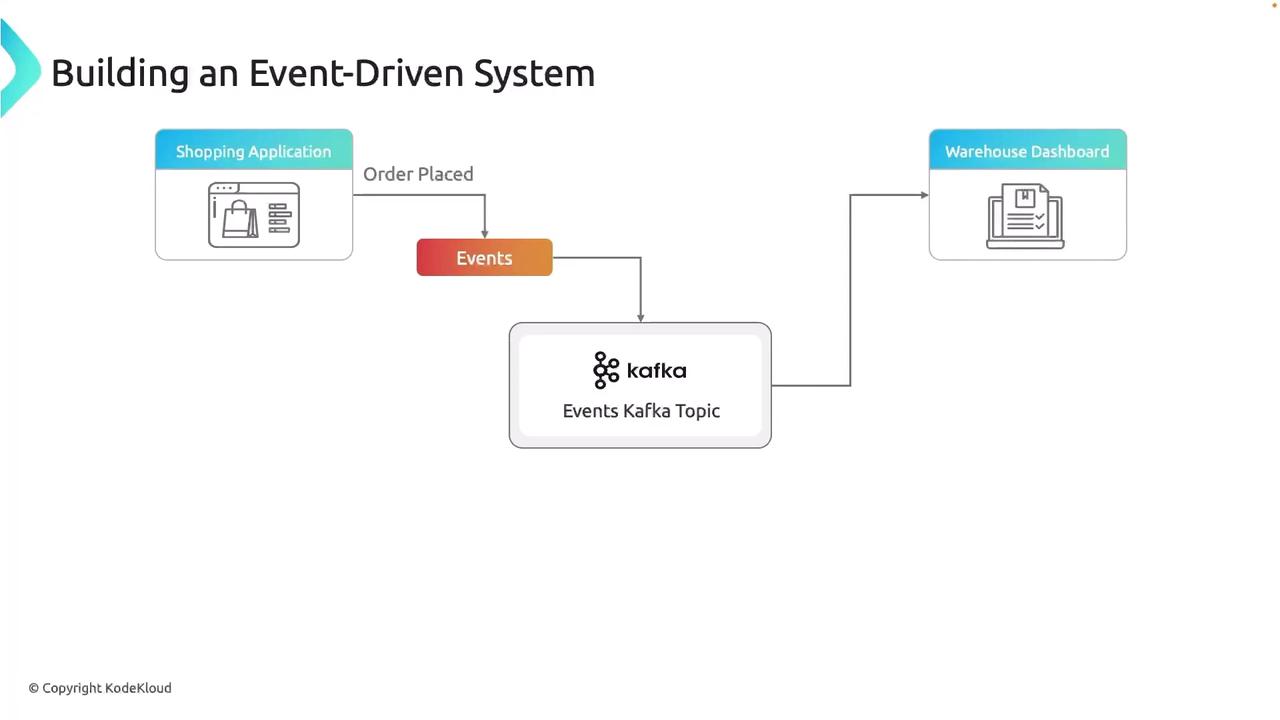
Components Breakdown
| Component | Role | Details |
|---|---|---|
| Web Application (Producer) | Publishes events to Kafka | Flask-based UI in Python sends OrderPlaced messages. |
| Apache Kafka | Event backbone & message bus | Stores, replicates, and streams events across multiple topics. |
| Warehouse Dashboard (Consumer) | Consumes and displays events | Subscribes to the Kafka topic and renders new orders in real time. |
Technology Stack
| Layer | Technology |
|---|---|
| Backend | Python, Flask |
| Messaging | Apache Kafka |
| Infrastructure | AWS EC2 |
| Frontend | HTML, CSS |
| Development IDE | Visual Studio Code |
Next Steps: Deploying Kafka on AWS EC2
- Launch an EC2 instance with Java installed.
- Download and extract the latest Kafka release.
- Configure
server.properties(broker ID, listeners, log directories). - Start Zookeeper and Kafka broker services.
- Test end-to-end by producing and consuming sample
OrderPlacedevents.
Ensure your EC2 security groups allow inbound traffic on Kafka’s default ports (9092 for clients, 2181 for ZooKeeper) and restrict access to trusted IPs only.