Preparing Your Environment
Before running any experiment, ensure you choose an appropriate use case and data science package. In this example, we use scikit-learn.If you install scikit-learn in the same terminal session running the MLflow UI, the UI will stop. For example, executing:will halt the UI. Always open a new terminal for installing additional packages.
Creating the Experiment File
Create a new file namedexample_mlflow.py in your VS Code editor and paste the code below. This script sets the MLflow tracking URI, creates synthetic regression data, splits it into training and testing sets, and defines a helper function to train models, make predictions, log metrics, and store models in MLflow.
Installing Required Packages
Make sure you have scikit-learn installed. Open a new terminal session and run the following command:Analyzing Experiment Results in MLflow
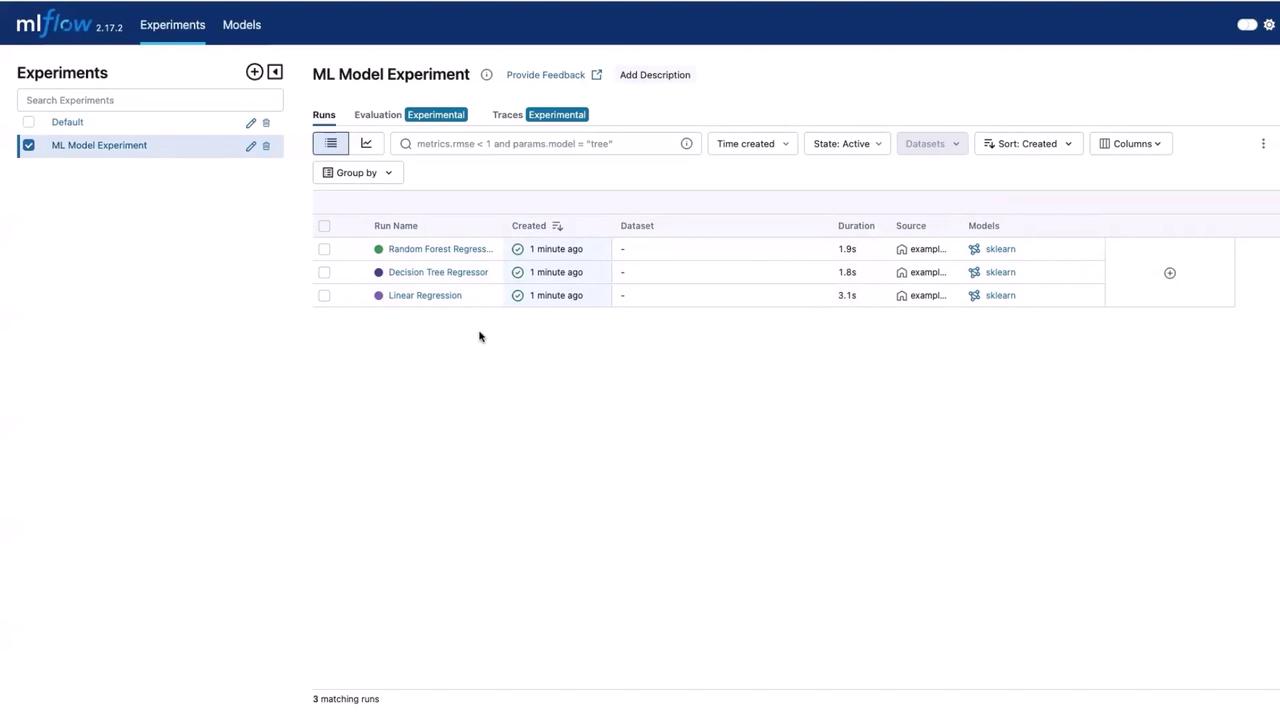
After the execution, open the MLflow UI and navigate to the experiments section to find a new experiment titled “ML Model Experiment”. Here, you will see three runs corresponding to the following models:- Linear Regression
- Decision Tree Regressor
- Random Forest Regressor