Automating Insurance Claim Reviews with M Lflow and Bento ML
Demo Setup MLflow server and run the ML Experiment
This guide covers setting up an MLflow server and running a machine learning experiment for anomaly detection using synthetic health insurance claims data.
Welcome to this guide on setting up an MLflow server and running an end-to-end machine learning experiment. In this demo, we simulate health insurance claims data (with injected anomalies) and build an anomaly detection model using the Isolation Forest algorithm. Follow along to set up your MLflow server in VS Code, generate synthetic data, train a model, and log results to MLflow.
Before you begin, ensure that you have VS Code and the required Python libraries installed. This guide assumes you have the necessary setup to run MLflow and execute Python scripts.
Begin by launching the MLflow UI. Open the terminal in VS Code and run:
Copy
Ask AI
mlflow ui
After executing the command, MLflow will start, and a pop-up notification should appear. Click on “open browser” to verify that the MLflow web UI is accessible. Once confirmed, create a new terminal in VS Code to continue with the next steps.
If you haven’t already generated the synthetic data, run the provided script. This script simulates health insurance claims, including some injected anomalies. Create a file named synthetic_health_claims.py and add the following content:
Copy
Ask AI
import pandas as pdimport numpy as np# Assume 'data' and 'num_samples' are defined previously in your projectdf = pd.DataFrame(data)# Introduce some anomalies (e.g., very high claim amounts)num_anomalies = 50anomalies = { 'claim_id': np.arange(num_samples + 1, num_samples + num_anomalies + 1), 'claim_amount': np.random.randint(10000, 25000, num_anomalies), # Much higher amounts 'patient_age': np.random.randint(18, 90, num_anomalies), 'provider_id': np.random.randint(1, 50, num_anomalies), 'days_since_last_claim': np.random.randint(0, 365, num_anomalies)}df_anomalies = pd.DataFrame(anomalies)# Combine normal data with anomaliesdf = pd.concat([df, df_anomalies]).reset_index(drop=True)# Shuffle the datasetdf = df.sample(frac=1).reset_index(drop=True)# Save the data to CSVdf.to_csv('synthetic_health_claims.csv', index=False)
Run the script using the following command:
Copy
Ask AI
python3 synthetic_health_claims.py
Upon execution, you should see an output confirming that the synthetic data was generated and saved. The console output will also show that the MLflow UI is running, along with relevant log messages.
In this section, you’ll train an ML model to perform anomaly detection using the Isolation Forest algorithm and log experiment details to the MLflow server.
Create a file named isolation_model.py with the following content:
Copy
Ask AI
import pandas as pdfrom sklearn.ensemble import IsolationForestfrom sklearn.model_selection import train_test_splitimport mlflowimport mlflow.sklearn# Load the synthetic datadf = pd.read_csv('synthetic_health_claims.csv')# Set the MLflow tracking URImlflow.set_tracking_uri("http://127.0.0.1:5000")# Define the features for the model. Note that 'claim_id' is not used.features = ['claim_amount', 'num_services', 'patient_age', 'provider_id', 'days_since_last_claim']# Split the data into training and test setsX_train, X_test = train_test_split(df[features], test_size=0.2, random_state=42)# Create (or set) the experiment in MLflowmlflow.set_experiment("Health Insurance Claim Anomaly Detection")with mlflow.start_run(): # Train the Isolation Forest model model = IsolationForest(n_estimators=100, contamination=0.05, random_state=42) model.fit(X_train) # Predict anomalies on training and test sets y_pred_train = model.predict(X_train) y_pred_test = model.predict(X_test) # Calculate the percentage of detected anomalies train_anomaly_percentage = (y_pred_train == -1).mean() * 100 test_anomaly_percentage = (y_pred_test == -1).mean() * 100 # Log model parameters mlflow.log_param("n_estimators", 100) mlflow.log_param("contamination", 0.05) # Log computed metrics mlflow.log_metric("train_anomaly_percentage", train_anomaly_percentage) mlflow.log_metric("test_anomaly_percentage", test_anomaly_percentage) # Log the model artifact to MLflow mlflow.sklearn.log_model(model, "model") print(f"Train Anomaly Percentage: {train_anomaly_percentage:.2f}%") print(f"Test Anomaly Percentage: {test_anomaly_percentage:.2f}%") print("Model and metrics logged to MLflow.")
Run the script by executing:
Copy
Ask AI
python3 isolation_model.py
The terminal will display detailed output regarding the experiment, including logged parameters and metrics. A typical output snippet might look like this:
Copy
Ask AI
2024/12/03 11:22:46 INFO mlflow.tracking.fluent: Experiment with name 'Health Insurance Claim Anomaly Detection' does not exist. Creating a new experiment.2024/12/03 11:22:46 WARNING mlflow.models.model: Model logged without a signature and input example. Please set `input_example` parameter when logging the model to auto infer the model signature.Train Anomaly Percentage: 5.20%Test Anomaly Percentage: 4.29%Model and metrics logged to MLflow.View run: http://127.0.0.1:5000/e/experiments/199596116865516564
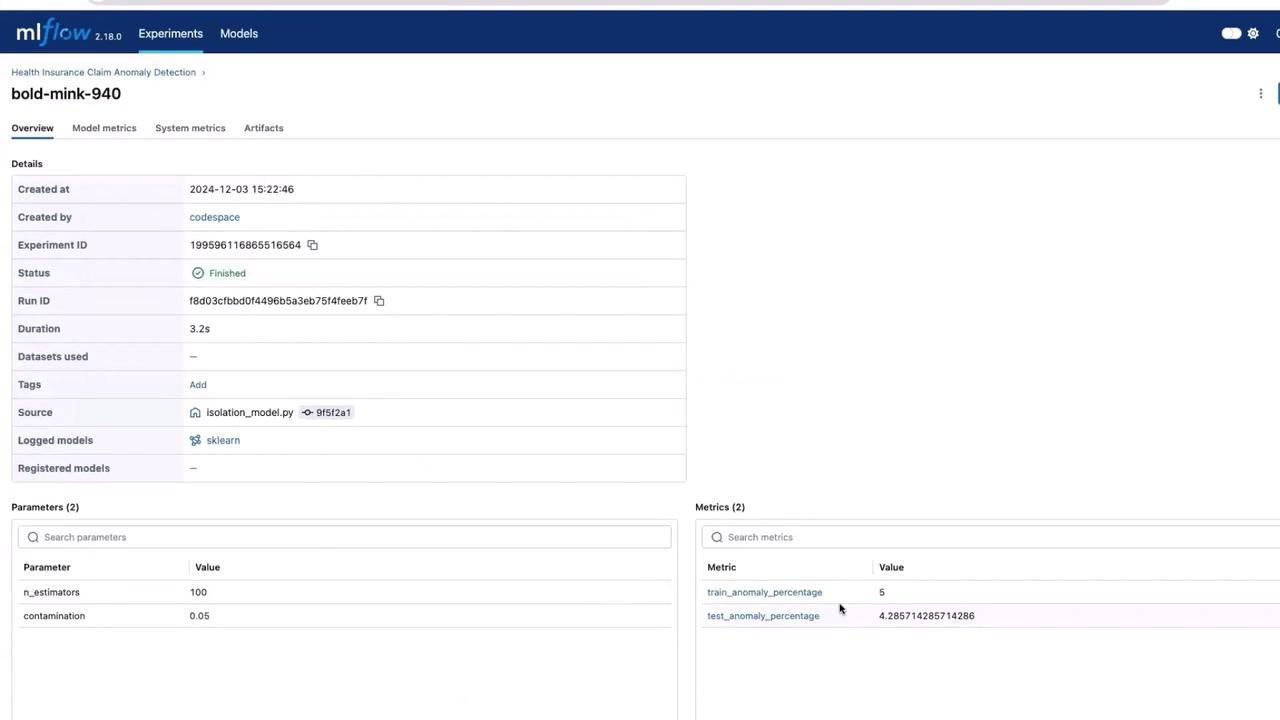
Once the script finishes running, refresh your browser where the MLflow UI is open. You should now see the “Health Insurance Claim Anomaly Detection” experiment, complete with parameters, metrics, and the model artifact.
This UI confirms that your experiment has been successfully logged and is ready for further exploration or deployment.
In a production setting, your model may undergo multiple iterations and rigorous testing before deployment. For this demo, we directly use the output from this experiment. The logged model artifact, which might be stored as a pickle file or another format, can be downloaded from the MLflow UI and integrated further.The next phase typically involves building a service around the model using frameworks like BentoML. For more detailed information on BentoML, refer to the BentoML Documentation.Thank you for reading this guide on setting up the MLflow server and running your ML experiment. For additional resources, check out the following links: