Demo Upgrading Model Versions with BentoML Serving
This tutorial explains how to upgrade machine learning model versions using BentoML while minimizing disruption to live user traffic.
Welcome to this tutorial on using BentoML to gradually upgrade your machine learning models without disrupting live user traffic. In this example, we have two versions of our ML model—v1 and v2. Switching all user traffic to a new version instantly is impractical in production environments. Instead, we use a blue-green deployment strategy to gradually route traffic between the two model versions.In our previous setup, a single model was deployed. In a real-world scenario, you might host both model versions in the same BentoML service yet keep their traffic isolated on different endpoints. This design allows requests for v1 and v2 to be handled separately, ensuring a smooth transition for your users.Below is a diagram that illustrates the model serving flow using BentoML. It shows how incoming requests are distributed between the different endpoints based on the model version:
In this updated architecture, all incoming requests are processed by one of two endpoints, each corresponding to a different model version.
After stopping the BentoML service, clearing the screen, and closing the file, open the model_service_v3.py file to review its configuration. This file references both models (v1 and v2) by creating two separate model runners and exposing two distinct endpoints.
Defining Separate Endpoints for Each Model Version
In model_service_v3.py, you will find code defining separate APIs for each model version:
Copy
Ask AI
# API for V1 model prediction@svc.api(input=JSON(pydantic_model=HouseInputV1), output=JSON(), route="/predict_house_price_v1")async def predict_house_price_v1(data: HouseInputV1): input_data = [[data.square_footage, data.num_rooms]] prediction = await model_v1_runner.predict.async_run(input_data) return {"predicted_price_v1": prediction[0]}# API for V2 model prediction@svc.api(input=JSON(pydantic_model=HouseInputV2), output=JSON(), route="/predict_house_price_v2")async def predict_house_price_v2(data: HouseInputV2): # One-hot encoding for the country country_encoded = [0, 0, 0] # Default for ['Canada', 'Germany', 'UK'] if data.country == "Canada": country_encoded[0] = 1 elif data.country == "Germany": country_encoded[1] = 1 elif data.country == "UK": country_encoded[2] = 1 # Further processing and prediction logic for v2 can be added here...
By merging both prediction functions into a single BentoML service, we can efficiently manage traffic for legacy integrations (using v1) and for new clients (using v2).The snippet below further defines the input schema for the v2 model along with an API endpoint for the v1 model again:
Copy
Ask AI
class HouseInputV2(BaseModel): num_bathrooms: int has_garage: int has_garden: int crime_rate: float avg_school_rating: float country: str# API for v1 model prediction@svc.api(input=JSON(pydantic_model=HouseInputV1), output=JSON(), route="/predict_house_price_v1")async def predict_house_price_v1(data: HouseInputV1): input_data = [data.square_footage, data.num_rooms] prediction = await model_v1_runner.predict.async_run(input_data) return {"predicted_price_v1": prediction[0]}
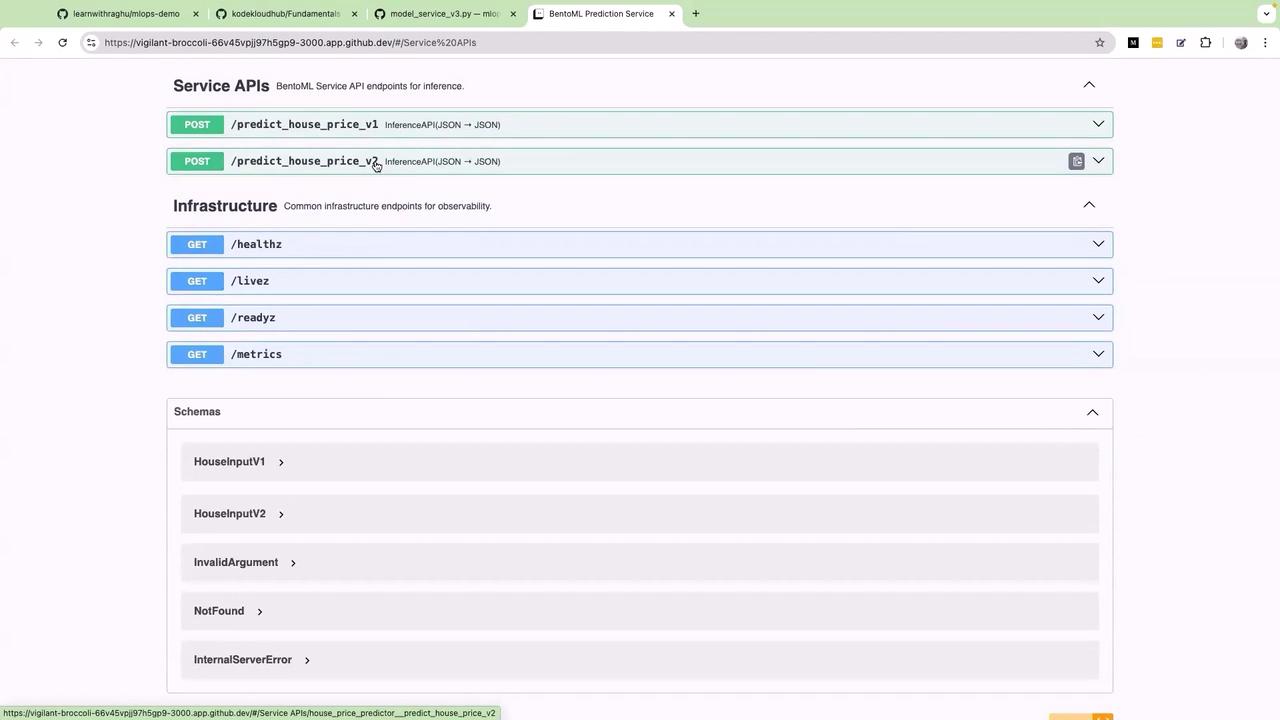
After running the BentoML service command and refreshing the service endpoint, both the v1 and v2 endpoints become available. This separation ensures compatibility with legacy clients while allowing new features and improvements to be tested using the v2 endpoint.Below, the following diagram shows the BentoML Prediction Service’s web interface. It displays the available API endpoints for house price prediction and provides additional information on infrastructure observability:
Managing both endpoints within a single service simplifies the transition and allows controlled traffic routing. In the future, depending on your production needs and traffic patterns, you may consider separating these endpoints into different services.
Here is another version of the model input schema and its endpoint configuration. This variation provides additional parameters for more detailed predictions:
Copy
Ask AI
class HouseInputV2(BaseModel): num_bathrooms: int house_age: int distance_to_city_center: float has_garden: int crime_rate: float avg_school_rating: float country: str# API for V2 model prediction@svc.api(input=JSON(pydantic_model=HouseInputV2), output=JSON(), route="/predict_house_price_v2")async def predict_house_price_v2(data: HouseInputV2): input_data = [[data.square_footage, data.num_rooms]] prediction = await model_v1_runner.predict.async_run(input_data) return {"predicted_price_v2": prediction[0]}
Test the improved service setup with the following curl requests:
This setup, which provides separate endpoints for different model versions using a single BentoML service, offers a controlled environment for traffic routing and facilitates a smoother transition from legacy models to new enhancements.Thank you for following this lesson on upgrading model versions with BentoML Serving.Below is a final example of using curl to test the v1 endpoint: