

1. Root Directory Overview
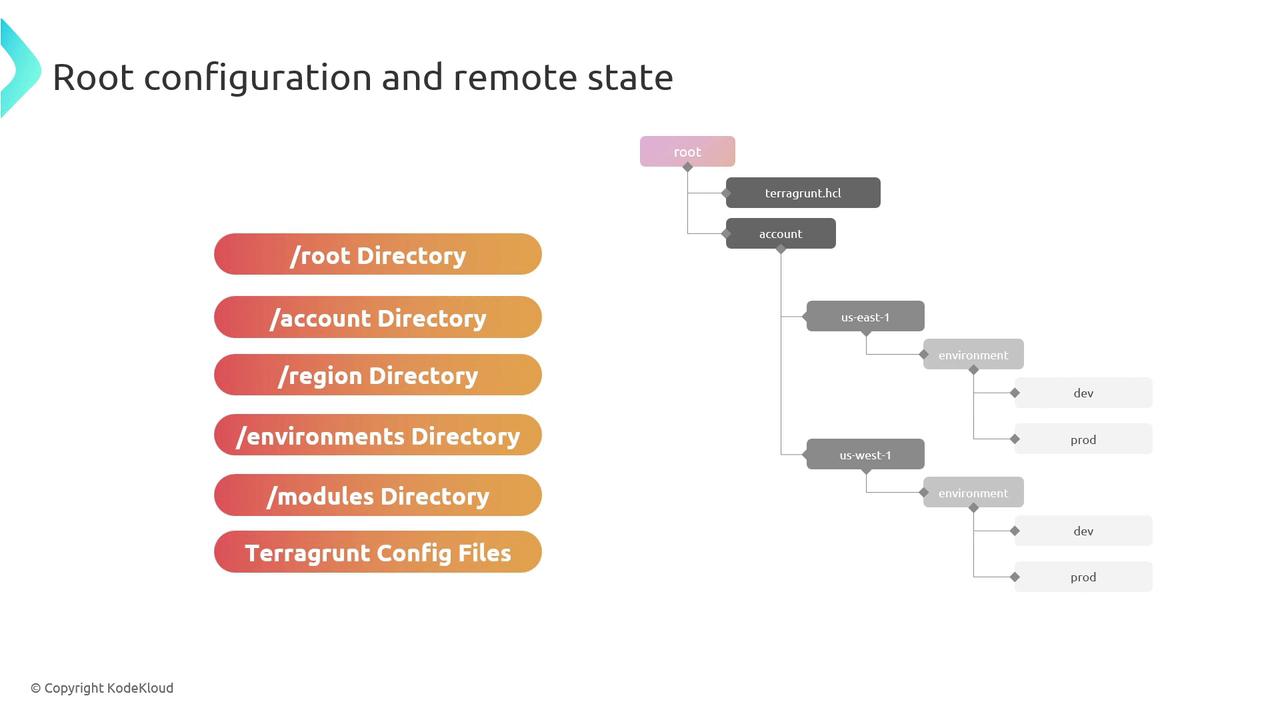
At the top level, maintain a root/ directory that holds all live environments and shared modules:| Directory | Purpose |
|---|---|
| account-1/ | Terragrunt configurations for AWS Account 1 |
| account-2/ | Terragrunt configurations for AWS Account 2 |
| modules/ | Central repo for all Terraform modules (local, Git, or registry) |
Place reusable Terraform modules in
modules/ to keep your infrastructure code DRY and version-controlled.2. Account-Level and Region Structure
Within each account folder, separate configurations by AWS region. Inside each region, create one directory per environment (dev, staging, production, etc.):
- us-east-1/: Configurations scoped to the
us-east-1region. - dev/, staging/, production/: Environment-specific folders containing
terragrunt.hcl.
3. Terragrunt Configuration (terragrunt.hcl)
Each environment directory must include a terragrunt.hcl file that:
- References the Terraform module source.
- Defines input variables for that environment.
- Configures remote state backend (S3 & DynamoDB).
4. Example terragrunt.hcl
Below is a sample configuration for the dev environment in account-1’s us-east-1 region:
5. Customization & Best Practices
- Use clear, consistent naming conventions for accounts, regions, and environments.
- Reference your shared modules via relative paths or Git/Terraform Registry URLs.
- Leverage Terragrunt’s
includeanddependencyblocks to minimize duplication.
Never hard-code sensitive values (API keys, secrets) in
terragrunt.hcl. Use AWS Secrets Manager, SSM Parameter Store, or environment variables instead.