This article explores configuring lifecycle rules in Terraform to manage resource creation and deletion effectively, ensuring service continuity during infrastructure updates.
In this article, we explore how to configure lifecycle rules in Terraform to control the order of resource creation and deletion. Managing resource lifecycles can help ensure service continuity and prevent unintended disruptions during your infrastructure updates.By default, when Terraform updates a resource, it treats it as immutable. This means the existing resource is deleted before a new one is created with the updated configuration. For example, if you update the file permissions on a local file resource from 0777 to 0700 and then run terraform apply, Terraform will first delete the old file and then create a new one.
By default, Terraform’s update process deletes the existing resource before creating a new one, which may not be desirable in all scenarios.
Terraform offers several lifecycle rules to modify this default behavior. These rules can be configured within the resource block to either create the new resource before destroying the old one, prevent resource deletion, or ignore specific attribute changes.
The create_before_destroy lifecycle rule instructs Terraform to create a new resource before deleting the old one. This is particularly useful when maintaining service availability is critical.
In some cases, you might want to ensure a resource is never accidentally deleted—even if a configuration change would normally force a replacement. Terraform allows you to achieve this using the prevent_destroy rule.
If you run terraform apply and the plan includes destroying the resource, Terraform will generate an error similar to the following:
Copy
Ask AI
$ terraform applylocal_file.my-pet: Refreshing state...[id=cba595b7d9f94ba1107a46f731912d95fb3d2c]Error: Instance cannot be destroyedon main.tf line 1: 1: resource "local_file" "my-pet" {Resource local_file.my-pet has lifecycle.prevent_destroy set, but the plan calls for this resource to be destroyed. To avoid this error and continue with the plan, either disable lifecycle.prevent_destroy or reduce the scope of the plan using the -target flag.
Even with prevent_destroy enabled, running terraform destroy explicitly will still remove the resource. This rule only prevents destruction triggered by configuration changes.
The ignore_changes rule is beneficial when you want Terraform to disregard modifications made to specific attributes. For example, if an external process updates the tags on an AWS EC2 instance, Terraform can be configured to ignore these changes during subsequent runs.Consider the following AWS EC2 instance configuration:
Copy
Ask AI
resource "aws_instance" "webserver" { ami = "ami-0edab43b6fa892279" instance_type = "t2.micro" tags = { Name = "ProjectA-Webserver" }}
By default, if the tags are updated externally (e.g., changing the tag from “ProjectA-Webserver” to “ProjectB-Webserver”), Terraform will detect the drift and attempt to revert the change:
Copy
Ask AI
$ terraform applyaws_instance.webserver: Refreshing state... [id=i-05cd83b221911acd5]An execution plan has been generated and is shown below.Resource actions are indicated with the following symbols: ~ update in-placeTerraform will perform the following actions: # aws_instance.webserver will be updated in-place ~ resource "aws_instance" "webserver" { ... tags = { ~ "Name" = "ProjectB-WebServer" -> "ProjectA-WebServer" } ... }Apply complete! Resources: 0 added, 1 changed, 0 destroyed.
To prevent Terraform from reverting such external changes, add the ignore_changes rule to the lifecycle block:
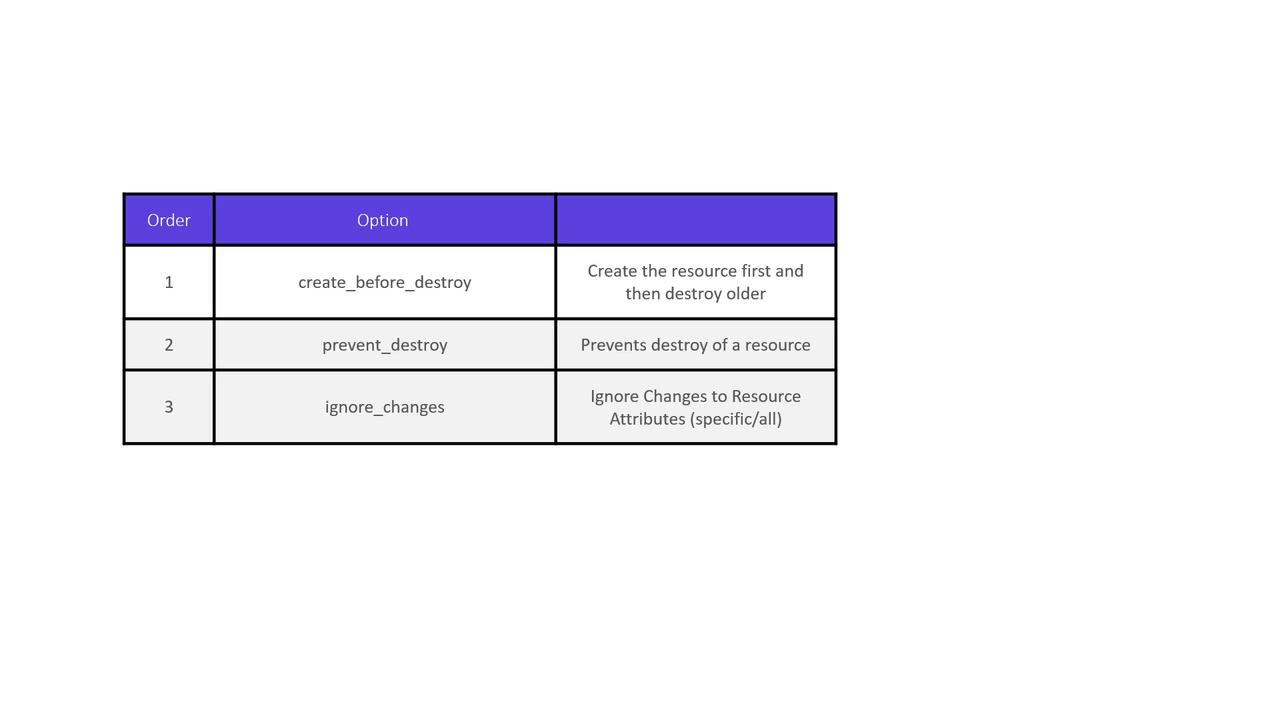
In this article, we reviewed three key lifecycle rules in Terraform:
The create_before_destroy rule ensures uninterrupted resource availability by creating the new resource first.
The prevent_destroy rule safeguards critical resources from unintentional deletion.
The ignore_changes rule allows you to specify attributes that Terraform should ignore during state comparisons, accommodating external changes.
Now, put these lifecycle rules into practice in your Terraform configurations for better resource management and more predictable infrastructure deployments.