This article teaches how to use the OpenAI ChatCompletion API in Jupyter Notebook for generating product descriptions and HTML snippets.
In this hands-on tutorial, you’ll learn how to leverage the OpenAI ChatCompletion API inside a Jupyter Notebook to generate product descriptions, concise summaries, and HTML snippets. By the end, you’ll have a reusable Python helper function and three prompt patterns for marketing automation.
Begin by importing the required libraries and setting your API key as an environment variable.
Copy
Ask AI
import osimport openai# Securely load your API key; do NOT hardcode in notebooks shared publiclyopenai.api_key = os.getenv("OPENAI_API_KEY")# Uncomment the line below if you prefer to paste your key directly:# openai.api_key = "<YOUR_API_KEY>"
Never commit your API key to source control. Use environment variables or a secrets manager to keep credentials safe.
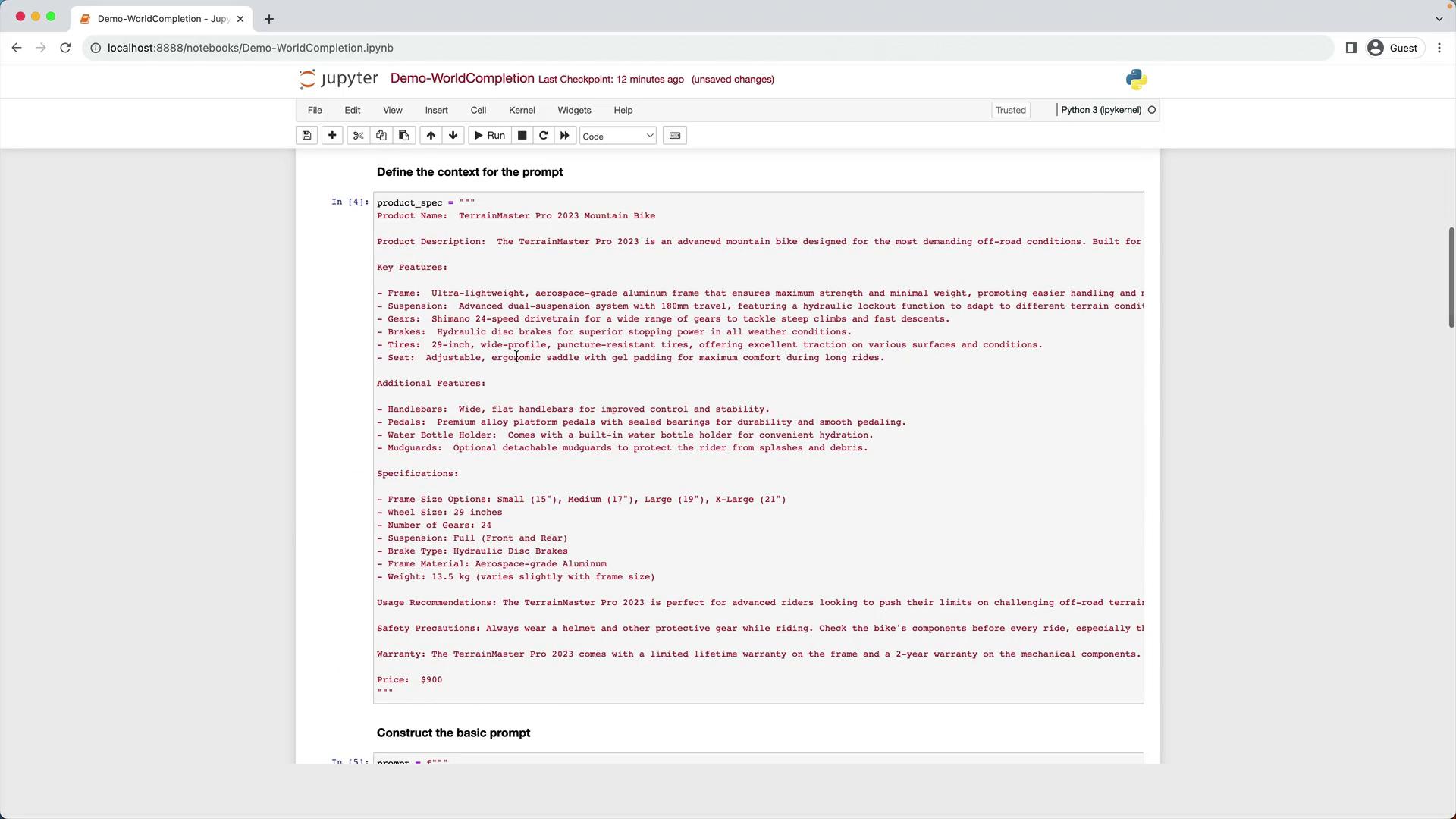
We’ll use a multi-line string as our product spec for a fictional TerrainMaster Pro 2023 Mountain Bike:
Copy
Ask AI
product_spec = """Product Name: TerrainMaster Pro 2023 Mountain BikeProduct Description: The TerrainMaster Pro 2023 is an advanced mountain bike designed for the most demanding off-road conditions.Key Features:- Frame: Aerospace-grade aluminum frame for maximum strength and minimal weight.- Suspension: Dual-suspension system with 180mm travel and hydraulic lockout.- Gears: Shimano 24-speed drivetrain.- Brakes: Hydraulic disc brakes.- Tires: 29-inch, wide-profile, puncture-resistant tires.- Seat: Ergonomic saddle with gel padding.Additional Features:- Handlebars: Wide, flat handlebars for improved control.- Pedals: Alloy platform pedals with sealed bearings.- Water Bottle Holder: Built-in for convenient hydration.- Mudguards: Optional detachable mudguards.Specifications:- Frame Size: Small (15"), Medium (17"), Large (19"), X-Large (21").- Wheel Size: 29 inches.- Suspension: Full (front and rear).- Brake Type: Hydraulic Disc.- Frame Material: Aerospace-grade Aluminum.- Weight: 13.5 kg (varies with frame size).Usage Recommendations: Ideal for advanced riders on challenging off-road terrain.Safety Precautions: Always wear protective gear and inspect components before riding.Warranty: Limited lifetime frame warranty; 2-year warranty on other components.Price: $900"""
4. Example 1: Generating a Full Product Description
Use the full specification to generate a detailed website description.
Copy
Ask AI
prompt = f"""Your task is to help the marketing team create a description for a product website based on the product spec.Write a description using the information provided in the specifications delimited by triple backticks.Technical specifications:```{product_spec}```"""response = get_word_completion(prompt)print(response)```text---## 5. Example 2: Creating a Concise VersionTo craft a shorter pitch for a landing page, simply instruct the model to be concise.```pythonprompt = f"""Your task is to help the marketing team create a description for a product website based on the product spec.Write a concise description from the specifications delimited by triple backticks.Technical specifications:```{product_spec}```"""response = get_word_completion(prompt)print(response)
6. Example 3: Generating HTML with a Specifications Table
Ask GPT-3.5 Turbo to output a complete HTML snippet, including:
An <h1> with the product name
A <div> styled in 12pt FireBrick font for the description
A titled table (Product Specifications) with two columns: name & value
Table CSS: DarkSlateGray text, 100% width, 12pt font
Copy
Ask AI
prompt = f"""Your task is to help the marketing team create HTML for a product website based on the product spec.- Add a <h1> header with the product name.- Wrap the description in a <div> styled with font-size:12pt; color:FireBrick.- Include a 'Product Specifications' table: - Two columns: specification name | value - Table style: color DarkSlateGray; width 100%; font-size 12ptProduct specifications:```{product_spec}```"""response = get_word_completion(prompt)print(response)```text---## 7. Previewing HTML in Jupyter NotebookRender the generated HTML inline using `IPython.display`:```pythonfrom IPython.display import display, HTMLdisplay(HTML(response))
You’ve now implemented a flexible word completion demo! Next up, we’ll explore GPT-3.5 Turbo’s code-completion capabilities.