This article explores variable usage, precedence, and task output registration in Ansible for effective playbook execution.
In this lesson, we’ll explore how variables work in Ansible, discuss the concept of variable precedence, and demonstrate how to register outputs from tasks. Variables in Ansible allow you to store key configuration data such as DNS server IPs, NTP server IPs, firewall rules, and more. They are integral not only for establishing connectivity with hosts but also for dynamic configuration during playbook execution.
Consider an inventory file example in which each host is defined with its unique IP via the host variable (ansible_host) and a group variable is assigned to set a common DNS server for all hosts in the group.
When an Ansible playbook is executed with this inventory, Ansible creates host objects, organizes them into groups, and applies the group-level variables accordingly. In this example, every host in the web_servers group receives the variable dns_server with the value 10.5.5.3.
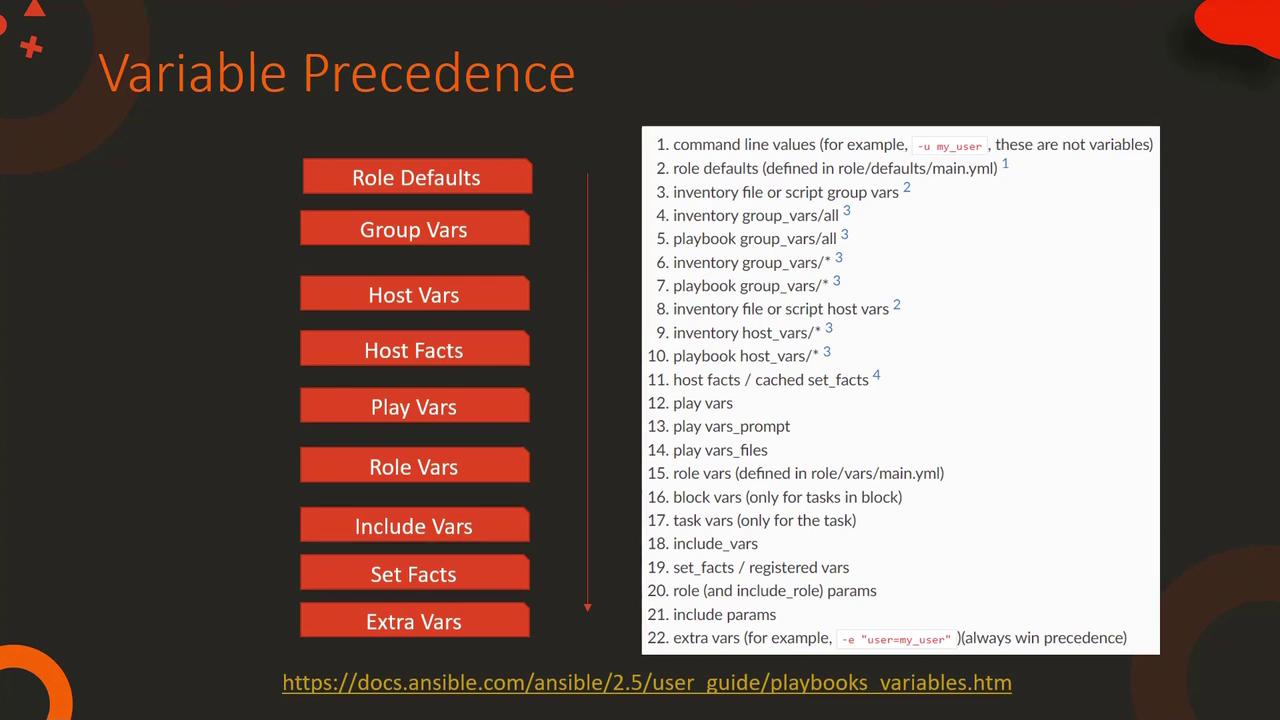
In this scenario, the host-level variable defined for web2 takes precedence over the group-level definition. Similarly, if you define a variable directly in the playbook, the playbook-level variable will override both host and group variables:
Copy
Ask AI
---- name: Configure DNS Server hosts: all vars: dns_server: 10.5.5.5 tasks: - nsupdate: server: '{{ dns_server }}'
Variables passed via the command line using the —extra-vars option have the highest precedence. For example, executing the playbook as shown below will override all other definitions.
Registering Task Outputs with the register Directive
In many scenarios, you might need to capture the output of a task for later use in your playbook. The register directive is used for this purpose. For instance, to store and later display the contents of the /etc/hosts file, you can use a playbook like this:
Copy
Ask AI
---- name: Check /etc/hosts file hosts: all tasks: - shell: cat /etc/hosts register: result - debug: var: result
When this play is executed, Ansible captures the output of the shell command in the variable named result. This registered variable contains essential details such as the return code (rc), command output (stdout and stdout_lines), and execution times. Note that the structure of the registered variable may vary depending on the module used.If you prefer to display only the command output, adjust the debug task as follows:
Copy
Ask AI
---- name: Check /etc/hosts file hosts: all tasks: - shell: cat /etc/hosts register: result - debug: var: result.stdout
Likewise, to print just the return code of the command, use:
Copy
Ask AI
---- name: Check /etc/hosts file hosts: all tasks: - shell: cat /etc/hosts register: result - debug: var: result.rc
Remember that variables registered with the register directive have host-level scope. This means they are available only for the duration of the playbook execution on the specific host where they were registered.
This verbose mode displays detailed information about each task’s execution, including command outputs and other essential metadata.This lesson provided an overview of registering variables, understanding variable precedence, and using the register directive to capture task outputs in Ansible. For further details and advanced examples, be sure to consult the Ansible Documentation.