This guide helps resolve common image pull errors in Kubernetes, including typos, missing credentials, incorrect tags, and DNS issues.
Welcome to this guide on resolving common image pull errors in Kubernetes. In this article, we will explore issues that can occur during image pulls, including typos in image names, missing credentials, incorrect tags, and DNS resolution errors. Whether you’re new to Kubernetes or an experienced user, this step-by-step guide will help you diagnose and fix these problems.
When a pod is stuck in an image pull error state, it means that Kubernetes tried to fetch the container image, encountered an error, and then applied an exponential backoff before retrying. This mechanism helps prevent network congestion and registry overload.
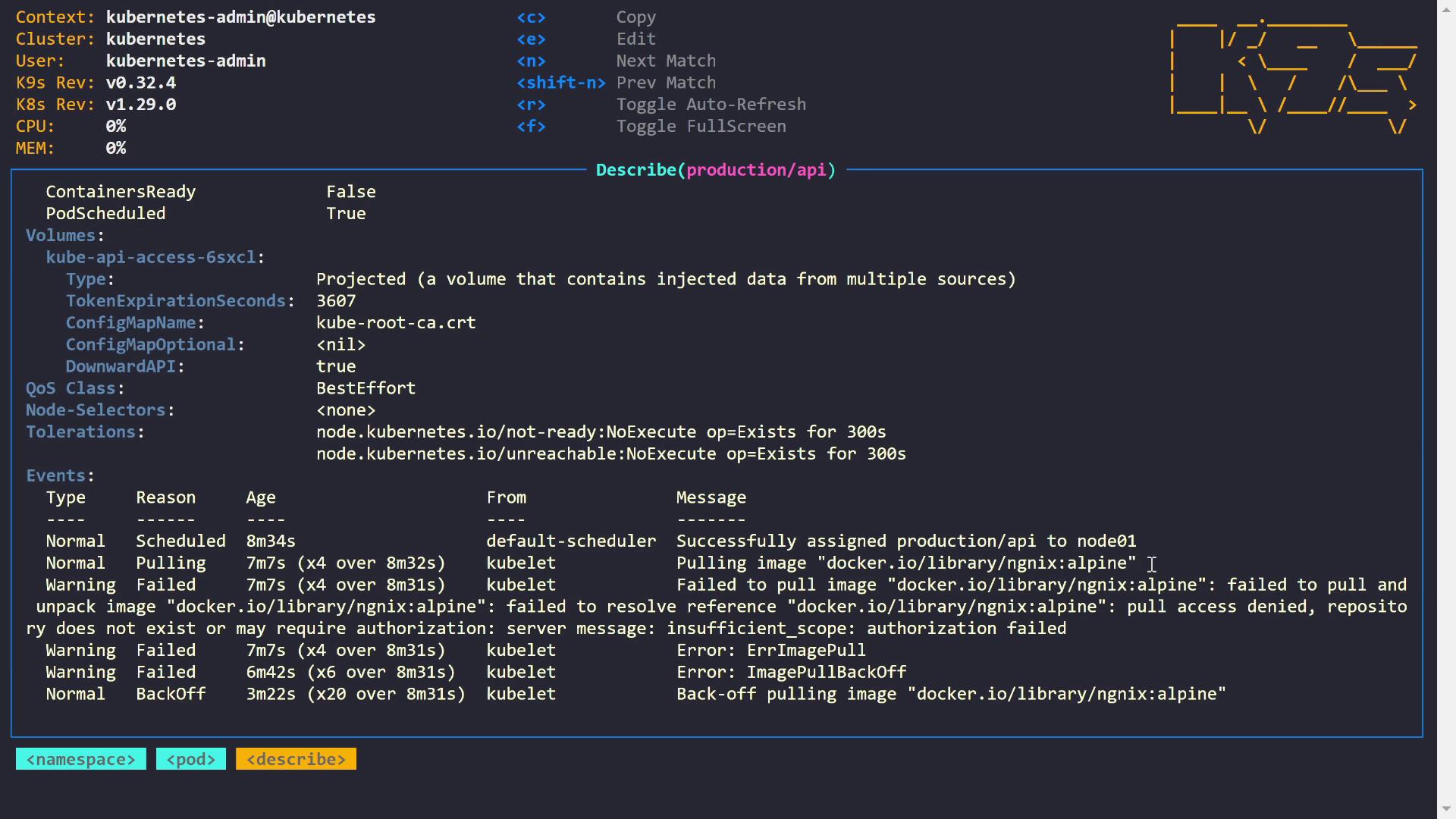
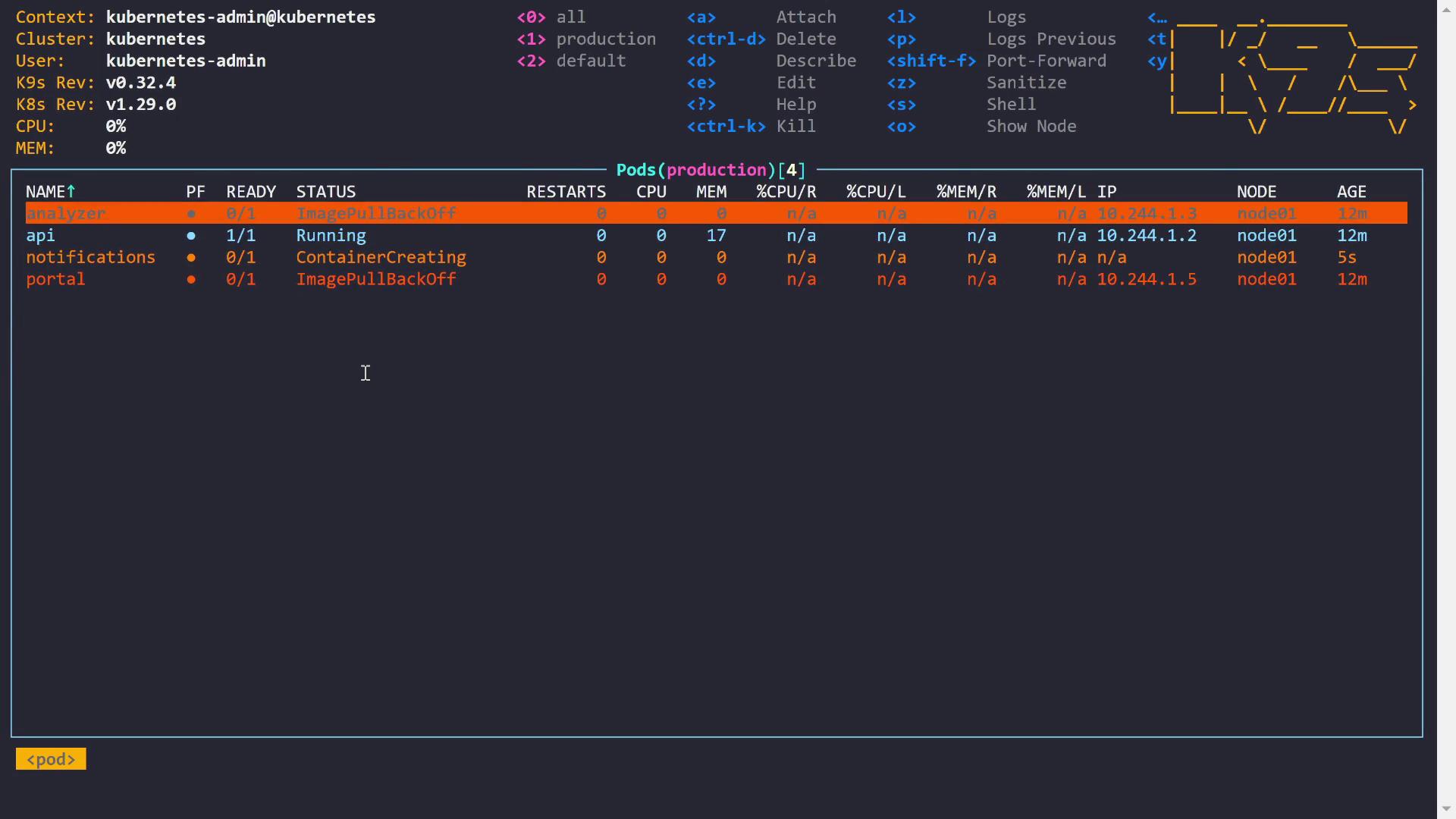
Let’s start by inspecting one of the pods that is not starting correctly. In this section, we describe the API pod to look at the events, which illustrate that the image pull error is due to an unresolved image reference.
The events reveal that the cluster scheduled the pod correctly but failed to pull the image because the reference could not be resolved. Common error messages include “pull access denied,” “repository does not exist,” or messages indicating the need for authorization.
In this example, the pod uses an image sourced from Docker Hub. Upon checking, a typo was discovered in the image name (“NGINX”). Correcting the typo will resolve the issue.Below is the updated pod definition:
2. Resolving Credential Issues for Private Registries
The next issue involves the notifications pod, which faces a 401 Unauthorized error while pulling an image from the GitHub Container Registry (ghcr.io). A 401 error generally indicates missing or invalid credentials.
Events:
  Normal   Scheduled   9m56s  default-scheduler  Successfully assigned production/notifications to node01
  Normal   Pulling     8m24s  kubelet    Pulling image "ghcr.io/testuser177/solar-system:3cd635a2ae17224806363eb3a4d565623650efb1"
  Warning  Failed      8m24s  kubelet    Failed to pull image "ghcr.io/testuser177/solar-system:3cd635a2ae17224806363eb3a4d565623650efb1": failed to resolve reference "ghcr.io/testuser177/solar-system:3cd635a2ae17224806363eb3a4d565623650efb1": failed to authorize: failed to fetch anonymous token: unexpected status from GET request to https://ghcr.io/token?scope=repository%3Atestuser177%2Fsolar-system%3Apull&service=ghcr.io: 401 Unauthorized
  Warning  Failed      8m24s  kubelet    Error: ErrImagePull
  Warning  Failed      8m12s  kubelet    Error: ImagePullBackOff
  Normal   Backoff     4m47s  kubelet    Back-off pulling image "ghcr.io/testuser177/solar-system:3cd635a2ae17224806363eb3a4d565623650efb1"
A quick check confirms that the required secret for ghcr.io (named “ghcr-secret”) does exist:
Copy
Ask AI
NAME TYPE DATA AGEghcr-secret kubernetes.io/dockerconfigjson 1 10m
Since you’re editing a pod directly (instead of a Deployment), some fields cannot be updated on a running pod. You must delete the pod and reapply the updated configuration.
The portal pod experienced image pull errors due to an incorrect image tag. In the pod description, the following error was observed:
Copy
Ask AI
Failed to pull image "docker.io/library/httpd:bookstore": rpc error: code = NotFound desc = failed to pull and unpack image "docker.io/library/httpd:bookstore": not found
Although the repository is correct (“docker.io/library/httpd”), the tag “bookstore” does not exist. A quick check on Docker Hub confirms the correct tag should be “bookworm” (or another valid tag). After correcting the tag in the pod definition, the portal pod successfully starts.Additionally, another pod faced DNS resolution issues with a long image reference from “gitlab.kodekloud.com”. The error message showed:
Copy
Ask AI
failed to resolve reference: dial TCP ...: lookup gitlab.kodekloud.com: no such host
Running a local nslookup confirms that the hostname cannot be resolved:
Copy
Ask AI
nslookup gitlab.kodekloud.com
Since the cluster cannot resolve the hostname, you will need to coordinate with your networking team or cluster administrators to fix the DNS issue.
In this guide, we walked through several common issues that lead to image pull errors in Kubernetes, including:
Typos in the image URL.
Missing or misconfigured image pull secrets for private registries.
Incorrect image tags.
DNS resolution errors.
It is essential to verify application details, ensure image URL correctness, and configure proper credentials before troubleshooting such issues. Happy troubleshooting!For more Kubernetes resources, check out the Kubernetes Documentation and Docker Hub.