This guide explores common Kubernetes container creation errors and the container lifecycle stages where these errors occur.
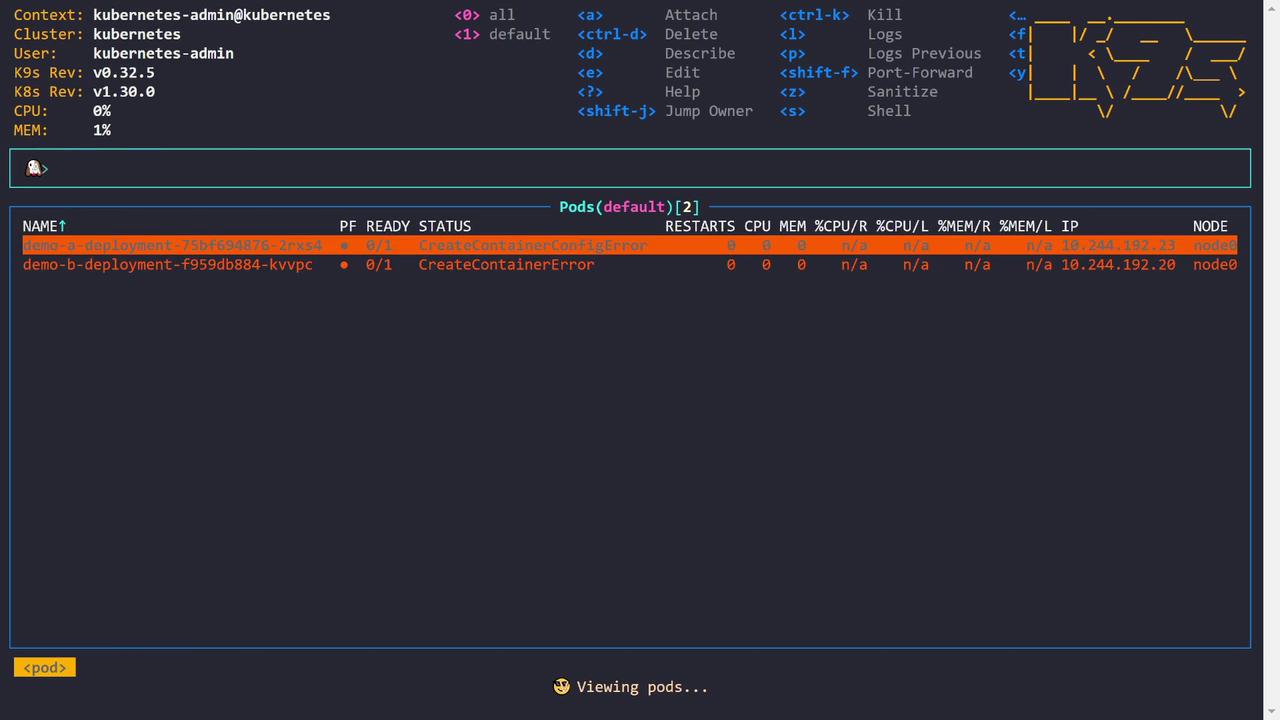
In this guide, we explore common Kubernetes container creation errors—specifically, CreateContainerConfigError and CreateContainerError. We will walk through the Kubernetes container lifecycle, highlighting the stages—from image pulling to container startup—and identify where these errors occur.Below is an initial pod status output displaying both errors:
Copy
Ask AI
NAME READY STATUS RESTARTS CPU MEM IP NODEdemo-a-deployment-75bf694876-2rxs4 0/1 CreateContainerConfigError 0 0 0 10.244.192.23 node0demo-b-deployment-f959d8b884-kvvpc 0/1 CreateContainerError 0 0 0 n/a 10.244.192.20 node0
An extended output with additional flags looks as follows:
Copy
Ask AI
NAME PF READY STATUS RESTARTS CPU MEM %CPU/R %MEM/R %CPU/L %MEM/L IP NODEdemo-a-deployment-75bf694876-2rxs4 ✔ 0/1 CreateContainerConfigError 0 0 0 n/a n/a n/a 10.244.192.23 node0demo-b-deployment-f959db884-kvvpc ✖ 0/1 CreateContainerError 0 0 0 n/a n/a n/a 10.244.192.20 node0
Understanding the container lifecycle is crucial for troubleshooting these issues. The container creation process is divided into four main stages:
Image Pulling
Kubernetes pulls the container image (e.g., nginx:latest) from the image registry to the node. With correct registry credentials, this step completes successfully.
Container Configuration
Kubernetes creates the container configuration by setting environment variables, command arguments, resource limits, volume mounts, network settings, security contexts, and more.
A CreateContainerConfigError is raised if required configurations (such as a referenced Secret or ConfigMap) are missing.
Container Creation
The container runtime (e.g., containerd or Docker) creates the container using the pulled image. This involves establishing the filesystem and Linux namespaces.
A CreateContainerError is typically due to issues encountered by the container runtime while setting up the container.
Container Start
Finally, the container’s process starts by executing the defined command or entry point. Errors occurring at this stage are often referred to as run container errors, signaling problems with the process startup.
The CreateContainerConfigError usually points to misconfigurations such as referencing a Secret or a ConfigMap that doesn’t exist, while the CreateContainerError suggests that the container runtime could not complete the container creation.
Reviewing the Events section reveals the root cause:
Copy
Ask AI
Describe(default/demo-a-deployment-75bf694876-2rxs4)Events:Type Reason Age From Message---- ----- ---- ---- ------Normal Scheduled 7m27s default-scheduler Successfully assigned default/demo-a-deployment-75bf694876-2rxs4 to node0Normal Pulled 7m21s kubelet Successfully pulled image "nginx:latest" in 2.973s (4.377s including wait)...Warning Failed 5m59s kubelet Error: secret "demo-a-secret" not found...Normal Pulling 2m17s kubelet Pulling image "nginx:latest"
The pod is referencing a Secret named demo-a-secret that does not exist in the cluster. The environment variable KEY_A is configured to use the value from this Secret (key: some_key). Without this Secret, Kubernetes cannot inject the necessary environment variable, leading to the CreateContainerConfigError.Below is the relevant portion of the pod’s YAML configuration:
After creating the Secret, the environment variable can be properly injected and the pod transitions from the error state. An updated pod status might look like this:
Copy
Ask AI
NAME READY STATUS RESTARTS CPU MEM IP NODE AGEdemo-a-deployment-75bf694876-vcftf 1/1 Running 0 0 17 10.244.192.4 node01 118demo-b-deployment-f959db884-kvvpc 0/1 CreateContainerError 0 0 0 n/a n/a 12m
Next, let’s investigate demo B which shows the CreateContainerError. The pod description for demo B indicates that no command or entry point is specified:
The detailed pod description for the failing container points out the issue:
Copy
Ask AI
Describe(default/demo-b-deployment-f959db884-kvpc)QoS Class: BestEffortNode-Selectors: <none>Tolerations: node.kubernetes.io/not-ready: NoExecute op=Exists for 300s node.kubernetes.io/unreachable: NoExecute op=Exists for 300sEvents: Type Reason Age From Message ---- ------ --- ---- ------- Normal Scheduled 12m default-scheduler Successfully assigned default/demo-b-deployment-f959db884-kvpc to node01 Normal Pulling 12m kubelet Pulling image "ngheith/no-entry-point:v5" Normal Pulled 12m kubelet Successfully pulled image "ngheith/no-entry-point:v5" in 548ms (1.422s including waiting). Warning Failed 12m kubelet Error: failed to generate spec: no command specified
The image ngheith/no-entry-point:v5 does not define an entry point, and the pod configuration does not override this by providing a command. To resolve this issue, update the deployment to include a valid command that keeps the container running—for example:
After updating the deployment, verifying the pod status should show that the container is now running without the creation error:
Copy
Ask AI
NAME READY STATUS RESTARTS CPU MEM IP NODE AGEdemo-a-deployment-75bf694876-vctf 1/1 Running 0 0 17 10.244.192.4 node01 3mdemo-b-deployment-f959db884-kvvtc 0/2 CreateContainerError 0 0 0 n/a n/a n/a
In some cases, the container is created successfully but fails to start its process due to an invalid command. For example, a deployment might define an incorrect command (gibberish), causing the container to crash after creation:
Copy
Ask AI
controlplane ~ ⮕ k apply -f demo
The resulting pod status shows a CrashLoopBackOff:
Copy
Ask AI
NAME PF READY STATUS RESTARTS CPU MEM %CPU/R %CPU/L %MEM/R %MEM/L IP NODE AGEdemo-a-deployment-75bf694876-vcttf ● 1/1 Running 0 0 17 n/a n/a n/a 10.244.192.4 node01 6m52sdemo-b-deployment-9cbbbd94f-l2xsc ● 1/1 Running 0 0 1 n/a n/a n/a 10.244.192.23 node01 3m1sdemo-c-deployment-5f47f795c-ghkl4 ● 0/1 CrashLoopBackOff 1 0 0 n/a n/a n/a 10.244.192.20 node01 8s
Describing the troubled pod for demo C indicates that the defined command (jibberish) is not recognized:
Copy
Ask AI
Describe(default/demo-c-deployment-5f47f795c-ghkl4)...Command: jibberishState: WaitingReason: RunContainerErrorLast State: TerminatedReason: StartErrorMessage: failed to create contained task: failed to create shim task: OCI runtime create failed: runc create failed: unable to start container process: exec: "jibberish": executable file not found in $PATH: unknownExit Code: 128Started: Thu, 01 Jan 1970 00:00:00 +0000Finished: Sun, 04 Aug 2024 22:26:55 +0000Ready: FalseRestart Count: 2...
To resolve this RunContainerError, update the deployment with a valid command. For example, to keep the container active, modify the deployment snippet as follows:
By understanding the container lifecycle and the specific error messages, you can more effectively narrow down troubleshooting efforts in Kubernetes environments.For more detailed troubleshooting techniques, check out the Kubernetes Documentation and resources on Container Runtime Troubleshooting.