

Building and Deploying Versioned Images
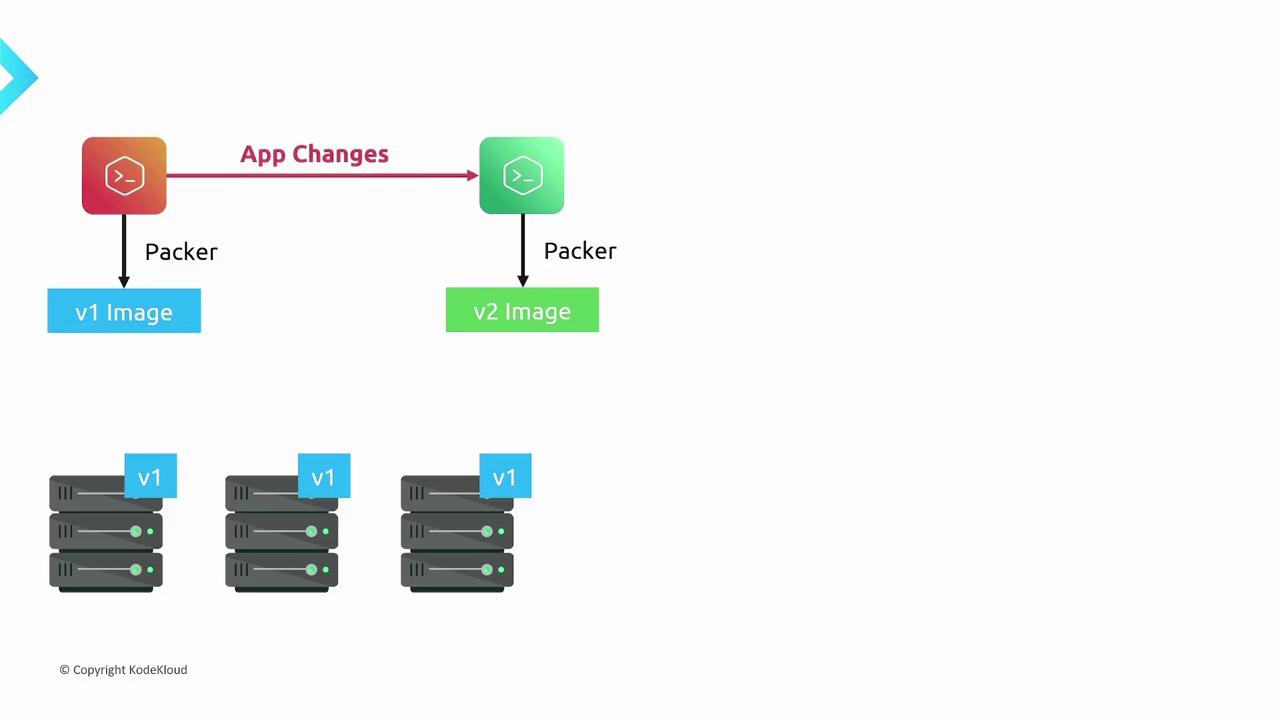
Start by developing version 1 of your application. Then:-
Define a Packer template that installs:
- Your application source code
- Required system packages and libraries
- Environment variables and runtime configuration
- Run Packer to build v1 of the machine image.
- Launch new instances using the v1 image. Since everything is pre-baked, these servers are immutable—no SSH tweaks or manual updates are needed.
- Update the source code in the template to v2.
- Adjust any configuration or dependencies.
- Execute Packer to produce the v2 image.
Rolling Out Updates
With the v2 image available, you can perform a smooth rollout:- Deploy instances that run the v2 image alongside your existing v1 servers.
- Execute your automated health checks or smoke tests against the newly launched servers.
- Once v2 instances are validated, decommission the v1 servers.
| Benefit | Description |
|---|---|
| Zero configuration drift | Every server comes up in the exact same state defined by the image. |
| No manual intervention | No SSH or manual changes are needed after server launch. |
| Repeatable deployments | Every build produces a versioned artifact that can be deployed anywhere, anytime. |
| Predictable upgrades | Rollbacks and rollouts are simple: launch a previous image version to revert. |

If you’re using infrastructure-as-code tools like Terraform or CloudFormation, integrate Packer image builds into your pipeline. This ensures your deployment templates always reference the correct, versioned AMI or image ID.