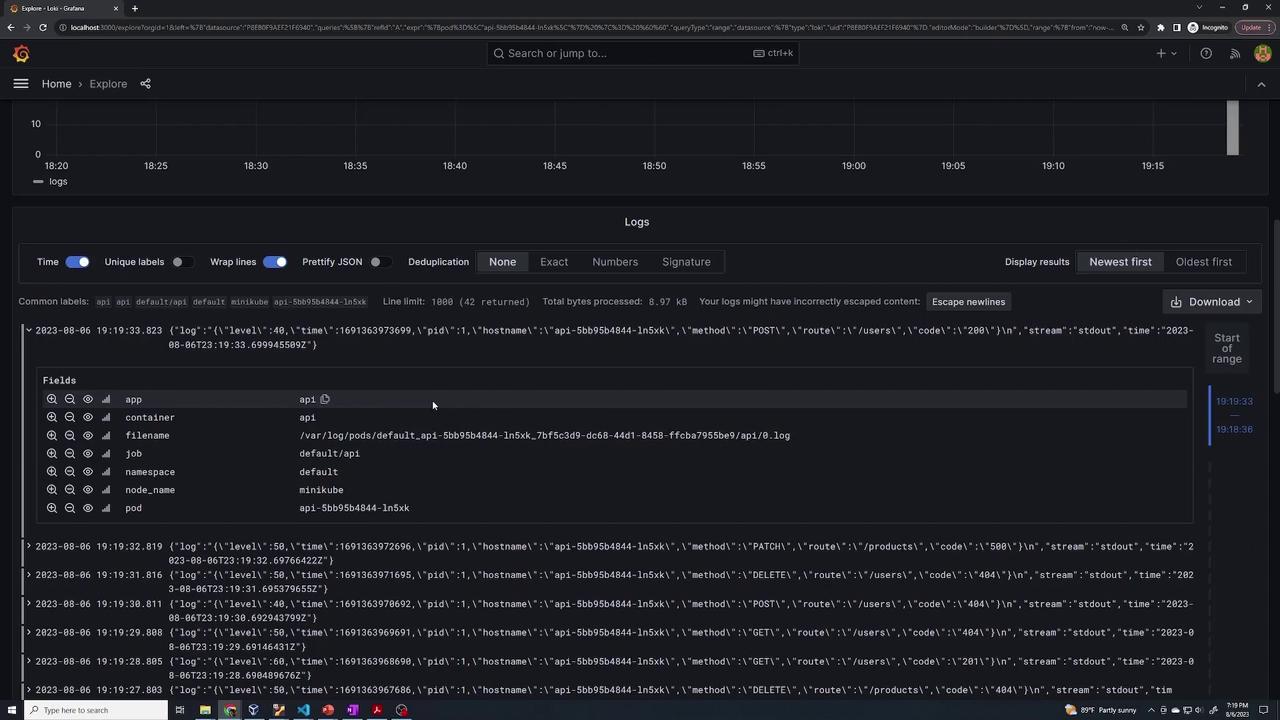
Learn to deploy an API application with automatic log forwarding to Loki, configure log collection with Promtail, and verify logs in Grafana.
In this lesson, you’ll learn how to deploy a new API application while ensuring its logs are automatically forwarded to Loki. This guide covers configuring log collection with Promtail, deploying the application on Kubernetes, and verifying the logs through Grafana.
Begin by creating a file named app-deployment.yaml to define both the log collection settings and the deployment configuration for your application. Add the following Promtail snippet to configure how log labels are applied and where Promtail should locate log files from Kubernetes pods:
Next, add the deployment configuration to the same file. The YAML snippet below describes a standard Kubernetes Deployment for an API application. This deployment uses the kodekloud/loki-demo image from Docker Hub—a demo container that generates random logs to help verify log collection via Loki.
Copy
Ask AI
kind: Deploymentmetadata: name: apispec: selector: matchLabels: app: api template: metadata: labels: app: api spec: containers: - name: api image: kodekloud/loki-demo resources: limits: memory: "128Mi" cpu: "500m"
After adding this configuration, save the app-deployment.yaml file.
These entries confirm that logs are correctly collected and forwarded to Loki.
Promtail automatically collects these logs and sends them to Loki without requiring any additional configuration.
This concludes the lesson on deploying an application and monitoring its logs using Loki and Grafana. By following these steps, you ensure that your Kubernetes-based application logs are efficiently collected and easily viewed in Grafana.