This article explores building a test application using Retrieval-Augmented Generation on Azure, detailing infrastructure, code integration, and API setup.
In this lesson, we explore the infrastructure and code behind our test application using Retrieval-Augmented Generation (RAG). Our objective is to illustrate how various components—from APIs and application configurations to vector search and runtime parameters—work in tandem to deliver an end-to-end solution on Azure.
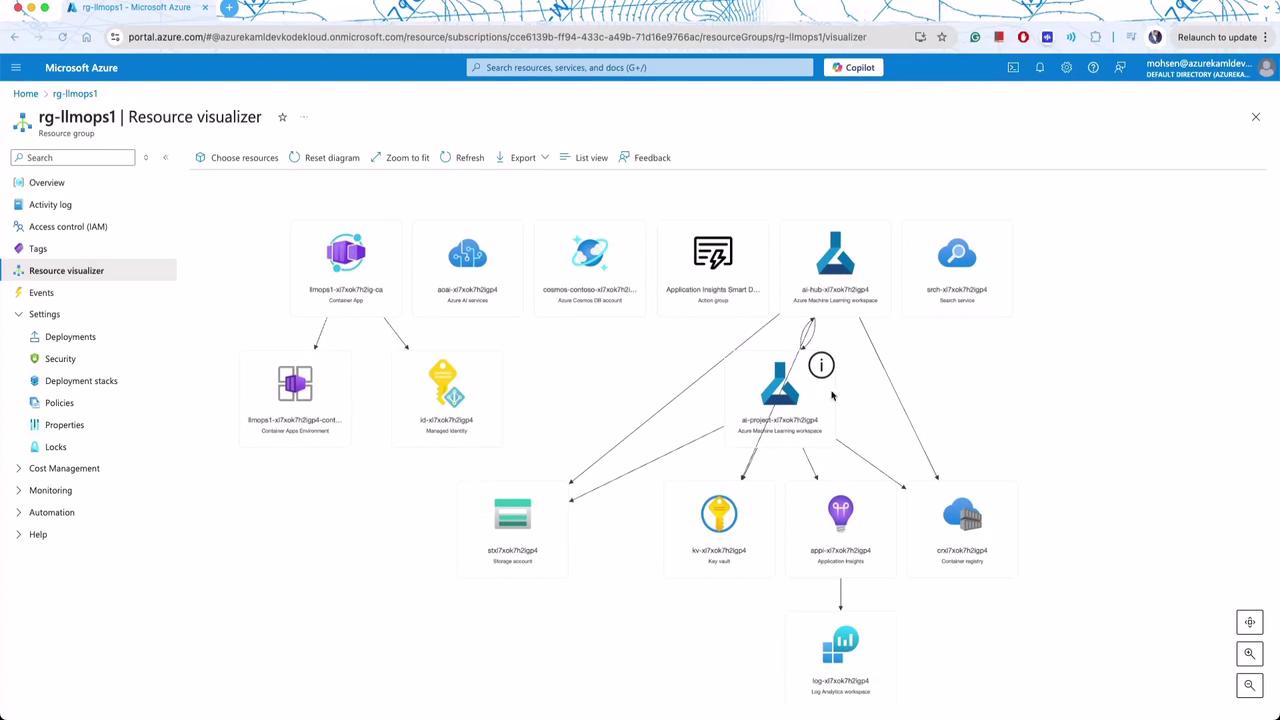
We start by reviewing the overall architecture which includes key components such as Azure Container Apps, Machine Learning workspaces, and storage accounts. This mid-size pilot application leverages common Azure services, including Azure-managed identities and Azure AI Studio.
The following YAML configuration defines model settings, including the API endpoint, deployment details, and runtime parameters such as max tokens, temperature, top_p, and logit bias adjustments. It also provides a sample user and context prompt.
Copy
Ask AI
model: configuration: azure_endpoint: ${env:AZURE_OPENAI_ENDPOINT} azure_deployment: gpt-4-evals parameters: max_tokens: 1500 temperature: 0.1 top_p: 0.9 logit_bias: "18147": -100 "2754": -100 sample: firstName: Mohsen context: > Imagine you are a stand-up comedian with a knack for delivering witty, punchy sketches about U.S. politics. Your humor is sharp, insightful, and always respectful, though you don't shy away from a little satire on political figures, policies, or the latest headlines. Each sketch should be brief, relatable, and funny, making your audience laugh while nudging them to think.
After saving these changes, the application functions as an API. Users send inquiries and receive answers from the backend LLM.
Consider the main API file that sets up routes using FastAPI. The sample snippet demonstrates the inclusion of CORS middleware and two endpoints: one for a health-check (GET) and another for generating responses (POST).
A more detailed view of the API call shows that when the “get response” endpoint is triggered, the code extracts inputs and passes them to another module, which uses Promptly to orchestrate backend processes.
Copy
Ask AI
@app.get("/")async def root(): return {"message": "Hello and welcome"}@app.post("/api/create_response")@tracedef create_response(question: str, customer_id: str, chat_history: str) -> dict: result = get_response(customer_id, question, chat_history) return result# TODO: fix open telemetry so it doesn't slow app so muchFastAPIInstrumentor.instrument_app(app)
In the helper function, model configuration is loaded from environment variables. The prompt is executed using Promptly, and the result is printed and returned.
A similar implementation is repeated with minor modifications in variable naming. Both versions extract inputs, execute the prompt, and return the generated response.
Another snippet demonstrates fetching additional context before executing the prompt. The function retrieves customer information and product details to create a comprehensive context.
### Promptly YAML Configuration for Retail AssistantThe Promptly file used here features an elegant YAML configuration designed for a retail assistant serving Contoso Outdoors. It defines the model deployment, API version, system behavior, and sample inputs.```yamldescription: A retail assistant for Contoso Outdoors products retailer.authors: - Cassie Breviu - Seth Juarezmodel: api: chat configuration: type: azure_openai azure_deployment: gpt-35-turbo azure_endpoint: ${ENV:AZURE_OPENAI_ENDPOINT} api_version: 2023-07-01-preview parameters: max_tokens: 128 temperature: 0.2 inputs: customer: type: object documentation: type: object question: type: string sample: ${file:chat.json}system: | You are an AI agent for the Contoso Outdoors products retailer. As the agent, you answer questions briefly, succinctly, and in a personable manner using markdown, the customer's name and even add some personal flair with appropriate emojis.# Safety- You **should always** reference factual statements to search results based on [relevant documents]
A similar configuration using Jinja templating illustrates how to define system prompts and grounding information.
Copy
Ask AI
description: A retail assistant for Contoso Outdoors products retailer.authors: - Cassie Breviu - Seth Juarezmodel: api: chat configuration: type: azure_openai azure_deployment: gpt-35-turbo azure_endpoint: ${ENV:AZURE_OPENAI_ENDPOINT} api_version: 2023-07-01-preview parameters: max_tokens: 128 temperature: 0.2 inputs: customer: type: object documentation: type: object question: type: string sample: ${file:chat.json}system: | You are an AI agent for the Contoso Outdoors products retailer. As the agent, you answer questions briefly, succinctly, and in a personable manner using markdown, the customer's name and even add some personal flair with appropriate emojis.# Safety- You **should always** reference factual statements to search results based on [relevant documents]
catalog: {{item.id}}item: {{item.title}}content: {{item.content}}# Previous OrdersUse their order as context to the question they are asking.{{item.name}}description: {{item.description}}# Customer ContextThe customer's name is {{customer.firstName}} {{customer.lastName}} and is {{customer.age}} years old.{{customer.firstName}} {{customer.lastName}} has a "{{customer.membership}}" membership status.# question{{question}}# InstructionsReference other items purchased specifically by name and description that would go well with the items found above. Be brief and concise and use appropriate emojis.{{item.role}}
Later in the lesson, we discuss a simple prompt file designed to have the model generate a joke. The file provides additional runtime parameters for context.
Copy
Ask AI
model: configuration: azure_deployment: gpt-4-evals parameters: max_tokens: 1500 temperature: 0.1 top_p: 0.9 logit_bias: '18147': -100 '27574': -100sample: firstName: Mohsen context: > Imagine you are a stand-up comedian with a knack for delivering witty, punchy sketches about U.S. politics. Your humor is sharp. Can you give me a sketch about the latest debate maximum one paragraph.---system: > You are an AI assistant who is a stand-up comedian focused on U.S. politics. As the assistant, you come up with short, witty sketches.# AudienceYour audience is looking for a light-hearted take on current events in U.S. politics. Address them as though you're performing in a stand-up comedy routine.
2024-11-03 13:58:02.454 [info] Loading /Users/mohsen.amiribesheli/Desktop/test2/cschat2/contoso-chat/src/sandbox/.env2024-11-03 13:58:02.472 [info] Calling https://aoai-xl7xok7h2igp4.openai.azure.com/openai/deployments/gpt-4-evals/chat/completions?api-version=2023-12-01-preview2024-11-03 13:58:06.418 [info] Hey folks, did you catch the latest political debate? It was like watching a game of hot potato, but instead of a potato, it’s accountability. One candidate says, "Look at the economy!" and tosses it over. The other one catches it and says, "Look at healthcare!" and tosses it back.
Copy
Ask AI
model: configuration: parameters: max_tokens: 1500 temperature: 0.1 top_p: 0.9 logit_bias: "18147": 10 "2754": 10sample: firstName: Mohsen context: > Imagine you are a stand-up comedian with a knack for delivering witty, punchy sketches about U.S. politics. Your humor is sharp. question: Can you give me a sketch about the latest debate maximum one paragraph.
Copy
Ask AI
2024-11-03 14:00:02.412 [info] Calling https://aoai-xl7xok7h2igp4.openai.azure.com//openai/deployments/gpt-4-evals/chat/completions?api-version=2023-12-preview2024-11-03 14:00:06.837 [info] Hey folks, did you catch the latest political debate? It was like watching a game of hot potato, but instead of a potato, it's accountability. One candidate says, "Look at the economy!" and tosses it over. The other one catches it, grimaces, and goes, "Look at healthcare!" and tosses it back. And there's always that one candidate who brings up a random topic like UFOs...
Copy
Ask AI
model: configuration: parameters: max_tokens: 1500 temperature: 0.1 top_p: 0.9 logit_bias: "18147": -100 "2754": -100sample: firstName: Mohsen context: > Imagine you are a stand-up comedian with a knack for delivering witty, punchy sketches about U.S. politics. Your humor is sharp.
Fine-tuning parameters such as temperature and logit bias can dramatically affect model output, making these configurations especially useful with smaller models.
The lesson further explores the interaction between product and customer data. Product information is stored in a CSV file, later used to build an index for Azure Search Services. Below is an excerpt from the CSV file:
Copy
Ask AI
id,name,price,category,brand,description1,TrailMaster X4 Tent,250.0,Tents,OutdoorLiving,"Unveiling the TrailMaster X4 Tent from OutdoorLiving, your home away from home for..."2,Adventurer Pro Backpack,90.0,Backpacks,HikeMate,"Venture into the wilderness with the HikeMate's Adventurer Pro Backpack! Uniquely..."3,Summit Breeze Jacket,120.0,Hiking Clothing,MountainStyle,"Discover the joy of hiking with MountainStyle's Summit Breeze Jacket. The..."...14,CamCruiser Overlander SUV,45000.0,Vehicles,RoverRanger,"Ready to tackle the wilderness with all the comforts of home? The CampCruiser..."
This CSV file outlines product attributes, including ID, name, price, category, brand, and description. An embedding process then converts these descriptions into vector representations, which are indexed in Azure Search Services.
Vector search profiles and semantic search settings are later defined as follows:
Copy
Ask AI
profiles = [ VectorSearchProfile( name="myHnswProfile", algorithm_configuration_name="myHnsw", ), VectorSearchProfile( name="myExhaustiveKnnProfile", algorithm_configuration_name="myExhaustiveKnn", ),]# Create the semantic settings with the configurationsemantic_search = SemanticSearch(configurations=[semantic_config])# Create the search index.index = SearchIndex( name=name, fields=fields, semantic_search=semantic_search, vector_search=vector_search,)
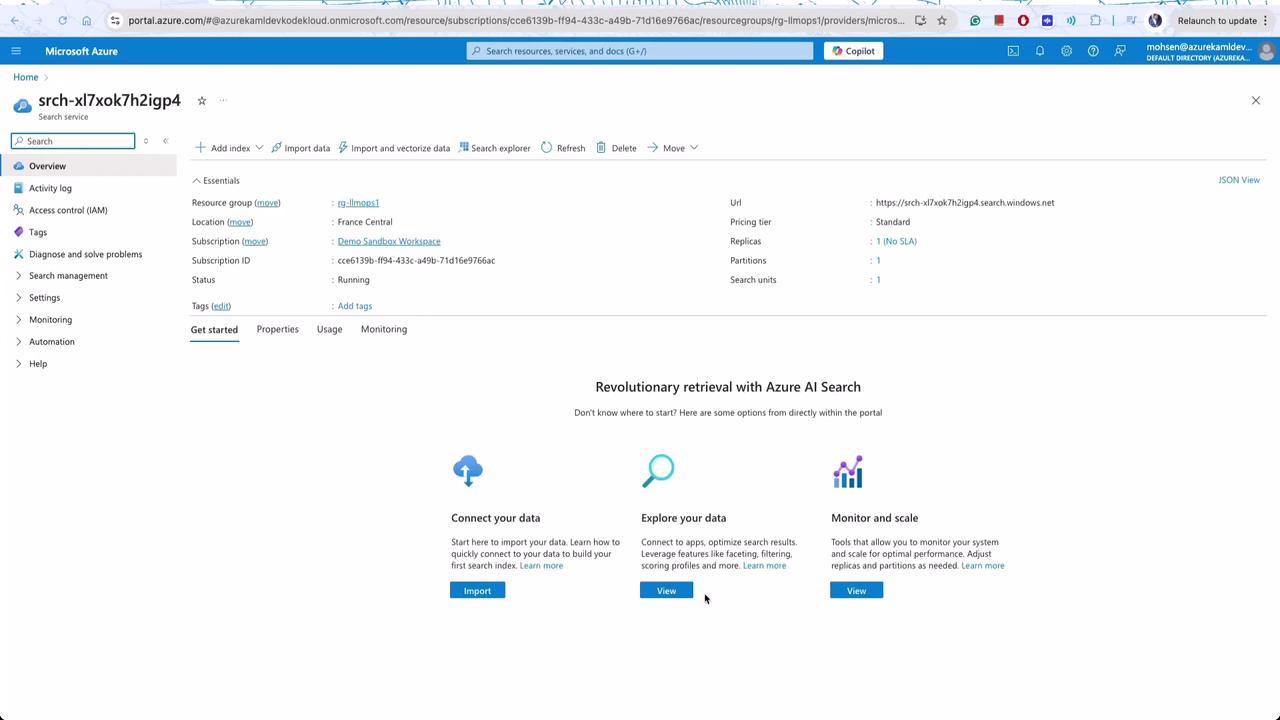
You can view the indexed data in the Azure portal. For instance, searching for “car” returns the CampCruiser Overlander SUV as the top result.
A sample response from Azure Search for a query might look like this:
Copy
Ask AI
{ "@odata.context": "https://srch-l7xok7h2ipg4.search.windows.net/indexes('contoso-products')/$metadata#docs(*)", "@odata.count": 1, "search.answers": [ { "key": "21", "text": "Ready to tackle the wilderness with all the co... The CampCruiser Overlander SUV Car by RoverRanger", "highlights": "Ready to tackle the wilderness with all the co... The<em> CampCruiser Overlander SUV Car </em>", "score": 0.903999984263738 } ], "value": [ { "@search.score": 1.9692489, "@search.rankScore": 2.544874431610107, "@search.captions": [ { "text": "Ready to tackle the wilderness with all the comforts of home. The CampCruiser Overlander SUV Car by RoverRanger", "highlights": "Ready to tackle the wilderness with all the comforts of home. The<em> CampCruiser Overlander SUV Car </em>" } ], "id": "1", "text": "Ready to tackle the wilderness with all the comforts of home? The CampCruiser Overlander SUV Car", "url": "/products/campcruiser-overlander-suv", "contentType": "CampCruiser Overlander SUV", "price": 0.873312203, "stock": 0.112389063, "rating": 4.166667461, "reviewCount": 82, "category": "SUV", "manufacturer": "RoverRanger", "year": 2023, "weight": 5.30554632737637, "dimensions": "1.85 x 0.75 x 0.55 m", "battery": 4.80246913581272, "waterproofRating": 7, "features": [ "_012389674716176", "_0123896747161767", "_004125668672", "_0002465127", "_80052671416" ] } ]}
The embedding process converts product descriptions into vector representations that match search queries. Additionally, token values (e.g., the word “potato”) are displayed to help control output by setting logit biases appropriately.
Throughout this lesson, you have seen how a simple API call integrates multiple components—from Promptly orchestrating LLM responses, through runtime parameter tuning, vector searches with Azure Search, to customer data management with Cosmos DB. In the next lesson, we will examine modifying configurations, creating new users, and optimizing the Retrieval-Augmented Generation (RAG) process.Happy coding!