This article explains the structure and functioning of DNS requests and responses, detailing message sections and transport methods.
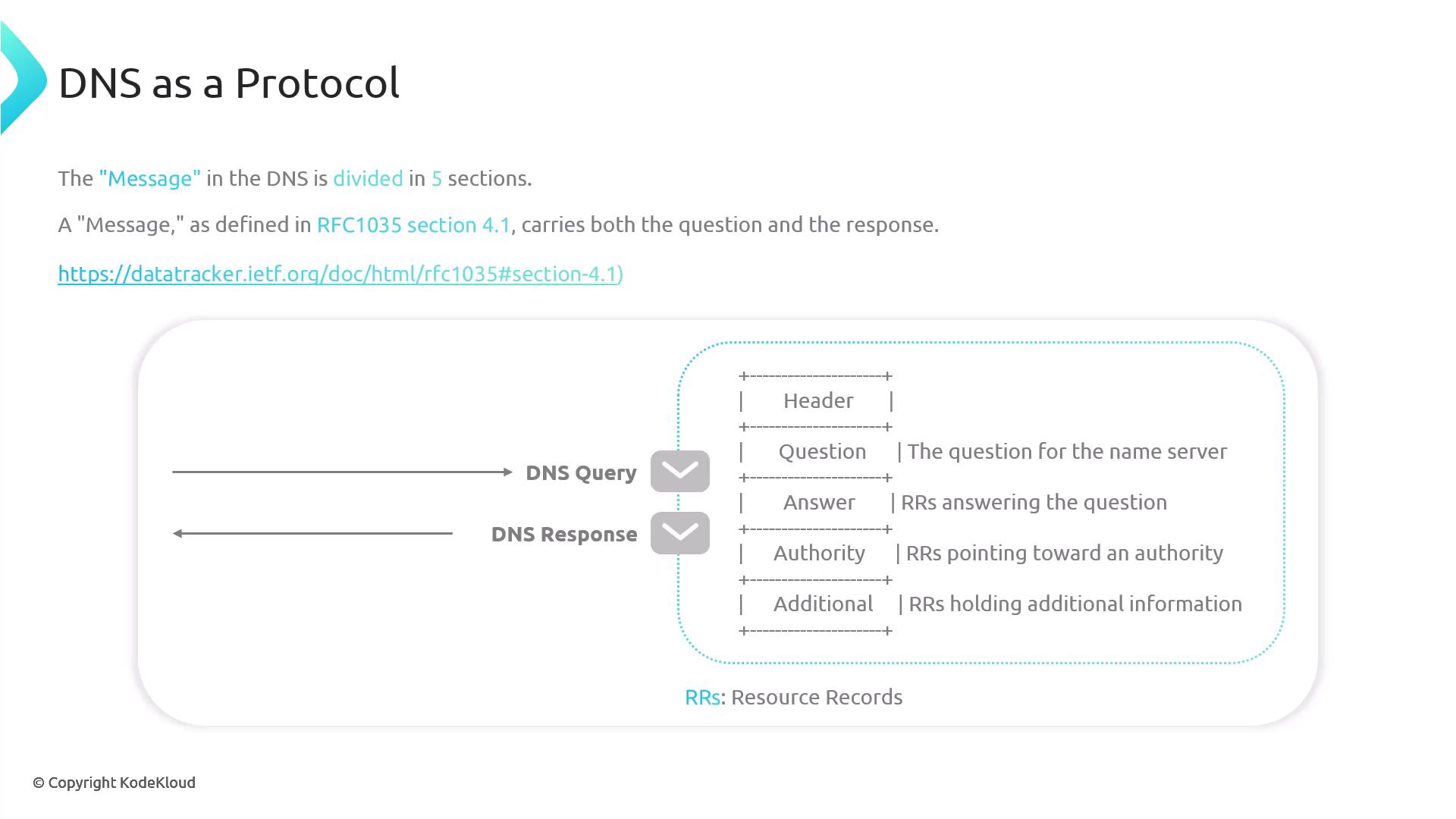
When resolving a domain name, a DNS query is initiated. The response is provided either from a cache or, if required, by querying an authoritative nameserver. The query traverses the DNS tree starting at the Root Zone.The DNS resolution involves two-way communication:
A request from the client that carries the query.
A response from a DNS component that carries the answer.
Both the request and response utilize a standard format defined in RFC 1035 section 4.1.
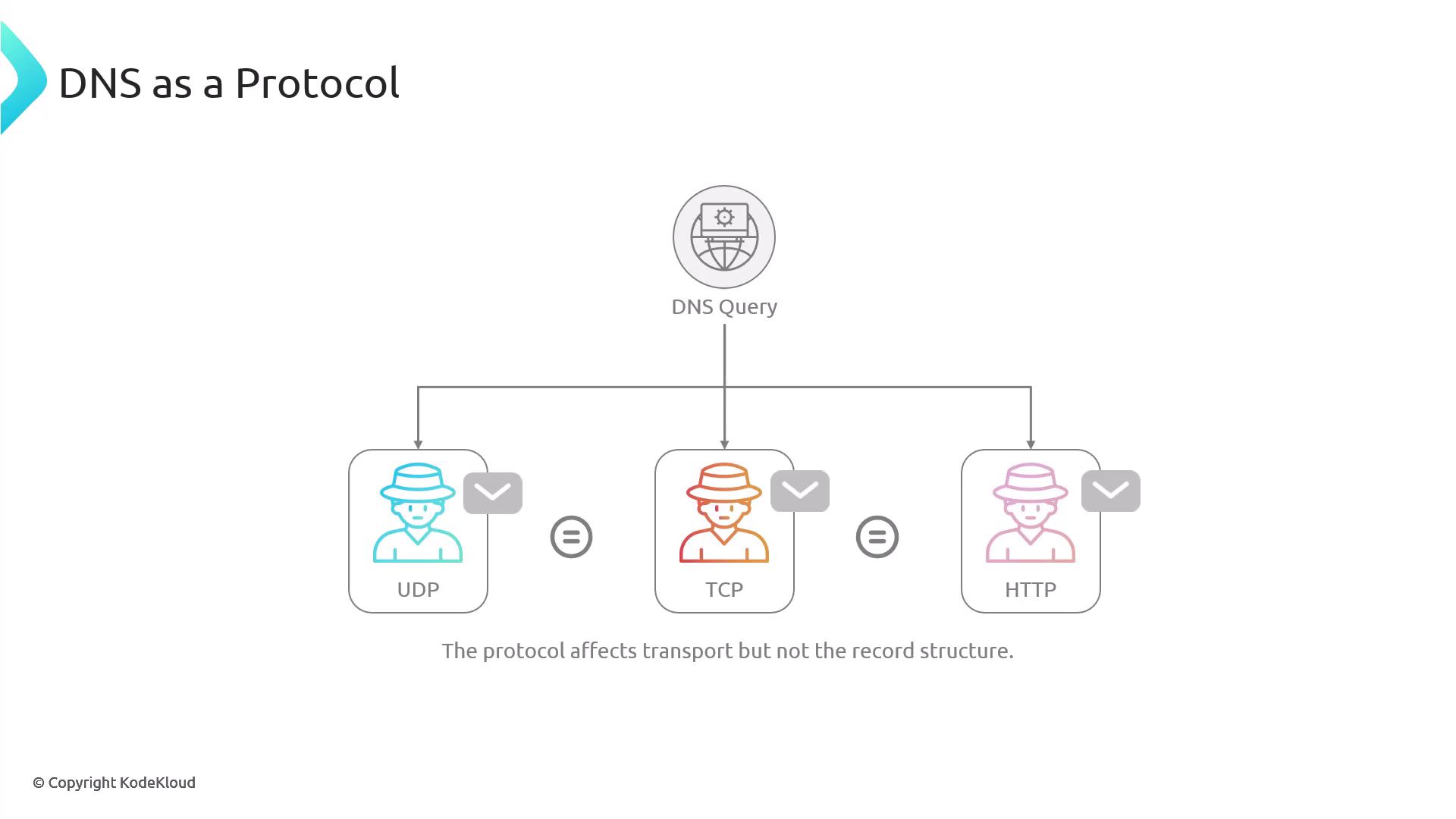
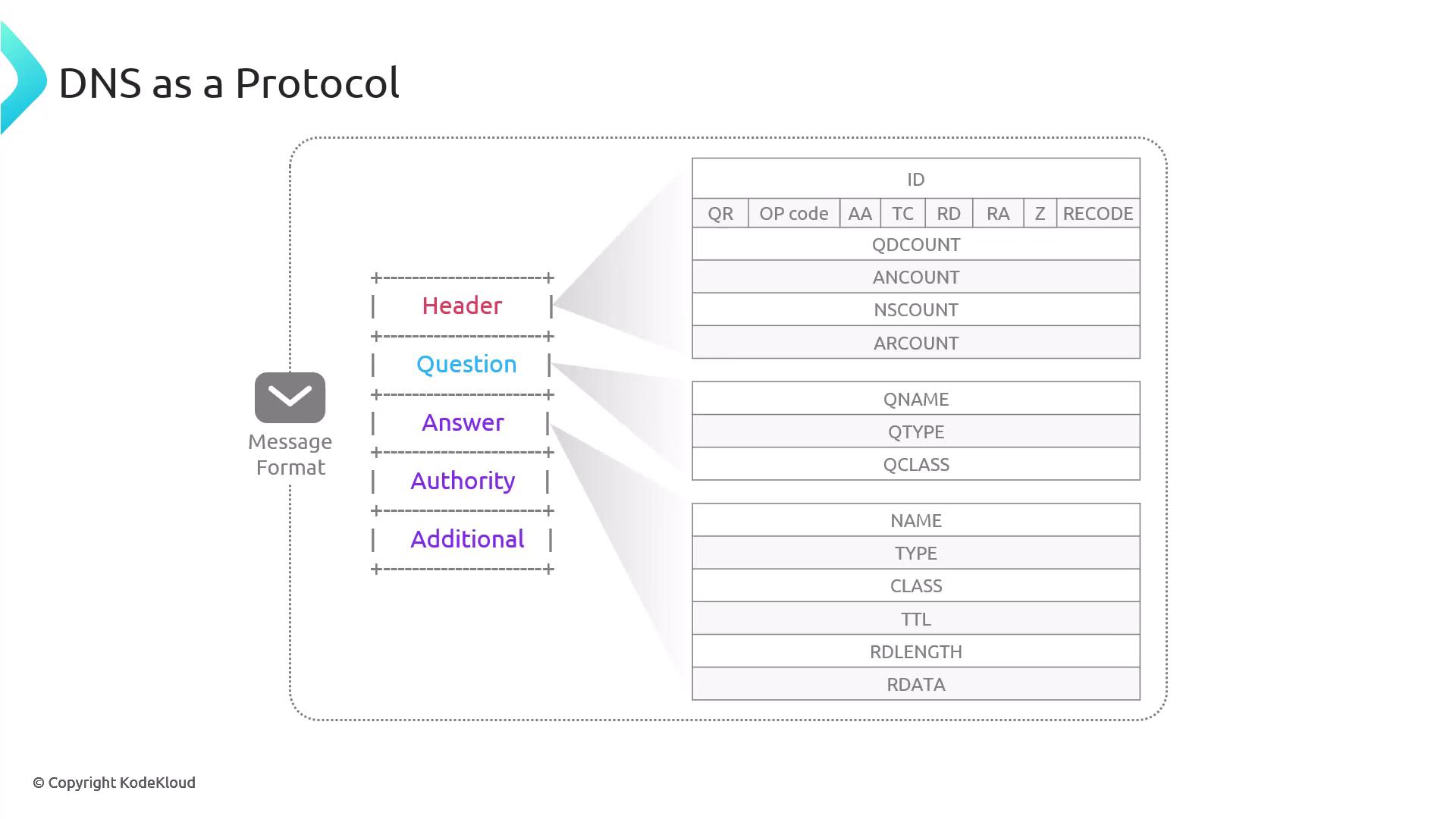
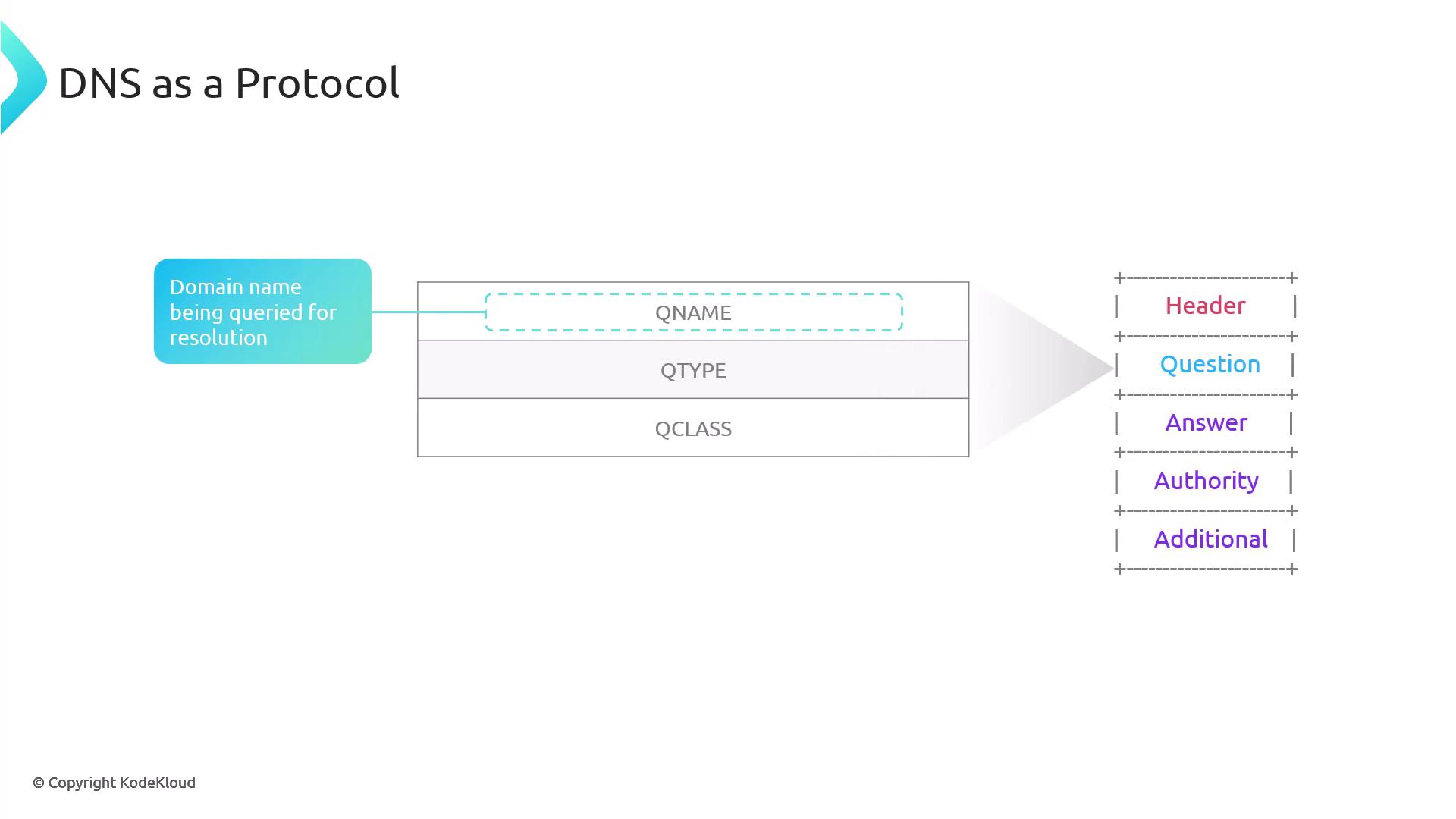
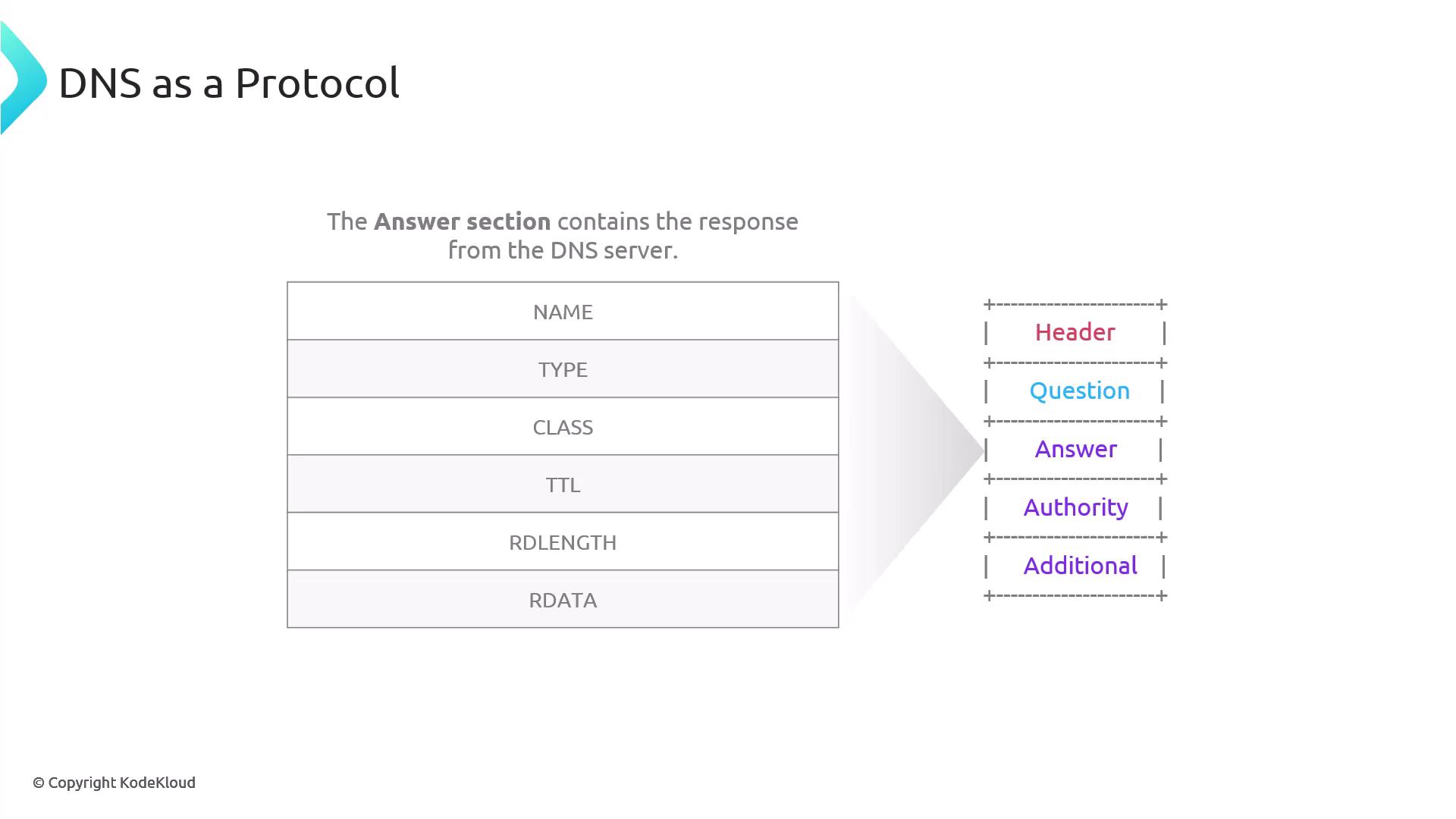
A DNS message is split into five sections. Both requests and responses share this structure with resource records. For instance, in a DNS request the question section is filled out with details about the domain name. In contrast, the response populates the answer and authority sections, while the header and additional sections can be used by both to indicate operation details.Depending on the query type, DNS messages may be transported via UDP, TCP, or HTTP. Although the transport method might influence how the message is sent (for example, when using the dig command which typically uses UDP or TCP), the resource record structure remains unchanged.
For example, a typical query using dig appears as follows:
Copy
Ask AI
$ dig kubernetes.io; <<>> DiG 9.10.6 <<>> kubernetes.io;; global options: +cmd;; Got answer:;; ->>HEADER<<- opcode: QUERY, status: NOERROR, id: 30343;; flags: qr rd ra; QUERY: 1, ANSWER: 1, AUTHORITY: 0, ADDITIONAL: 1;; OPT PSEUDOSECTION:; EDNS: version: 0, flags:; udp: 512;; QUESTION SECTION:;kubernetes.io. IN A;; ANSWER SECTION:kubernetes.io. 3592 IN A 147.75.40.148;; Query time: 18 msec;; SERVER: 2806:10c0:ffff:e#53(2806:10c0:ffff:e);; WHEN: Sat Jan 18 19:40:04 CST 2025;; MSG SIZE rcvd: 58
Note that in most cases the entire DNS message (both the request and response) can be carried in a single UDP packet. If the message exceeds the UDP size limit (often due to a large response), the server will fallback to using TCP.When DNS messages are transmitted over encrypted protocols like HTTPS or TLS, the data is secured in transit. The DoH/DoT resolver decrypts the data, performs the lookup using standard unencrypted servers, and then re-encrypts the response back to the client.Let’s now dive into the DNS message format, starting with the header. By comparing the output of the DIG command with the DNS message structure, you can see how each section of the DNS message corresponds to parts of the output.
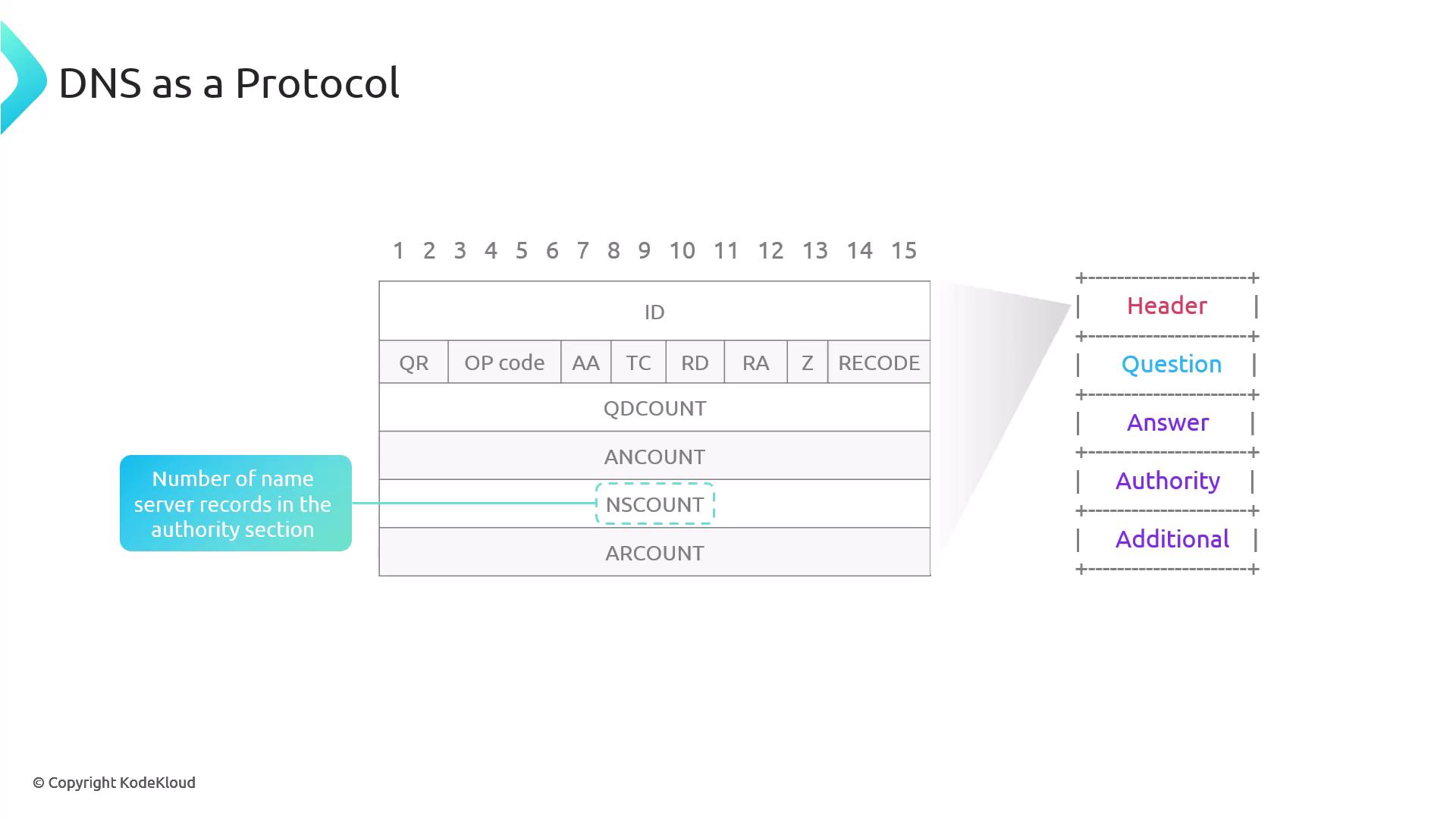
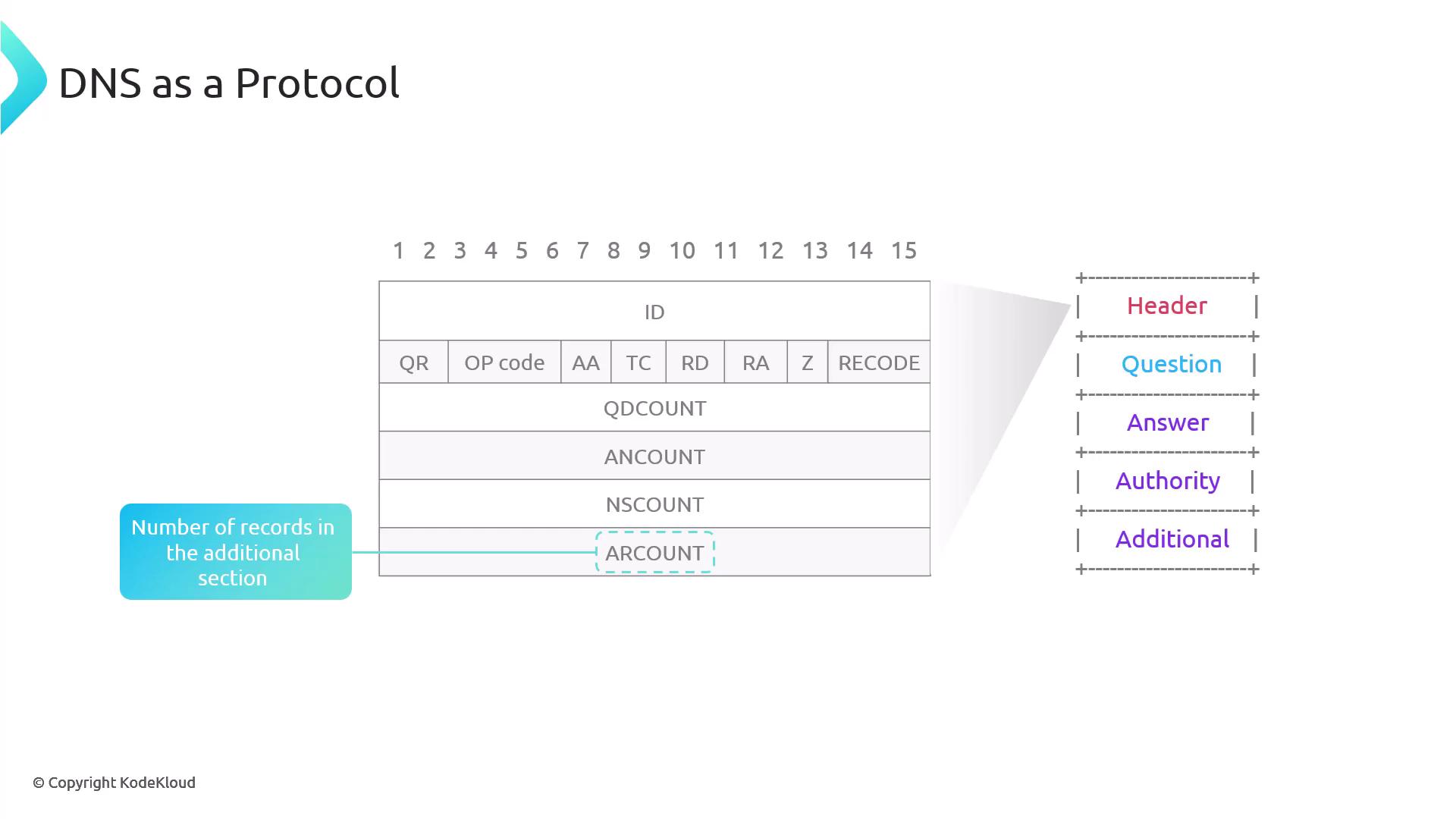
The DNS header is 12 bytes long and contains several key fields:
Copy
Ask AI
$ dig kubernetes.io; <<>> DiG 9.10.6 <<>> kubernetes.io;; global options: +cmd;; Got answer:;; ->>HEADER<<- opcode: QUERY, status: NOERROR, id: 30343;; flags: qr rd ra; QUERY: 1, ANSWER: 1, AUTHORITY: 0, ADDITIONAL: 1;; OPT PSEUDOSECTION:; EDNS: version: 0, flags:; udp: 512;; QUESTION SECTION:;kubernetes.io. IN A;; ANSWER SECTION:kubernetes.io. 3592 IN A 147.75.40.148;; Query time: 18 msec;; SERVER: 2086:10c0:ffff:#53(2086:10c0:ffff::e);; WHEN: Sat Jan 18 19:40:04 CST 2025;; MSG SIZE rcvd: 58
ID Field: An integer generated by the client to match responses with queries, since UDP does not inherently track packets. The server copies this ID into its response.
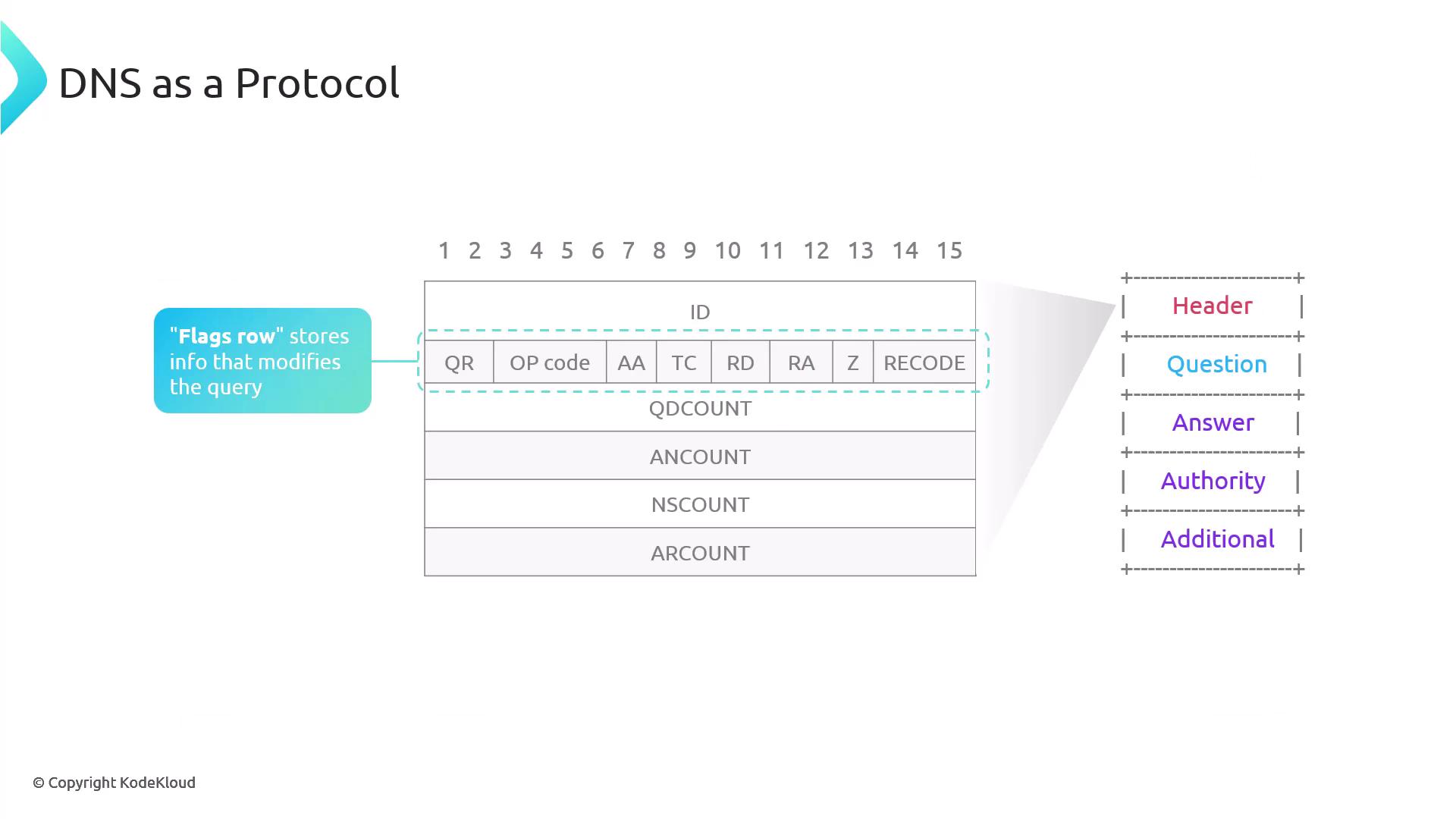
Flags Row:
The flags include:
QR: Indicates if the message is a query (0) or a response (1). DIG outputs will show 1 for responses.
Opcode: Specifies the query type; standard queries use 0.
AA: Authoritative Answer – set if the responding nameserver is authoritative.
TC: Truncation – if a DNS response is too large for UDP, the server sets TC to 1 to prompt a TCP retry.
RD and RA:
RD (Recursion Desired): Set by the client to request full DNS resolution.
RA (Recursion Available): Indicates in the response whether recursive queries are supported.
For example, querying an authoritative nameserver directly with the @ symbol might yield the following output:
Copy
Ask AI
$ dig @a.gtld-servers.net. kodekloud.com +additional;; DiG 9.10.6 <<>> @a.gtld-servers.net. kodekloud.com +additional;; (2 servers found);; global options: +cmd;; Got answer:;; ->>HEADER<<- opcode: QUERY, status: NOERROR, id: 14538;; flags: qr rd; QUERY: 1, ANSWER: 0, AUTHORITY: 2, ADDITIONAL: 13;; WARNING: recursion requested but not available;; OPT PSEUDOSECTION:; EDNS: version: 0, flags: 0, udp: 4096;; QUESTION SECTION:;kodekloud.com. IN A;; AUTHORITY SECTION:kodekloud.com. 172800 IN NS cheryl.ns.cloudflare.com.kodekloud.com. 172800 IN NS wesley.ns.cloudflare.com.;; ADDITIONAL SECTION:cheryl.ns.cloudflare.com. 172800 IN A 108.162.192.83cheryl.ns.cloudflare.com. 172800 IN A 172.64.38.83cheryl.ns.cloudflare.com. 172800 IN A 173.245.58.83cheryl.ns.cloudflare.com. 172800 IN AAAA 2001:503:a83e::2:30cheryl.ns.cloudflare.com. 172800 IN AAAA 2606:4700:20::681c:25awesley.ns.cloudflare.com. 172800 IN A 173.245.58.83wesley.ns.cloudflare.com. 172800 IN A 173.245.59.62wesley.ns.cloudflare.com. 172800 IN A 172.64.31.44wesley.ns.cloudflare.com. 172800 IN AAAA 2001:503:a83e::3:3b4wesley.ns.cloudflare.com. 172800 IN AAAA 2606:4700:20::6818:252cheryl.ns.cloudflare.com. 172800 IN AAAA 2606:4700:20::681c:25a;; Query time: 86 msec;; SERVER: 2001:503:a83e::2:30#53(2001:503:a83e::2:30);; WHEN: Sun Jan 12 21:54:22 CST 2025;; MSG SIZE rcvd: 362
Z Flag: Reserved for future use.
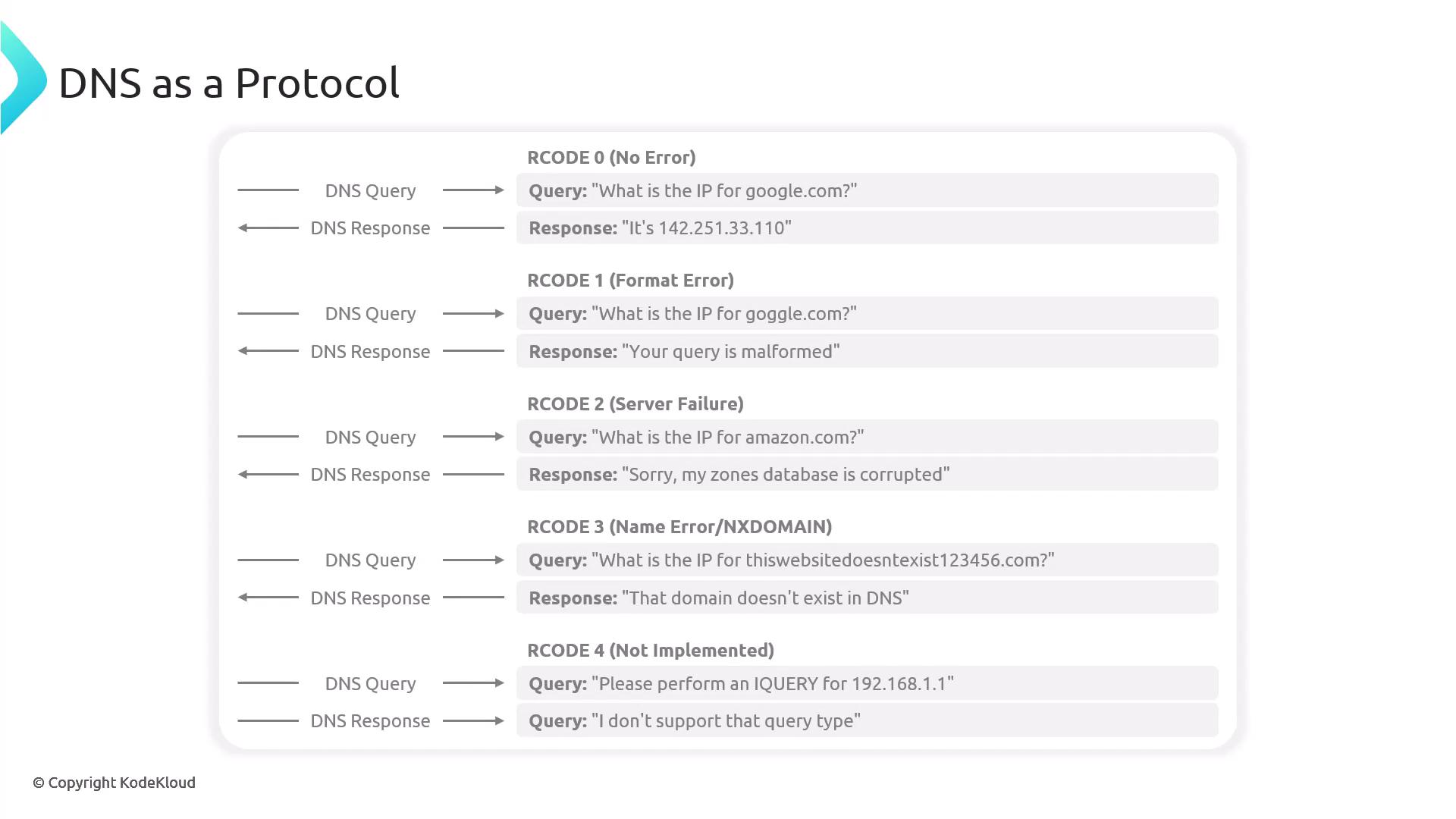
Rcode: Indicates the outcome of the query. An Rcode of 0 means success, while 3 indicates that the domain does not exist.
QDCOUNT (Question Count): Number of questions in the question section (typically 1).
ANCOUNT (Answer Count): Number of resource records in the answer section. Multiple A records for a domain increase this count.
NSCOUNT (Authority Count): Number of nameserver records in the authority section. Although DIG shows the authorities, the raw NS count is visible through packet capture tools like TCPDump or Wireshark.
ARCOUNT (Additional Count): Number of records in the additional section, often used for supplementary data like glue records.
The authority section also contains resource records that are similar in structure to those in the answer section. It is typically filled when the nameserver responds authoritatively—for example, when a root nameserver is queried for a TLD.For instance, running the following command against a .gtld nameserver might produce this output:
Copy
Ask AI
$ dig @c.gtld-servers.net kodekloud.com; <<>> DiG 9.10.6 <<>> @c.gtld-servers.net kodekloud.com;; (2 servers found);; global options: +cmd;; Got answer:;; ->>HEADER<<- opcode: QUERY, status: NOERROR, id: 18540;; flags: qr rd; QUERY: 1, ANSWER: 0, AUTHORITY: 2, ADDITIONAL: 13;; WARNING: recursion requested but not available;; OPT PSEUDOSECTION:; EDNS: version: 0, flags: udp: 4096;; QUESTION SECTION:;kodekloud.com. IN A;; AUTHORITY SECTION:kodekloud.com. 172800 IN NS cheryl.ns.cloudflare.com.kodekloud.com. 172800 IN NS wesley.ns.cloudflare.com.
The additional section follows the same resource record structure and is used to provide supplementary information. As the DNS protocol evolved, this section was repurposed to store new functionality while maintaining backward compatibility. It is particularly useful for displaying glue records or supplementing NS records.For example, using the +additional flag:
Copy
Ask AI
$ dig @c.gtld-servers.net. kodekloud.com +additional;; DiG 9.10.6 <<>> @c.gtld-servers.net. kodekloud.com +additional;; (2 servers found);; global options: +cmd;; Got answer:;; ->>HEADER<<- opcode: QUERY, status: NOERROR, id: 56508;; flags: qr rd; QUERY: 1, ANSWER: 0, AUTHORITY: 2, ADDITIONAL: 13;; WARNING: recursion requested but not available;; OPT PSEUDOSECTION:; EDNS: version: 0, flags:; udp: 4096;; QUESTION SECTION:;kodekloud.com. IN A;; AUTHORITY SECTION:kodekloud.com. 172800 IN NS cheryl.ns.cloudflare.com.kodekloud.com. 172800 IN NS wesley.ns.cloudflare.com.;; ADDITIONAL SECTION:cheryl.ns.cloudflare.com. 172800 IN A 108.162.192.83cheryl.ns.cloudflare.com. 172800 IN A 172.64.32.83cheryl.ns.cloudflare.com. 172800 IN A 173.245.58.83cheryl.ns.cloudflare.com. 172800 IN AAAA 2606:4700:50::adf5:3f53cheryl.ns.cloudflare.com. 172800 IN AAAA 2606:4700:50::6c2:c1f6wesley.ns.cloudflare.com. 172800 IN A 108.162.193.246wesley.ns.cloudflare.com. 172800 IN A 172.64.23.246wesley.ns.cloudflare.com. 172800 IN A 173.245.59.246wesley.ns.cloudflare.com. 172800 IN AAAA 2606:4700:50::adf5:3bf6wesley.ns.cloudflare.com. 172800 IN AAAA 2606:4700:50::6c2:c1f6;; Query time: 67 msec;; SERVER: 2001:503:ba3e::2:30(2001:503:ba3e::2:30);; WHEN: Sun Jan 19 09:53:46 CST 2025;; MSG SIZE rcvd: 362
The additional section repeats the same fields—NAME, TYPE, CLASS, TTL, RDLength, and RDATA—for supplementary records like glue.
Think of the additional section as a versatile drawer in your DNS toolkit. Originally designed for a single purpose, it has been repurposed to store extra information without changing the overall format.
In the next lesson, we will examine the extended DNS capabilities provided by the OPT records contained within the additional section.
Copy
Ask AI
$ dig @c.gtld-servers.net. kodekloud.com +additional;; DiG 9.10.6 <<>> @c.gtld-servers.net. kodekloud.com +additional;; (2 servers found);; global options: +cmd;; Got answer:;; ->>HEADER<<- opcode: QUERY, status: NOERROR, id: 56508;; flags: qr rd; QUERY: 1, ANSWER: 0, AUTHORITY: 2, ADDITIONAL: 13;; WARNING: recursion requested but not available;; OPT PSEUDOSECTION:; EDNS: version: 0, flags:; udp: 4096;; QUESTION SECTION:;kodekloud.com. IN A;; AUTHORITY SECTION:kodekloud.com. 172800 IN NS cheryl.ns.cloudflare.com.kodekloud.com. 172800 IN NS wesley.ns.cloudflare.com.;; ADDITIONAL SECTION:cheryl.ns.cloudflare.com. 172800 IN A 108.162.192.83cheryl.ns.cloudflare.com. 172800 IN A 172.64.32.83cheryl.ns.cloudflare.com. 172800 IN A 173.245.58.83cheryl.ns.cloudflare.com. 172800 IN AAAA 2066:4700:50::adf5:3b53cheryl.ns.cloudflare.com. 172800 IN AAAA 2606:4700:50::5c2:cf53wesley.ns.cloudflare.com. 172800 IN A 108.162.193.246wesley.ns.cloudflare.com. 172800 IN A 172.64:23.246wesley.ns.cloudflare.com. 172800 IN A 173.245.59.246wesley.ns.cloudflare.com. 172800 IN AAAA 2606:4700:50::adf5:3bf6wesley.ns.cloudflare.com. 172800 IN AAAA 2606:4700:50::5c2:c1f6;; Query time: 67 msec;; SERVER: 2001:503:ba3e::30#53(2001:503:ba3e::30);; WHEN: Sun Jan 19 00:53:46 CST 2025;; MSG SIZE rcvd: 362
In this lesson, we explored the structure of DNS messages by breaking down the header, question, answer, authority, and additional sections. This detailed examination helps in understanding how DNS queries and responses are constructed and interpreted while emphasizing the consistency in resource record structure regardless of the transport protocol.