In this lesson, you’ll configure FluxCD to pull plain YAML manifests from a different Git repository and apply them with Kustomize Controller. We’ll create a GitRepository source and a Kustomization resource step by step.
Prerequisites
A Kubernetes cluster with FluxCD v0.38+ installed
flux CLI configured with your cluster’s kubeconfigAccess to the bb-app-source repository on GitHub
1. Checkout the 2-demo Branch Switch to the 2-demo branch in your bb-app-source repository:
cd bb-app-source
git checkout 2-demo
You should see:
Branch '2-demo' set up to track remote branch '2-demo' from 'origin'.
Switched to a new branch '2-demo'
2. Review the Application Manifest Inspect the Deployment manifest under manifests/. Notice the image version has been updated to 7.2.0 :
# bb-app-source/manifests/deployment.yaml env : dev version : 7.2.0 spec : containers : - name : app image : siddharth67/block-buster-dev:7.2.0 imagePullPolicy : Always resources : requests : memory : "10Mi" cpu : "10m" limits : memory : "64Mi" cpu : "20m"
3. Create the GitRepository Source From your Flux cluster configuration directory (block-buster/flux-clusters/dev-cluster), run:
cd ../block-buster/flux-clusters/dev-cluster
flux create source git bb-app-2demo \
  --url https://github.com/sidd-harth-2/bb-app-source \
  --branch 2-demo \
  --timeout 10s \
  --export > bb-app-2demo-source.yaml
This generates:
# bb-app-2demo-source.yaml apiVersion : source.toolkit.fluxcd.io/v1beta2 kind : GitRepository metadata : name : bb-app-2demo namespace : flux-system spec : interval : 1m0s url : https://github.com/sidd-harth-2/bb-app-source ref : branch : 2-demo
Commit and push this file so Flux can fetch your manifests automatically.
4. Create the Kustomization Resource Use the Flux CLI to define a Kustomization that points to the manifests folder in your bb-app-source repo:
flux create kustomization bb-app-2demo-kustomize \
  --source GitRepository/bb-app-2demo \
  --path ./manifests \
  --prune=true \
  --interval=10s \
  --target-namespace 2-demo \
  --export > bb-app-2demo-kustomize.yaml
# bb-app-2demo-kustomize.yaml apiVersion : kustomize.toolkit.fluxcd.io/v1beta2 kind : Kustomization metadata : name : bb-app-2demo-kustomize namespace : flux-system spec : interval : 10s path : ./manifests prune : true sourceRef : kind : GitRepository name : bb-app-2demo targetNamespace : 2-demo
The --prune=true flag will remove any Kubernetes resources in the target namespace that are not tracked by this Kustomization. Ensure you don’t have unmanaged resources in 2-demo.
Commit and push the Kustomization YAML so Flux can reconcile it.
5. Overview of Created Resources Resource Type Purpose Flux CLI Example GitRepository Fetch remote plain YAML manifests flux create source git bb-app-2demo … --export > source.ymlKustomization Apply and reconcile manifests in the 2-demo NS flux create kustomization bb-app-2demo-kustomize … > kustomize.yml
6. Verify Flux Reconciliation First, check your Git sources:
Expected output:
NAME         REVISION                READY   MESSAGE
bb-app-2demo 2-demo@sha1:7dfa8105     True    stored artifact for revision '2-demo@sha1:7dfa8105'
flux-system  main@sha1:cf1664a0       True    stored artifact for revision 'main@sha1:cf1664a0'
Next, verify Kustomizations:
You should see:
NAME                    REVISION                 READY   MESSAGE
bb-app-2demo-kustomize  2-demo@sha1:7dfa8105     True    Applied revision: 2-demo@sha1:7dfa8105
7. Confirm Kubernetes Resources List your namespaces and workload in 2-demo:
kubectl get ns
kubectl get all -n 2-demo
You should observe the block-buster Deployment, Service, and Pods running version 7.2.0 .
8. Access the Application Find the NodePort for the block-buster-service:
kubectl get svc block-buster-service -n 2-demo
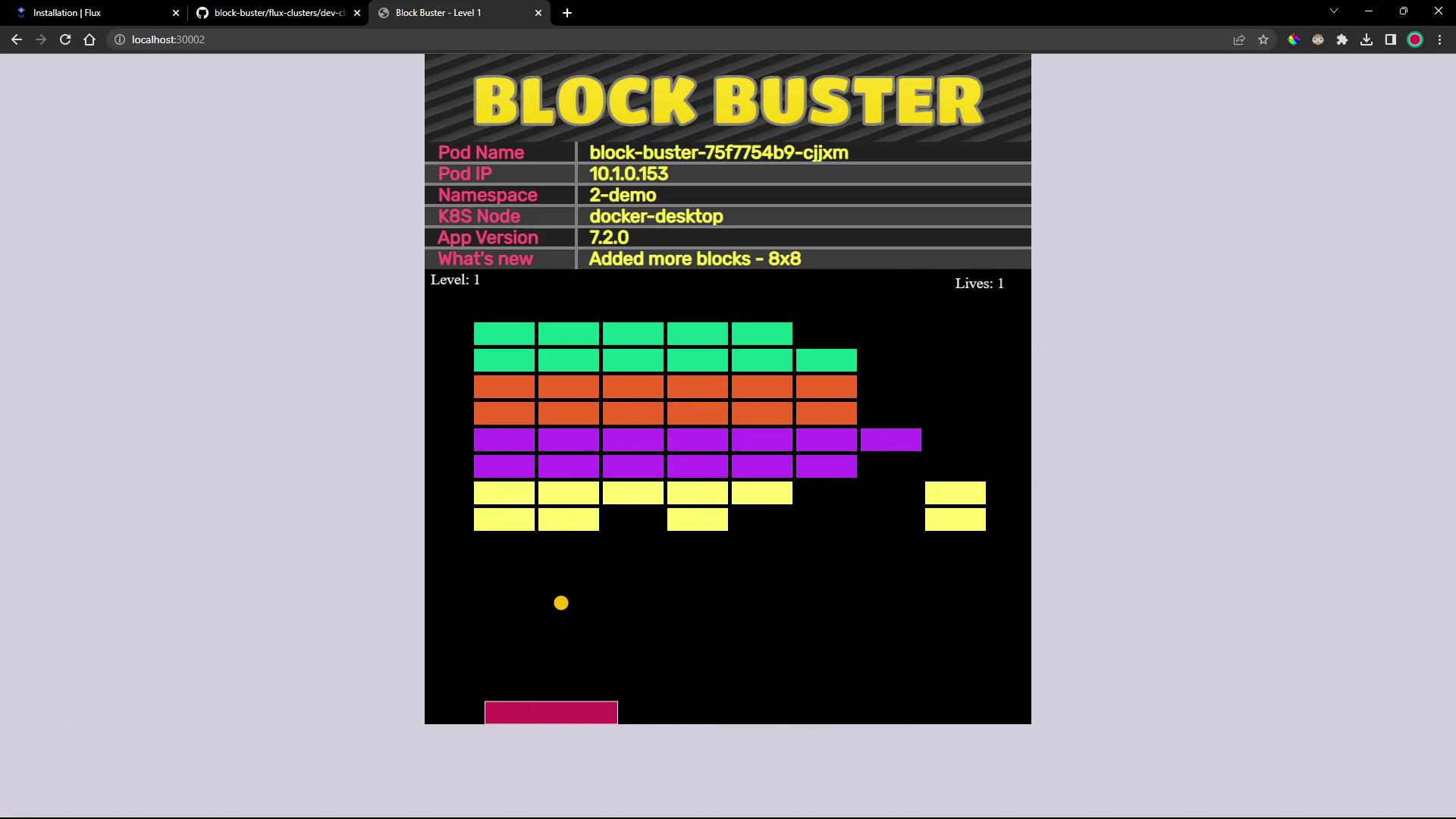
Open your browser at http://<NODE_IP>:<NODE_PORT>. You’ll see the updated “Block Buster” game interface running version 7.2.0:
Links and References